Event System Pitfalls: Memory Leaks, Data Pollution, and Recursive Traps That Ship in Production

You've been testing your game for 5 minutes at a time. It runs great. Then QA files a report: "Memory usage grows steadily over a 30-minute play session. Frame rate degrades from 60 to 40 after loading 6 scenes." You profile it. There are 847 listeners registered to an event that should have 12. Each scene load added new subscriptions but never removed the old ones. The objects were destroyed, but their delegate references live on, pinning dead MonoBehaviours in memory where the garbage collector can't touch them.
Or this one: "Health values are wrong on the second Play Mode session. First run works fine." You hit Play, test combat, stop. Hit Play again. The player starts with 73 HP instead of 100. ScriptableObject state from the last session bled through because nobody reset it.
Or the classic: the game hangs for 3 seconds, then Unity crashes. Event A's listener raised Event B. Event B's listener raised Event A. Stack overflow. Except sometimes it doesn't crash — it just hangs, eating CPU in an infinite loop that produces no visible error.
These aren't hypothetical. These are bugs I've seen ship in production games. And they all have the same root cause: event system patterns that look correct in isolation but fail at scale.
The Seven Deadly Sins of Event Systems
Before we talk about solutions, let's catalog the failure modes. Every event system — not just GES, not just Unity's, every pub/sub implementation in any language — has these potential pitfalls. The difference between a system that ships and one that doesn't is whether the team knows about them before the first QA pass.
Sin 1: The Orphaned Subscription
This is the most common event system bug in existence. Subscribe in Awake(), forget to unsubscribe. The object gets destroyed, but the delegate still holds a reference. The garbage collector can't collect the MonoBehaviour because the event's invocation list has a pointer to it.
public class BadExample : MonoBehaviour
{
    [GameEventDropdown, SerializeField] private Int32GameEvent onDamage;

    private void Awake()
    {
        onDamage.AddListener(HandleDamage);
        // No corresponding RemoveListener anywhere
    }

    private void HandleDamage(int amount)
    {
        // This method will be called even after the object is "destroyed"
        // Unity marks it as destroyed, but the C# object is still alive
        // because the delegate reference prevents GC
        transform.position += Vector3.up; // MissingReferenceException
    }
}
The insidious part: this works fine for the first scene. It even works fine for the second scene if you're lucky. The memory leak is invisible until someone plays for 20 minutes and loads enough scenes to accumulate hundreds of orphaned delegates.
In a profiler, you'll see the managed memory growing steadily with each scene load. The leaked objects aren't just the MonoBehaviours — they include everything those MonoBehaviours reference: textures, meshes, materials. One leaked listener can pin megabytes of assets.
Sin 2: Data Pollution Between Sessions
Unity's Play Mode has a subtle trap. ScriptableObject instances persist in memory between Play Mode sessions. If your event (which is a ScriptableObject) stores runtime state — listener lists, cached values, schedule handles — that state persists after you stop playing.
Hit Play. Subscribe 5 listeners. Stop. Hit Play again. Those 5 listeners are still "registered" in the ScriptableObject's memory... but the MonoBehaviours that owned them are gone. Now you have 5 dead delegates in the list, plus the 5 new ones from the fresh session. Stop and play 10 times? 50 dead delegates.
This manifests as:
- Events firing more times than expected (ghost listeners from previous sessions)
MissingReferenceExceptionon the first event raise (dead delegates trying to invoke)- Gradually degrading editor performance over long development sessions
For static fields, the problem is even worse. Static fields survive domain reloads only in specific configurations (with the "Enter Play Mode Settings" optimization enabled). When they do survive, any static caches, registries, or state become contaminated between sessions.
Sin 3: The Recursive Raise
Event A's listener raises Event B. Event B's listener raises Event A. Or the simpler version: Event A's listener raises Event A. Stack overflow.
// Infinite recursion
private void HandleHealthChanged(int newHealth)
{
    // "I need to notify everyone that health changed"
    onHealthChanged.Raise(newHealth);
    // This calls HandleHealthChanged, which calls Raise, which calls...
}
The direct version is obvious. The indirect version is harder to spot:
OnDamageDealt -> HandleDamage -> raises OnHealthChanged
OnHealthChanged -> HandleHealthCheck -> raises OnDamageDealt (reflected damage)
OnDamageDealt -> HandleDamage -> raises OnHealthChanged
... forever
Two events, two listeners, an infinite cycle. And it doesn't always crash. If the cycle eventually exits due to some state condition (like health reaching zero), it might just cause a multi-second freeze that's hard to reproduce because it depends on specific game state.
Sin 4: The Lost Schedule Handle
You call RaiseRepeating() with count: -1 (infinite) and don't store the handle. The event fires forever. You can't stop it. The coroutine running it has no external reference. It just... keeps going.
private void StartAmbientEffect()
{
    // "I'll cancel this later"
    // narrator: they did not cancel this later
    onAmbientPulse.RaiseRepeating(interval: 0.5f, count: -1);
}
The handle is returned by the method and immediately discarded. If this method runs once per scene load, you accumulate one more infinite repeating event per scene. After 10 scenes, you have 10 overlapping ambient pulses, each firing twice per second. That's 20 event raises per second for something that should be 2.
Sin 5: The Lambda Trap (Again)
We covered this in the listener strategies post, but it's in this list because it's the single most reported "bug" in event systems. Anonymous delegates can't be unsubscribed.
private void OnEnable()
{
    onDamage.AddListener((int amount) => health -= amount);
}

private void OnDisable()
{
    // This creates a NEW lambda. It doesn't match the one above.
    onDamage.RemoveListener((int amount) => health -= amount);
    // The original is still subscribed. Memory leak.
}
The language makes the dangerous pattern look natural. The safe pattern looks verbose. It's a pit of failure.
Sin 6: The Nuclear RemoveAllListeners
System A manages events for a subsystem. During cleanup, it calls RemoveAllListeners() to clear its registrations. Except RemoveAllListeners() removes ALL listeners — including the ones registered by Systems B, C, and D.
// CombatSystem.cs
private void OnDisable()
{
    // "Clean up my listeners"
    onPlayerDamaged.RemoveAllListeners();  // OOPS: killed AudioManager's listener too
}
Now the AudioManager stops playing hit sounds, the AnalyticsTracker stops recording damage events, and the AchievementSystem stops tracking milestones. All because one system used a sledgehammer where it needed a scalpel.
This is especially common in quick prototypes that become production code. RemoveAllListeners() is faster to write than tracking individual references. It works fine when your system is the only listener. It breaks silently when other systems start subscribing to the same events.
Sin 7: The Expensive Predicate
Conditional listeners have a predicate that's evaluated every time the event fires. If the event fires 60 times per second and the predicate does a Physics.OverlapSphere, that's 60 sphere casts per second per conditional listener.
// 60 sphere casts per second, just for the condition check
onPositionUpdate.AddConditionalListener(
    HandleNearbyEnemies,
    () => Physics.OverlapSphere(transform.position, 10f, enemyLayer).Length > 0,
    priority: 50
);
The profiler shows the time in "condition evaluation" and you wonder why your event system is slow. The event system is fine. Your predicate is doing the work of an entire physics system inside a delegate that was supposed to be a cheap boolean check.
GES Patterns That Prevent These
Now let's talk solutions. Some of these are built into GES. Others are patterns you enforce through convention.
The Golden Rule: OnEnable / OnDisable
If you internalize one thing from this entire blog series, make it this:
private void OnEnable()
{
    myEvent.AddListener(HandleEvent);
}

private void OnDisable()
{
    myEvent.RemoveListener(HandleEvent);
}
Not Awake / OnDestroy. Not Start / OnApplicationQuit. OnEnable / OnDisable.
Here's why this specific pair matters:
OnEnable/OnDisable tracks the active state. Deactivate a GameObject? OnDisable fires, listener removed. Reactivate? OnEnable fires, listener re-added. Disabled objects don't receive events — which is almost always correct.
Awake/OnDestroy only fires once. Deactivate and reactivate an object subscribed in Awake? It's still subscribed while disabled, receiving events it shouldn't process.
Start has timing issues. Another object raises an event in its Awake. Your Start-subscribed listener misses it. OnEnable runs earlier in the lifecycle.
The one exception: persistent listeners on DontDestroyOnLoad objects. Subscribe with AddPersistentListener in OnEnable, remove with RemovePersistentListener in OnDestroy (not OnDisable, because OnDisable fires during scene transitions for active objects).
// Standard: scene-scoped listeners
private void OnEnable()
{
    myEvent.AddListener(HandleEvent);
    myEvent.AddPriorityListener(HandlePriority, 50);
}

private void OnDisable()
{
    myEvent.RemoveListener(HandleEvent);
    myEvent.RemovePriorityListener(HandlePriority);
}

// Exception: DontDestroyOnLoad persistent listeners
private void OnEnable()
{
    myEvent.AddPersistentListener(HandleEvent, 0);
}

private void OnDestroy()
{
    myEvent.RemovePersistentListener(HandleEvent);
}
Auto Static Reset: GES's Built-In Data Pollution Prevention
GES handles the ScriptableObject persistence problem with an Auto Static Reset mechanism. When you exit Play Mode in the editor, GES automatically clears:
- All static event caches
- All listener registrations
- All scheduled event handles
- All trigger and chain connections created at runtime
Your events start clean every time you press Play. No manual reset methods. No [RuntimeInitializeOnLoadMethod] hacks. The event asset itself (name, type, inspector config) persists because that's design-time data. The runtime state (listeners, schedules, flow connections) is wiped because that's play-time data.
This separation is deliberate. Design-time data should persist between sessions — you don't want to re-configure events every time you test. Runtime data should not persist — you don't want ghost listeners from the last session.
If you're storing custom state on event subclasses (your own properties or fields), you need to handle that reset yourself. The auto-reset covers GES's internal state, not your extensions. Use [RuntimeInitializeOnLoadMethod(RuntimeInitializeLoadType.SubsystemRegistration)] for your own statics.
The Recursive Guard Pattern
GES doesn't automatically break recursive cycles because sometimes re-entrant raises are intentional (rarely, but it happens). Instead, use a guard flag:
private bool _isProcessingHealth;

private void HandleHealthChange(int newHealth)
{
    if (_isProcessingHealth) return;
    _isProcessingHealth = true;

    try
    {
        // Process health logic...

        // Safe: won't recurse because of the guard
        onHealthChanged.Raise(newHealth);
    }
    finally
    {
        _isProcessingHealth = false;
    }
}
The try/finally is critical. Without it, an exception in the processing logic leaves _isProcessingHealth stuck at true permanently. The handler would never fire again for the rest of the session.
For indirect cycles (A raises B raises A), either guard both handlers or restructure so the cycle uses a separate event that doesn't feed back:
// Before (cycles):
OnDamage -> HandleDamage -> raises OnHealthChanged
OnHealthChanged -> HandleHealth -> raises OnDamage (reflected)

// After (no cycle):
OnDamage -> HandleDamage -> raises OnHealthChanged
OnHealthChanged -> HandleHealth -> raises OnReflectedDamage (separate event)
OnReflectedDamage -> HandleReflected -> does NOT raise OnHealthChanged
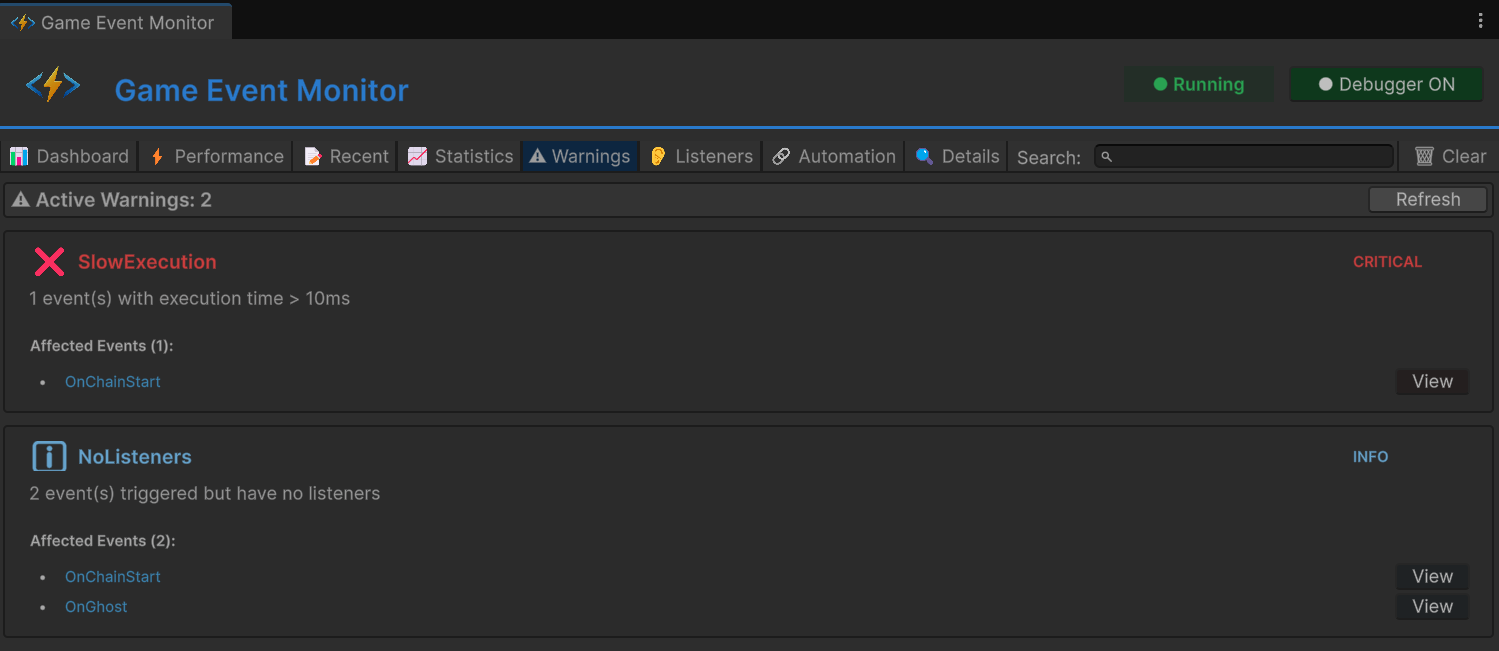
The Runtime Monitor's Warnings tab flags events raised while already being processed. If you see recursion warnings during testing, you have a cycle that needs guarding.
Handle Management: Always Store, Always Cancel
Every RaiseDelayed() and RaiseRepeating() returns a ScheduleHandle. Always store it. Always cancel it in OnDisable.
// ANTI-PATTERN: handle lost forever
private void StartPoison()
{
    onPoisonTick.RaiseRepeating(10, interval: 1f, count: -1);
    // Can never cancel this. Runs until application quits.
}

// CORRECT: stored and managed
private ScheduleHandle _poisonHandle;

private void StartPoison()
{
    _poisonHandle = onPoisonTick.RaiseRepeating(10, interval: 1f, count: -1);
}

private void CurePoison()
{
    if (_poisonHandle.IsActive)
        _poisonHandle.Cancel();
}

private void OnDisable()
{
    if (_poisonHandle.IsActive)
        _poisonHandle.Cancel();
}
For multiple concurrent schedules:
private List<ScheduleHandle> _activeSchedules = new List<ScheduleHandle>();

private void ScheduleSomething()
{
    var handle = onEvent.RaiseDelayed(2f);
    _activeSchedules.Add(handle);
}

private void CancelAll()
{
    foreach (var handle in _activeSchedules)
    {
        if (handle.IsActive) handle.Cancel();
    }
    _activeSchedules.Clear();
}

private void OnDisable() => CancelAll();
SetInspectorListenersActive: Batch Muting
GES events can have listeners configured visually in the Behavior Window. These fire alongside code listeners. During batch operations — loading 100 items, processing bulk data, resetting state — visual listeners that trigger particles, sounds, or UI animations would be overwhelming.
myEvent.SetInspectorListenersActive(false);
try
{
    for (int i = 0; i < 100; i++)
    {
        myEvent.Raise(processedItems[i]);
    }
}
finally
{
    myEvent.SetInspectorListenersActive(true);
}

// Final raise with visual feedback
myEvent.Raise(summary);
Code listeners still fire normally. Only the inspector-configured visual responses are muted. The try/finally ensures they get re-enabled even if the batch processing throws.
Surgical Removal: Never Use RemoveAllListeners for Cleanup
Each component should only remove its own listeners:
// BAD: destroys everyone's subscriptions
private void OnDisable()
{
    myEvent.RemoveAllListeners();
}

// GOOD: removes only what you own
private void OnDisable()
{
    myEvent.RemoveListener(MyHandler);
    myEvent.RemovePriorityListener(MyOtherHandler);
}
RemoveAllListeners() is appropriate only for global state resets — loading a completely new game session, resetting after a test. It removes Basic, Priority, and Conditional listeners but deliberately leaves Persistent listeners intact (because those explicitly opted out of cleanup).
Cache Your Delegates
Method references are always the safest pattern for listeners:
// BROKEN: anonymous lambda, can never be removed
onDamage.AddListener((int amount) => health -= amount);

// CORRECT: method reference, stable identity
onDamage.AddListener(HandleDamage);
private void HandleDamage(int amount) => health -= amount;

// ALSO CORRECT: cached delegate for when you need closures
private System.Action<int> _handler;
private void OnEnable()
{
    _handler = (amount) => health -= amount;
    onDamage.AddListener(_handler);
}
private void OnDisable()
{
    onDamage.RemoveListener(_handler);
}
This applies to all listener types. Any listener you plan to remove needs a stable delegate reference.
Keep Predicates Cheap
Conditional listener predicates should be field reads, not computations:
// BAD: physics query every time the event fires
onPositionUpdate.AddConditionalListener(
    HandleNearby,
    () => Physics.OverlapSphere(transform.position, 10f).Length > 0,
    priority: 50
);

// GOOD: update the cache periodically, read it cheaply
private bool _hasNearbyEnemies;

private void FixedUpdate()
{
    _hasNearbyEnemies = Physics.OverlapSphere(
        transform.position, 10f, enemyLayer).Length > 0;
}

onPositionUpdate.AddConditionalListener(
    HandleNearby,
    () => _hasNearbyEnemies,
    priority: 50
);
One physics query per FixedUpdate versus one per event firing. For events that fire multiple times per frame, this is the difference between smooth gameplay and a stuttering mess.
The Architecture Pattern: Service Event Interfaces
For large projects, centralize each subsystem's event wiring in a dedicated interface class:
public class CombatEventInterface : MonoBehaviour
{
    [Header("Outgoing Events")]
    [GameEventDropdown, SerializeField] private Int32GameEvent onDamageDealt;
    [GameEventDropdown, SerializeField] private SingleGameEvent onCombatStarted;
    [GameEventDropdown, SerializeField] private SingleGameEvent onCombatEnded;

    [Header("Incoming Events")]
    [GameEventDropdown, SerializeField] private SingleGameEvent onPlayerDied;
    [GameEventDropdown, SerializeField] private Int32GameEvent onHealReceived;

    private CombatSystem _combat;

    private void OnEnable()
    {
        _combat = GetComponent<CombatSystem>();
        onPlayerDied.AddPriorityListener(_combat.HandlePlayerDeath, 100);
        onHealReceived.AddPriorityListener(_combat.HandleHeal, 100);
    }

    private void OnDisable()
    {
        onPlayerDied.RemovePriorityListener(_combat.HandlePlayerDeath);
        onHealReceived.RemovePriorityListener(_combat.HandleHeal);
    }

    public void NotifyDamageDealt(int amount) => onDamageDealt.Raise(amount);
    public void NotifyCombatStarted() => onCombatStarted.Raise();
    public void NotifyCombatEnded() => onCombatEnded.Raise();
}
The CombatSystem itself has zero knowledge of GES. It calls methods on CombatEventInterface. This makes the combat system testable without events and the event wiring auditable in a single file. When something goes wrong, you check one class to see every event the combat system touches.
Pre-Ship Checklist
Run through this before considering your event architecture production-ready:
- Every
AddListenerhas a correspondingRemoveListenerin the opposite lifecycle method - Every
AddPersistentListenerhas aRemovePersistentListenerinOnDestroy - Every
RaiseDelayed/RaiseRepeatinghandle is stored and cancelled inOnDisable - No lambdas used for listeners that need removal (delegate caching or method references only)
- No recursive event patterns without guard flags
RemoveAllListeners()only used for global resets, never for per-component cleanup- Conditional predicates are cheap (field reads, not computations)
- High-frequency events have minimal listener counts
- Inspector listeners are muted during batch operations
- Runtime Monitor shows no warnings during a full play-through
These ten checks will catch 95% of event system bugs before they reach players. The remaining 5% are logic bugs in your game code, not event system issues — and the Runtime Monitor will help you find those too.
The pattern across all of these is the same: event systems are powerful exactly because they decouple things. But decoupling means the compiler can't catch the mistakes that coupling would make obvious. You have to enforce the discipline yourself — or use a system that enforces it for you.
🚀 Global Developer Service Matrix
🇨🇳 China Developer Community
- 🛒 Unity China Asset Store
- 🎥 Bilibili Video Tutorials
- 📘 Technical Documentation
- 💬 QQ Group (1071507578)
🌐 Global Developer Community
📧 Support & Collaboration