Parallel vs Sequential: The Two Execution Patterns Every Event System Needs (And Most Don't Have)

Player dies. Death sound and death particles should start at the same instant — no reason to wait for one before starting the other. But the screen fade absolutely MUST finish before the respawn point loads. And the respawn MUST finish before the player teleports. And the teleport MUST finish before the screen fades back in.
That's parallel AND sequential execution in the same flow, triggered by a single event. And here's the uncomfortable truth: most event systems in Unity give you exactly one pattern. Fire an event, all listeners respond, done. Whether those responses should happen simultaneously or in strict sequence? Your problem.
So you solve it. With coroutines. And callbacks. And booleans named _hasFadeFinished. And before you know it, you've built an ad-hoc state machine scattered across six files that nobody — including future-you — can follow.
The Execution Pattern Problem
Let me walk through what "parallel and sequential in the same flow" actually looks like with standard Unity tools. Because the devil is absolutely in the implementation details.
The Parallel Part (Seems Easy)
Player dies. Three things happen at once: death sound, death particles, input disabled. Standard C# events handle this:
public static event Action OnPlayerDeath;

// AudioManager.cs
OnPlayerDeath += PlayDeathSound;

// ParticleManager.cs
OnPlayerDeath += SpawnDeathParticles;

// InputManager.cs
OnPlayerDeath += DisableInput;
All three fire when the event is raised. "Parallel" in the sense that they all execute within the same dispatch. Straightforward.
But what if PlayDeathSound throws an exception? The delegate invocation list stops. SpawnDeathParticles and DisableInput never execute. One broken handler takes down the entire response chain. Your player dies silently with no particles and active input. Fun.
"Just wrap each handler in a try-catch." Sure. Now you're writing boilerplate exception handling in every subscription. Or building a custom event dispatcher that catches per-handler. Which means building infrastructure that should already exist.
And priority? Maybe input should disable FIRST — there's a tiny window where the player could press a button during the death sound setup. With flat delegate chains, execution order is subscription order. Which is load order. Which is non-deterministic.
The Sequential Part (Here's Where It Falls Apart)
After the parallel effects, the sequential respawn flow: fade to black, wait, load checkpoint, wait, teleport, fade back in.
IEnumerator DeathSequence()
{
    yield return StartCoroutine(FadeToBlack());
    yield return StartCoroutine(LoadRespawnPoint());
    TeleportPlayer();
    yield return StartCoroutine(FadeIn());
    EnableInput();
}
Clean. Works. Until you need changes.
Want to skip the fade for instant multiplayer respawn? Want to add a "Continue?" screen between fade and respawn? Want a respawn animation after teleporting? Three changes and you get this:
IEnumerator DeathSequence(DeathInfo info)
{
    if (!info.isInstantRespawn)
    {
        yield return StartCoroutine(FadeToBlack());
    }

    if (info.showContinueScreen)
    {
        yield return StartCoroutine(ShowContinuePrompt());
        if (!_playerChoseContinue)
        {
            yield return StartCoroutine(ShowGameOverScreen());
            yield break;
        }
    }

    yield return StartCoroutine(LoadRespawnPoint());
    TeleportPlayer();

    if (info.playRespawnAnimation)
    {
        yield return StartCoroutine(PlayRespawnAnimation());
    }

    yield return StartCoroutine(FadeIn());
    EnableInput();
}
The coroutine now has branching, early returns, conditional steps. It lives in one file. The AudioManager, ParticleManager, and InputManager know nothing about it. The parallel effects and the sequential flow are completely disconnected. And this is a relatively simple death sequence.
The Type Mismatch Problem
Here's a problem nobody talks about until they hit it. Your damage event carries a DamageInfo struct — attacker, target, amount, type, crit flag. Downstream, the health bar UI just needs the float damage amount. The screen shake system just needs the bool isCritical.
In a flat event system, you have two choices:
Option A: Everyone receives DamageInfo. The health bar extracts info.damage. The screen shake extracts info.isCritical. Every listener receives data it doesn't need and performs its own extraction. Coupling everywhere.
Option B: Middleman events. The damage handler receives DamageInfo, extracts the float, and raises a separate OnDamageAmountChanged event. Extracts the bool and raises OnCriticalHitOccurred. Now you have boilerplate relay events whose only job is type conversion.
With 50 events, option B means potentially dozens of middleman events that exist solely to transform types. That's boilerplate explosion. Each relay event is another asset to manage, another thing to name, another entry in the event dropdown.
The Async Problem
"Wait for this to finish before continuing" sounds simple. In Unity it's anything but.
The scene load is async. The animation is time-based. The network call returns a Task. The fade uses a custom tweening system. Each async mechanism has its own completion pattern — coroutine yields, Task continuations, callback delegates, animation events.
Coordinating them in a single sequential flow means your coroutine becomes a translator between different async paradigms:
IEnumerator WaitForAnimation(Animator anim, string clipName)
{
    anim.Play(clipName);
    while (anim.GetCurrentAnimatorStateInfo(0).normalizedTime < 1.0f)
        yield return null;
}

IEnumerator WaitForSceneLoad(string sceneName)
{
    var op = SceneManager.LoadSceneAsync(sceneName);
    while (!op.isDone)
        yield return null;
}
Every async thing needs a custom coroutine wrapper. The coordination logic is invisible — it's hidden inside yield statements and while loops. A designer looking at this code sees implementation details, not the flow.
The Hybrid Complexity: Boss Fights
Now combine everything. A boss fight phase transition:
- HP drops below threshold (condition)
- Roar animation + music change + arena lighting shift (parallel, but roar is async)
- Wait for roar to finish (async sequential)
- Switch attack patterns (sequential)
- Spawn minions one at a time with staggered timing (sequential loop)
- Wait for all minions spawned (async sequential)
- Boss becomes vulnerable (sequential)
- IF final phase, play special dialogue (conditional branch)
That's parallel triggers, sequential chains, async waits, conditional branches, and staggered timing — all in one flow. Express it in coroutines and you get a 100-line method with nested yields, boolean flags, phase enums, and callbacks from animation events feeding back into the coroutine.
The logic is correct. But it's write-only code. Nobody reads it six months later. Nobody modifies it safely without understanding every yield and every flag.
State machines? Better abstraction, but the complexity explodes. Three phases with conditional transitions and parallel effects easily requires 15-20 states. Each state manages its own parallel operations AND handles transitions AND evaluates conditions. You've replaced invisible coroutine spaghetti with well-structured but equally opaque state machine spaghetti.
GES's Answer: Two Explicit Patterns You Can Mix
GES introduces two fundamental execution patterns — Trigger and Chain — as first-class concepts in both the visual Flow Graph editor and the code API. They're not abstractions layered on top of Unity's event system. They're the two atomic building blocks that every event flow is composed of.
Trigger: Parallel Fan-Out (Orange)
When a source event fires, all Trigger-connected targets fire simultaneously and independently.
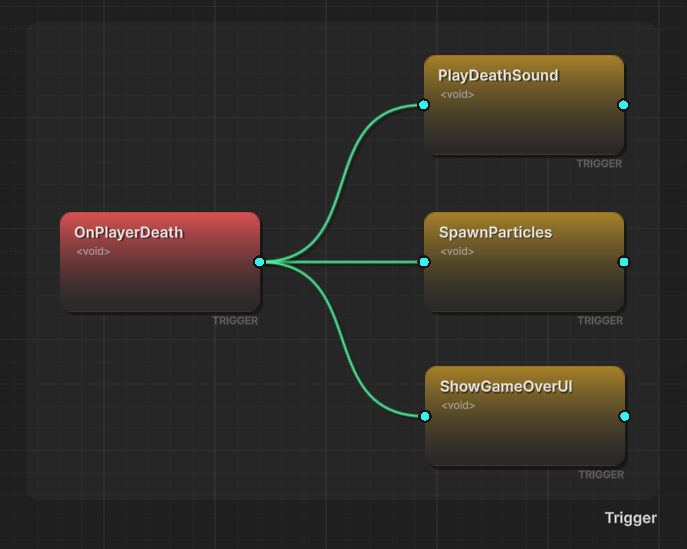
Parallel execution. All targets begin processing in the same frame. No guaranteed order between them (unless you assign priorities).
Fault-tolerant. If target B throws an exception, targets A and C still execute. One broken handler doesn't take down the whole flow. This is the behavior you WISH C# events had out of the box.
Fire-and-forget. The source doesn't wait for any target to complete. If a target starts a 5-second coroutine, the source doesn't know or care.
Priority-sorted. While conceptually parallel, trigger targets execute in deterministic order within a frame. Assign priorities: priority: 20 executes before priority: 10. This handles "mostly parallel, but disable input before playing the death sound" without needing a separate sequential step.
// All fire simultaneously when onPlayerDeath is raised
onPlayerDeath.AddTriggerEvent(onDisableInput, priority: 20);     // First
onPlayerDeath.AddTriggerEvent(onPlayDeathSound, priority: 10);   // Second
onPlayerDeath.AddTriggerEvent(onSpawnDeathParticles, priority: 5); // Third
In the Flow Graph editor, trigger connections are orange lines fanning out from a source node. Visual shorthand: "all of these happen together."
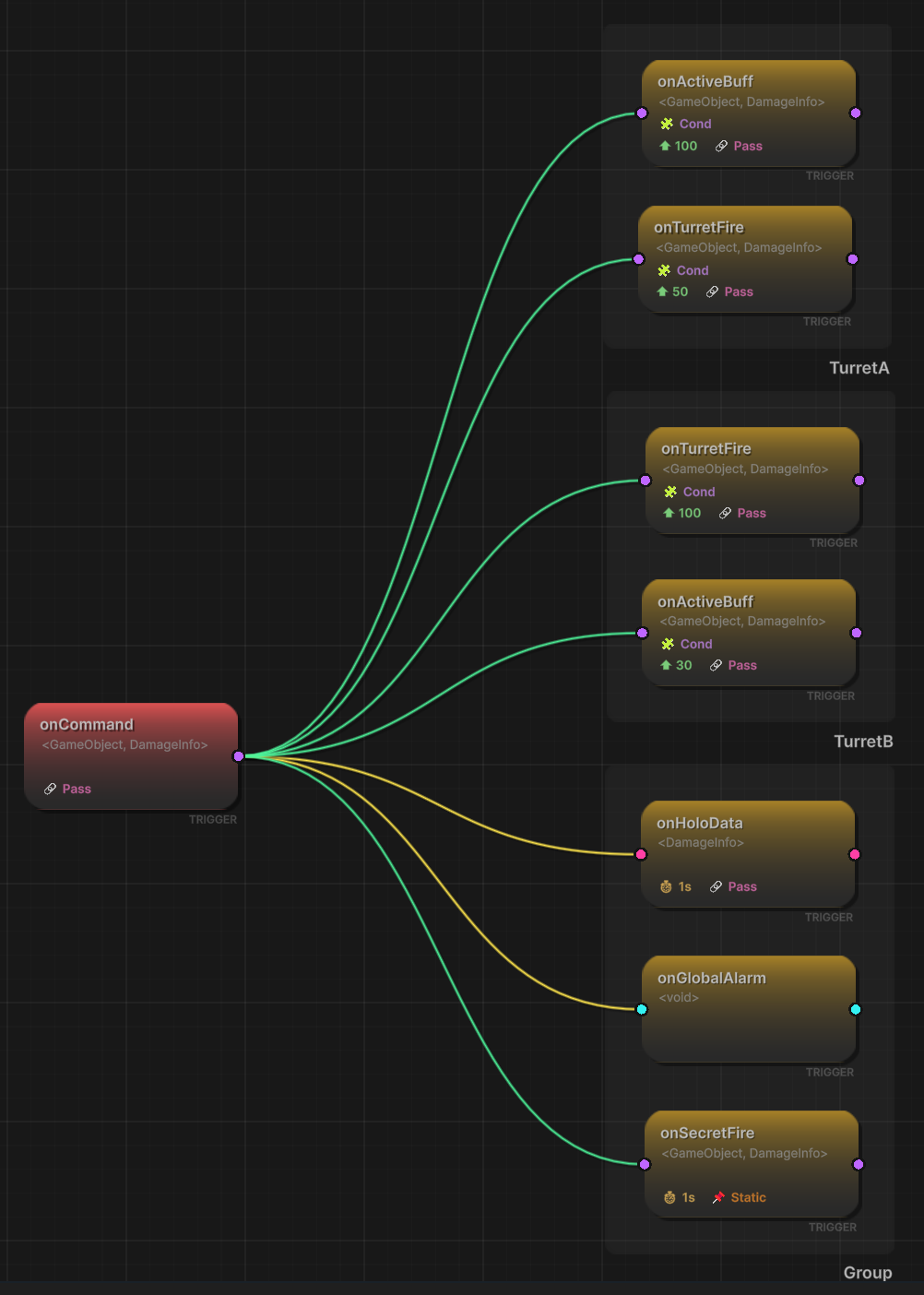
Chain: Sequential Blocking (Green)
When a source event fires, Chain-connected targets execute one after another, in strict order. Each step waits for the previous step to complete.
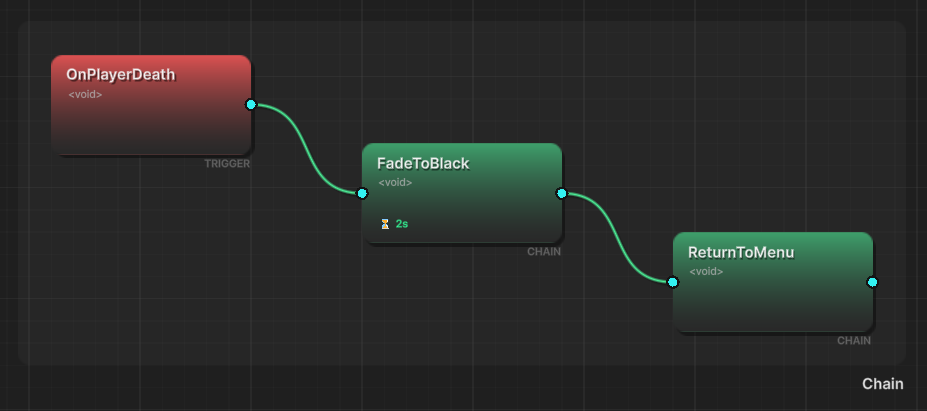
Strict ordering. Step 1, then step 2, then step 3. No ambiguity. No race conditions. The visual layout reads left to right, top to bottom — exactly the execution order.
Delay and duration. Each chain step can have a delay (pause before starting) and a duration (how long this step "takes" before the chain proceeds). This replaces WaitForSeconds scattered through coroutines with explicit, visible timing on each connection.
Async waiting with waitForCompletion. Chain steps can pause the chain until the handler's async operation finishes. Scene loads, animations, network calls — the chain waits for them gracefully. No coroutine wrapper code. No completion callbacks. Just a checkbox.
Conditional halting. Chain connections support conditions that can stop the remaining sequence. If a condition evaluates to false, subsequent steps don't execute. "If the player has a revive token, abort the death sequence" is a condition on the first chain step.
// Each step waits for the previous to complete
onPlayerDeath.AddChainEvent(onFadeToBlack, delay: 1.0f);
onFadeToBlack.AddChainEvent(onLoadRespawn, waitForCompletion: true);
onLoadRespawn.AddChainEvent(onTeleportPlayer);
onTeleportPlayer.AddChainEvent(onResetPlayerState);
onResetPlayerState.AddChainEvent(onFadeIn, duration: 1.0f);
onFadeIn.AddChainEvent(onEnableInput);
In the Flow Graph, chain connections are green lines flowing in sequence. Visual shorthand: "these happen in this order."
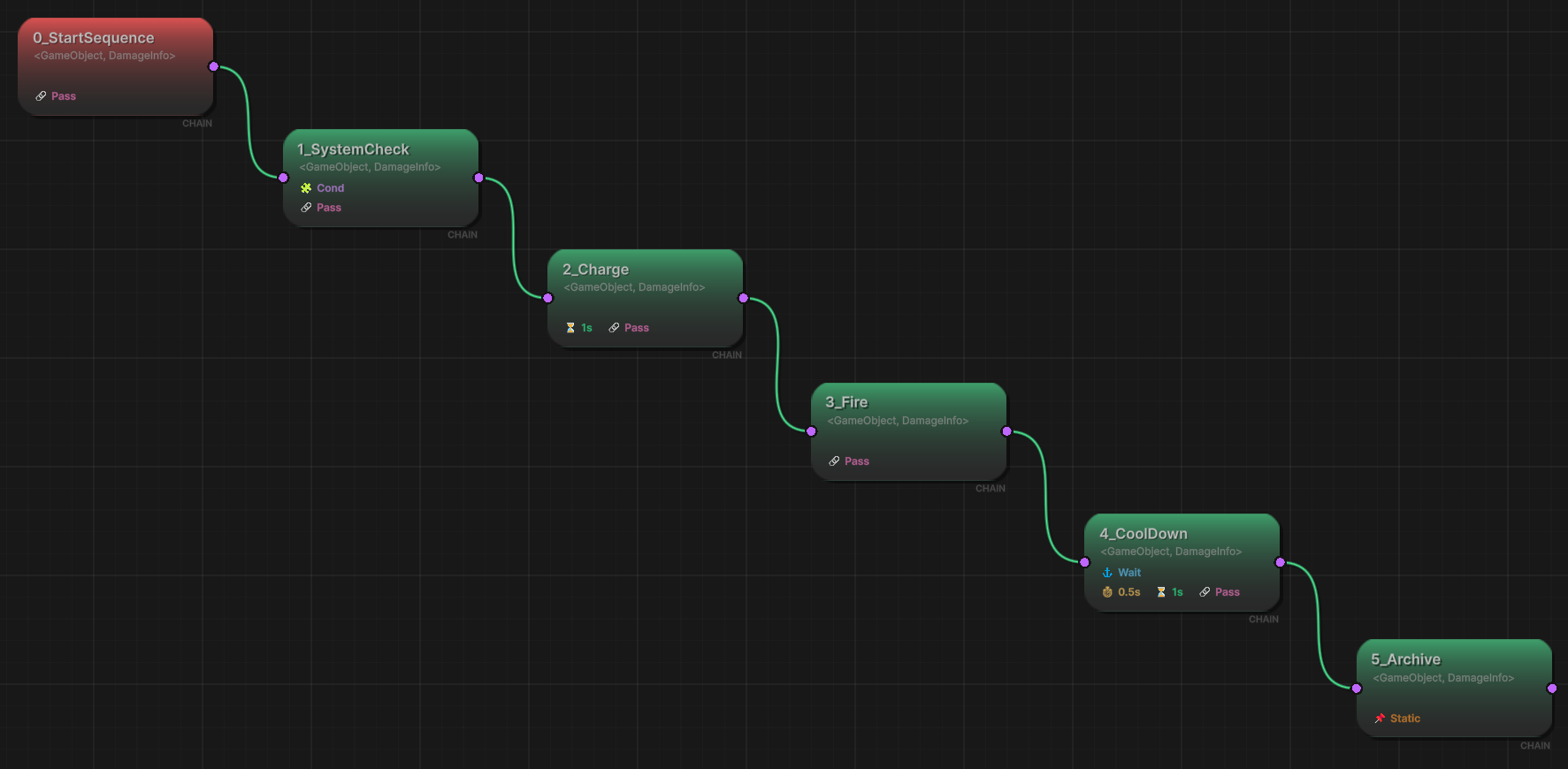
Mixing Them: The Hybrid Flow
Real game logic is never purely parallel or purely sequential. It's both. The whole point of having two explicit patterns is that you can mix them freely from the same source node.
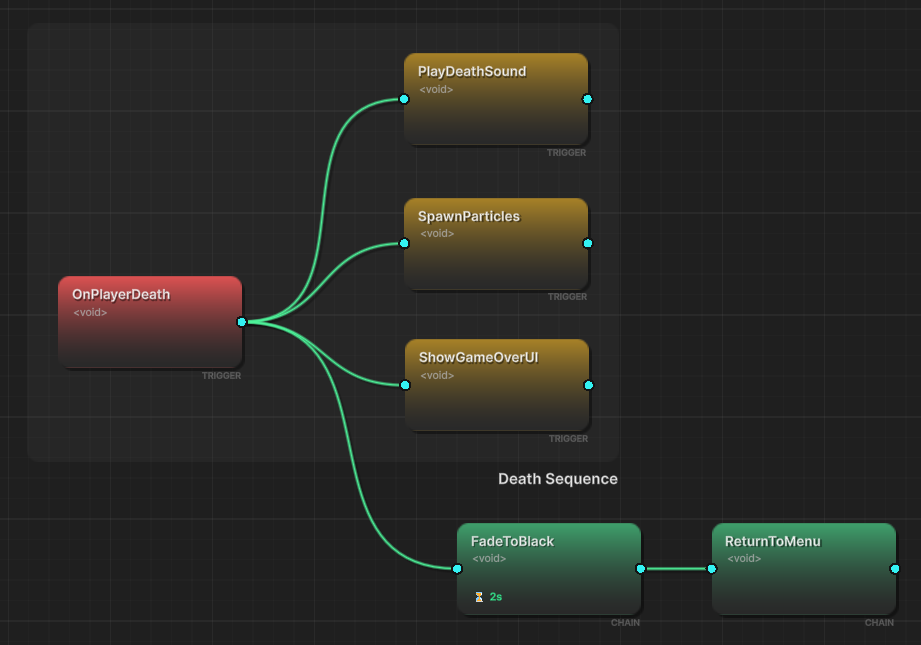
The player death flow becomes:
OnPlayerDeath ──trigger──► OnPlayDeathSound       (parallel, immediate)
              ──trigger──► OnSpawnDeathParticles   (parallel, immediate)
              ──trigger──► OnDisableInput          (parallel, immediate, priority: 20)
              ──chain───► OnFadeToBlack            (sequential, delay: 1.0s)
                          └──chain──► OnLoadRespawn (waitForCompletion)
                                     └──chain──► OnTeleportPlayer
                                                 └──chain──► OnResetState
                                                             └──chain──► OnFadeIn (duration: 1.0s)
                                                                         └──chain──► OnEnableInput
Three orange trigger lines fan out — parallel effects fire immediately. A green chain starts the sequential respawn flow. Both run concurrently: the death sound plays WHILE the chain waits for its 1.0s delay before starting the fade.
In code:
void SetupDeathFlow()
{
    // Parallel effects (Trigger - orange)
    onPlayerDeath.AddTriggerEvent(onDisableInput, priority: 20);
    onPlayerDeath.AddTriggerEvent(onPlayDeathSound, priority: 10);
    onPlayerDeath.AddTriggerEvent(onSpawnDeathParticles, priority: 5);

    // Sequential respawn (Chain - green)
    onPlayerDeath.AddChainEvent(onFadeToBlack, delay: 1.0f);
    onFadeToBlack.AddChainEvent(onLoadRespawn, waitForCompletion: true);
    onLoadRespawn.AddChainEvent(onTeleportPlayer);
    onTeleportPlayer.AddChainEvent(onResetPlayerState);
    onResetPlayerState.AddChainEvent(onFadeIn, duration: 1.0f);
    onFadeIn.AddChainEvent(onEnableInput);
}
But the visual Flow Graph is where this really clicks. Open the editor and you see the entire flow: the parallel fan-out on the left, the sequential chain flowing right. Orange and green. Instant comprehension of something that would be 80 lines of coroutine code across multiple files.
Argument Transformers: Solving the Type Mismatch
Remember the middleman event problem? Upstream sends DamageInfo, downstream needs just the float damage amount. Without transformers, you'd create relay events for every type conversion.
GES solves this with Argument Transformers — type conversion nodes that sit on connections between events in the Flow Graph.
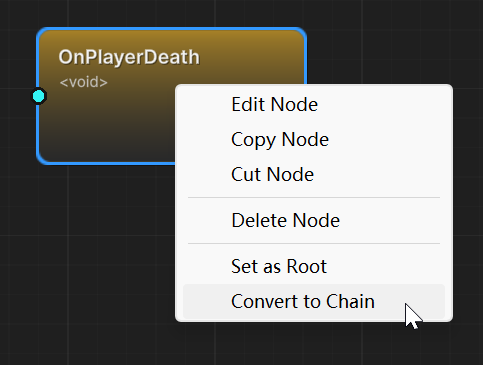
When you connect a DamageInfo source to a SingleGameEvent target, the editor detects the type mismatch and lets you define a transformation. You specify a property path from the source type to the target type:
DamageInfo → .damage → float
The transformer extracts damageInfo.damage and passes the float value to the downstream event. No middleman event. No boilerplate relay code. The transformation is visible on the connection itself.
This works with nested property access too:
DamageInfo → .attacker.stats.critChance → float
The Flow Graph shows transformer connections differently from direct connections, so you can always see where type conversion is happening. The type system validates the path at configuration time — if the property doesn't exist or the final type doesn't match the target, you get a visible error before runtime.
Connection Compatibility Indicators
When you drag a connection between two nodes, the editor shows color-coded compatibility:
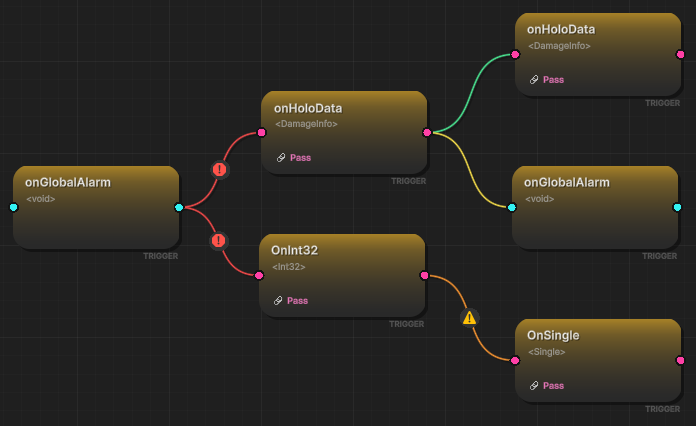
- Green: Types match perfectly.
Int32GameEventtoInt32GameEvent. Direct connection. - Yellow: Compatible with transformation.
DamageInfosource,floattarget. An argument transformer can bridge the gap. - Orange: Possible but requires configuration. Types are unrelated, but a void passthrough or custom transformer can work.
- Red: Invalid. Typically a circular dependency in chain mode.
No guesswork about whether two nodes can connect. The visual feedback tells you instantly.
The Two-Layer Condition System
This is the most nuanced part of the trigger/chain design. There are two independent layers of conditions, and they serve different purposes.
Node conditions (configured in the NodeBehavior Window) control the FLOW itself.
If a node condition evaluates to false:
- On a trigger connection: that specific target doesn't fire, but other triggers from the same source are unaffected
- On a chain connection: the ENTIRE remaining sequence halts — subsequent steps never execute
Event conditions (configured in the Behavior Window) control the SIDE EFFECTS only.
If an event condition evaluates to false:
- The event's actions (gameplay responses like playing sounds, spawning particles) don't execute
- But the FLOW CONTINUES — the next chain step still fires, the trigger dispatch still proceeds
Why does this distinction exist? Because "skip" and "abort" are fundamentally different operations.
"Skip playing the sound but keep going with the respawn sequence" → event condition on the sound's Event Action. The chain continues to the next step.
"If the player has a revive token, ABORT the entire death sequence" → node condition on the first chain step. The entire chain stops.
In the Flow Graph, both condition types are visible on their respective nodes. During runtime debugging, you can see which layer blocked execution. This visibility alone prevents hours of debugging "why did the chain stop?" questions.
Nested Groups: Organizing Complex Flows
When a flow gets large — 20+ nodes, multiple trigger fan-outs, branching chains — the graph can become hard to read. GES supports nested groups: visual containers that collapse a sub-flow into a single labeled box.
Group a boss phase transition into a "Phase 2 Transition" group. Collapse it. Now your top-level graph shows OnBossHP50 → [Phase 2 Transition] → OnPhase2Active instead of 12 intermediate nodes.
Expand the group when you need to edit the internals. Collapse it when you want the big picture. This is the same concept as code folding in an IDE — hide completed details, show the structure.
Pattern Gallery: Three Common Architectures
After using trigger and chain across multiple projects, three patterns emerge consistently.
The Broadcaster Pattern
One source, many independent responses. Pure trigger fan-out.
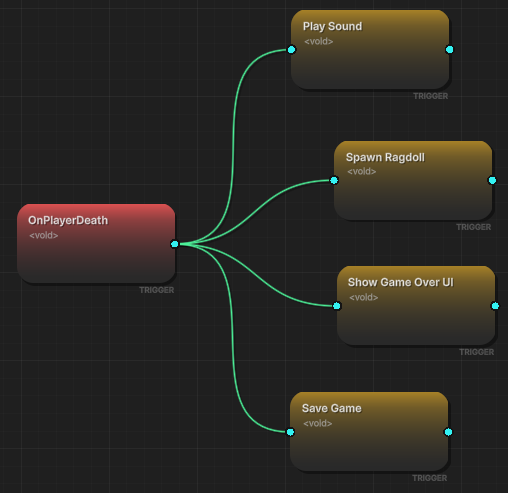
OnPlayerDeath triggers: update score, log analytics, play sound, show UI, notify AI. All independent. All fault-tolerant. If analytics logging fails, the sound still plays.
When to use: Event responses are independent and don't need coordination. The most common pattern — probably 60% of all event connections.
Code equivalent:
onPlayerDeath.AddTriggerEvent(onUpdateScore);
onPlayerDeath.AddTriggerEvent(onLogAnalytics);
onPlayerDeath.AddTriggerEvent(onPlaySound);
onPlayerDeath.AddTriggerEvent(onShowDeathUI);
onPlayerDeath.AddTriggerEvent(onNotifyAI);
The Cinematic Pattern
Strict sequential flow with timing control. Pure chain.
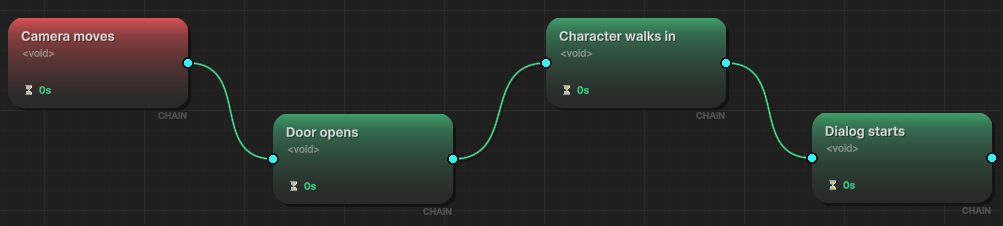
OnCutsceneStart chains: move camera (waitForCompletion) → start dialogue (waitForCompletion) → show choice UI (waitForCompletion) → based on choice, continue appropriate branch.
When to use: Order is load-bearing. Step B would break or produce wrong results if step A hasn't finished. Cutscenes, tutorials, sequential state mutations.
Code equivalent:
onCutsceneStart.AddChainEvent(onMoveCamera, waitForCompletion: true);
onMoveCamera.AddChainEvent(onStartDialogue, waitForCompletion: true);
onStartDialogue.AddChainEvent(onShowChoiceUI, waitForCompletion: true);
The Hybrid Boss Pattern
Parallel immediate feedback + sequential state changes + conditional branches. The full power of both patterns.
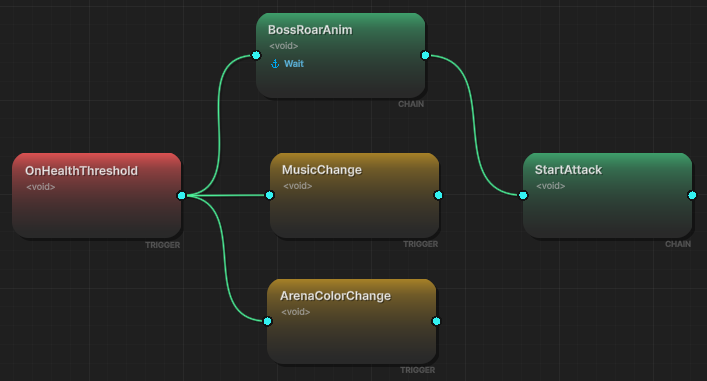
OnBossPhaseTransition:
- Triggers (parallel): warning sound, screen shake, UI alert, particle burst
- Chain (sequential): boss invulnerability → roar animation (waitForCompletion) → spawn minions (staggered delay) → load new attack patterns → boss vulnerability restored
- Node condition on final step: if this is the last phase, branch into the special ending chain instead
When to use: The realistic pattern for any complex game moment. Immediate sensory feedback (trigger) + careful state mutation (chain) + conditional branching (node conditions).
Code equivalent:
void SetupBossTransition()
{
    // Immediate feedback (parallel)
    onBossPhaseTransition.AddTriggerEvent(onWarningSound);
    onBossPhaseTransition.AddTriggerEvent(onScreenShake);
    onBossPhaseTransition.AddTriggerEvent(onUIAlert);

    // State mutation (sequential)
    onBossPhaseTransition.AddChainEvent(onBossInvulnerable);
    onBossInvulnerable.AddChainEvent(onRoarAnimation, waitForCompletion: true);
    onRoarAnimation.AddChainEvent(onSpawnMinions, delay: 0.5f);
    onSpawnMinions.AddChainEvent(onLoadAttackPatterns);
    onLoadAttackPatterns.AddChainEvent(onBossVulnerable);
}
Runtime Debugging: Watching the Flow Execute
The Flow Graph isn't just a configuration tool. During Play mode, you can watch the entire flow execute in real time:
- Active nodes pulse with their connection color (orange for trigger, green for chain)
- Completed nodes flash briefly
- Skipped nodes (condition was false) show a red flash
- Errored nodes show a persistent red highlight
You can watch a boss phase transition execute step by step. See the trigger fan-out fire simultaneously. Watch the chain progress through each step. Spot immediately when a condition blocks a step or an error breaks the flow.
This visibility is what you lose with coroutine-based flows. When a coroutine silently stops in the middle, you add Debug.Log statements everywhere and play detective. When a Flow Graph node shows a red flash, you see exactly where and why.
The Decision Framework
After using trigger and chain patterns across multiple projects, here's the heuristic:
Default to Trigger. If you're not sure, start with trigger. Most event connections are "this system should respond to this event, independently." Sound, particles, UI, analytics, state tracking — all triggers. Probably 60-70% of connections.
Upgrade to Chain when order is load-bearing. If step B would break when step A hasn't finished, that's a chain. Fade before teleport. Load before initialization. Animation before hitbox activation.
Use both when you have immediate feedback + delayed consequences. Instant sensory response (sound, particles, visual effects) is trigger. Careful state mutation (scene load, teleport, data save) is chain. Players feel the response immediately while game state updates safely in sequence.
Use argument transformers when types don't match. Don't create middleman events for type conversion. Put a transformer on the connection and specify the property path.
Use node conditions for "abort." The entire remaining chain stops. "Player has revive token? Don't run the death sequence."
Use event conditions for "skip." The chain continues but this step's side effects don't execute. "Mute mode? Skip the sound but keep the respawn going."
The visual Flow Graph makes all of this explicit. Orange for parallel. Green for sequential. Transformers on connections. Conditions on nodes. The entire architecture of a complex game flow — the boss fight, the cutscene, the death sequence — visible in one window instead of scattered across dozens of files.
🚀 Global Developer Service Matrix
🇨🇳 China Developer Community
- 🛒 Unity China Asset Store
- 🎥 Bilibili Video Tutorials
- 📘 Technical Documentation
- 💬 QQ Group (1071507578)
🌐 Global Developer Community
📧 Support & Collaboration