Unity's Generic Serialization Wall: Type-Safe Events Without the Boilerplate Tax

You build GameEvent<T>. Clean, type-safe, elegant. You create a GameEvent<float> field for health updates and slap [SerializeField] on it. You switch to the Inspector. The field isn't there. It's just... gone. Unity is staring at you with a blank panel like you asked it to divide by zero.
It's Unity's oldest architectural headache. The serialization system doesn't understand generics. It never has. And every developer who's ever tried to build a type-safe, data-driven event system has walked face-first into this wall.
This isn't a minor inconvenience. It's the kind of limitation that poisons your entire architecture. You either give up type safety, drown in boilerplate, or accept that your beautiful generic design will never touch the Inspector. For years, the community answer has been "just write the concrete classes by hand." But here's the thing — if the boilerplate is 100% predictable, why is a human writing it?
Why Unity Can't Serialize Generics
Let's actually understand what's happening under the hood before we try to fix it.
Unity's serialization system — the engine behind the Inspector, prefab saving, scene files, and asset storage — was designed in an era before C# generics were common in game development. It operates on concrete types with known, fixed memory layouts. When the serializer encounters a field, it needs to know the exact type at compile time so it can allocate memory, draw the Inspector GUI, and write the data to disk.
When Unity hits a field like this:
[SerializeField] private GameEvent<float> healthChanged;
It doesn't know what to do. The generic type parameter T means the memory layout isn't fixed from the serializer's perspective. It can't create an Inspector drawer because it doesn't know what fields to show. It can't store the reference in the scene file because it doesn't know the concrete type. So it does the only thing it can — it ignores the field entirely.
The field compiles. It exists in your C# code. It just doesn't exist as far as Unity's Inspector and serialization pipeline are concerned. No warning, no error, just silence.
This means that if you want type-safe events that actually work in the Inspector — which is the entire point of a visual workflow — you need a concrete, non-generic subclass for every single type you want to use:
// You have to write one of these for EVERY type
[CreateAssetMenu]
public class FloatGameEvent : GameEvent<float> { }

[CreateAssetMenu]
public class Int32GameEvent : GameEvent<int> { }

[CreateAssetMenu]
public class StringGameEvent : GameEvent<string> { }

[CreateAssetMenu]
public class Vector3GameEvent : GameEvent<Vector3> { }
One line of meaningful information — the type parameter — wrapped in a full class declaration. Every. Single. Time.
The Boilerplate Math
Let's do some quick arithmetic that'll make you uncomfortable.
For a proper event system, each type doesn't just need a concrete event class. It also needs a binding field so the visual workflow can connect events to responses. That's two pieces of generated code per type, minimum.
A typical mid-sized Unity project uses around 15 distinct types for events: a handful of primitives (int, float, bool, string), some Unity types (Vector3, Color, GameObject, Transform), and a few custom structs specific to your game (DamageInfo, ItemData, QuestProgress).
15 types x 2 artifacts = 30 chunks of nearly identical boilerplate code.
Now add sender variants. Sender events carry two type parameters — who sent it and what data it carries. Want GameEvent<GameObject, float> for per-entity health? That's another concrete class plus another binding field. Even a conservative project might have 5-10 sender combinations.
You're looking at 40+ pieces of boilerplate code where the only meaningful variation is the type name. Every one of them is a copy-paste opportunity. Every one of them is a potential typo. Every one of them has to be updated if your base class interface ever changes.
And here's the thing nobody talks about: it's not just the initial creation. It's the maintenance. Someone refactors the base event class and forgets to update three concrete types. Someone adds a new type and puts the file in the wrong folder. Someone copy-pastes IntGameEvent, renames it to FloatGameEvent, but forgets to change the generic parameter inside. The code compiles, the tests pass, and two weeks later you discover your float events have been silently casting to int the whole time.
This isn't hypothetical. This happens in real projects constantly.
Common Workarounds (And Why They All Fail)
The Unity community is nothing if not creative. Here are the approaches people have tried, and why none of them actually solve the problem.
Manual Boilerplate: "Just Write It"
The brute-force approach. Create every concrete class by hand. It works, technically, but:
- It's tedious and error-prone. You're doing mechanical work that adds zero creative value.
- Adding a new type means creating multiple files every time. Miss one and things break silently.
- Refactoring the base class means touching every single derived class.
- Nobody does this consistently. Types end up scattered across the project, named differently, organized differently. Six months in, your codebase looks like three different people wrote the same system three different ways. Because they did.
Abandon Type Safety: The object Approach
Some systems dodge the generic problem entirely by using object:
public class GenericEvent : ScriptableObject
{
    public void Raise(object data) { /* broadcast to listeners */ }
}

// Usage
scoreEvent.Raise(42);           // Boxed int — works
scoreEvent.Raise("oops");       // Wrong type — also compiles, breaks at runtime
scoreEvent.Raise(new Enemy());  // Also compiles. Also wrong. Also runtime.
Congratulations, you've "solved" the serialization problem by throwing away the entire reason you wanted generics in the first place. Every event call is now a potential runtime error. Every listener needs manual casting and null checks. You've essentially recreated JavaScript's type system inside C#.
The boxing/unboxing overhead isn't great either, especially if you're raising events frequently. But the real cost is developer confidence — you can never be sure an event carries the right type without reading every call site.
T4 Templates: Right Idea, Wrong Execution
Some developers write T4 text templates or custom editor scripts to auto-generate the boilerplate. This is actually the right instinct — recognize that the code is predictable and automate it. But most implementations are:
- Fragile. T4 templates break when you look at them funny.
- Opaque. The developer who set them up leaves, and now nobody understands the template syntax.
- External. They live outside your normal Unity workflow, so people forget they exist.
- Manual. You still have to remember to run the generation step.
Copy-Paste: The Honest Answer
Let's be real — this is what most people actually do. Copy an existing concrete class, change the type name, change the generic parameter, save. It works until it doesn't. And it doesn't when:
- You copy the wrong template and inherit from the wrong base class
- You forget to rename something and end up with duplicate class names
- You paste into the wrong namespace
- You do it 30 times and your eyes glaze over by number 15
Everyone does this. Everyone regrets it eventually.
What Other Languages Do
This problem isn't unique to Unity, but most other ecosystems have solved it.
Rust has #[derive(...)] macros that auto-implement trait boilerplate at compile time. Define your struct, slap a derive attribute on it, done.
Go has go generate — a first-class code generation tool built into the language toolchain. You write a generator once, reference it in a comment, and the toolchain handles the rest.
C# itself has Roslyn source generators, which can generate code at compile time based on existing types. In theory, this is the perfect solution. In practice, Unity's compiler pipeline has limited source generator support, the debugging experience is rough, and the tooling is still catching up. It's getting better, but it's not "just works" territory yet.
The pattern across all these solutions is the same: if the boilerplate is predictable, the machine should write it. A human typing out public class FloatGameEvent : GameEvent<float> { } is doing work that could be expressed as a template with a single variable. That's literally what compilers are for.
Which brings us to the fundamental question: your event boilerplate is 100% predictable. The concrete class name follows a pattern. The generic parameter is the only variable. The binding field follows the same pattern. So why is a human writing any of it?
Three Event Types, One System
Before we look at how GES handles code generation, let's understand the three event architectures it provides. Each one maps to a specific communication pattern.
Void Events: GameEvent
The simplest form. An event with no data payload. "Something happened" — that's the entire message.
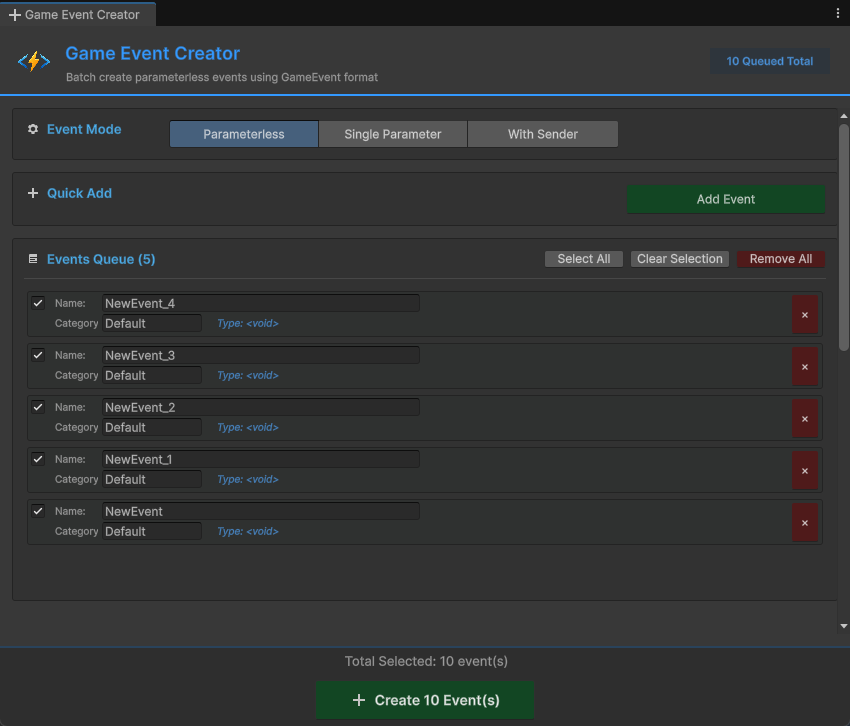
[GameEventDropdown, SerializeField] private GameEvent onLevelComplete;

public void CompleteLevel()
{
    onLevelComplete.Raise();
}
No generic parameters, no serialization issues, no code generation needed. Just create the ScriptableObject asset and use it. Game start, game over, pause, unpause, checkpoint reached — any signal where the occurrence itself is the entire message.
Single Parameter Events: GameEvent<T> Becomes Concrete
An event that carries one piece of typed data. "Something happened, and here's the relevant information."
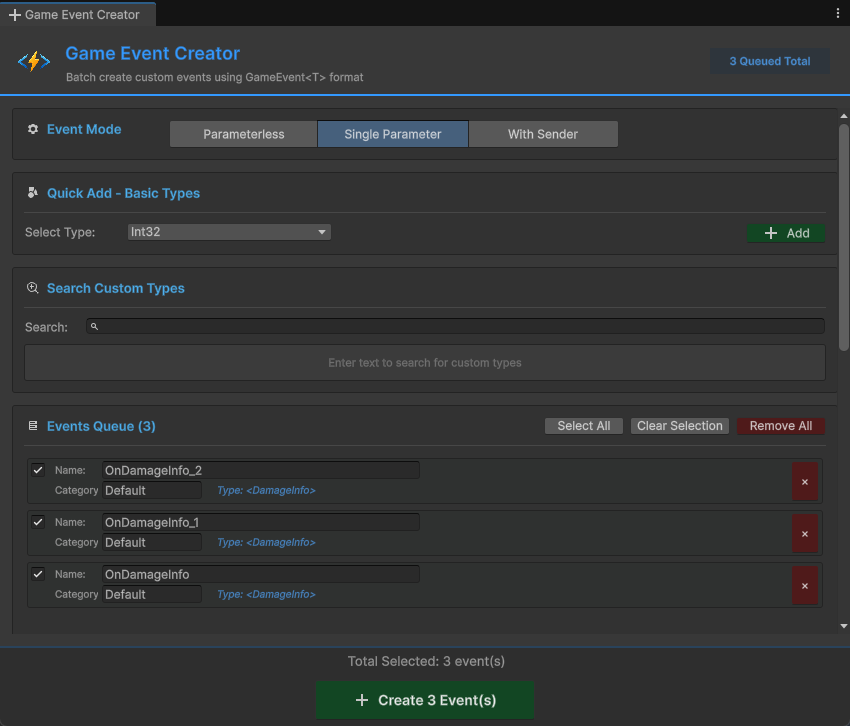
This is where the serialization wall hits. You can't use GameEvent<float> directly in the Inspector. GES solves this with concrete types like SingleGameEvent, Int32GameEvent, BooleanGameEvent, and so on:
[GameEventDropdown, SerializeField] private Int32GameEvent onScoreChanged;

public void AddScore(int points)
{
    currentScore += points;
    onScoreChanged.Raise(currentScore);
}
Notice: the field type is Int32GameEvent, not GameEvent<int>. It's a concrete, non-generic class that Unity can serialize, inspect, and store. Under the hood it inherits from GameEvent<int>, but Unity never sees the generic — it only sees the concrete subclass.
Use cases: score changes (Int32GameEvent), health updates (SingleGameEvent), damage amounts (SingleGameEvent), item counts, cooldown timers, anything where one piece of data tells the whole story.
Sender Events: GameEvent<TSender, TArgs> Becomes Concrete
An event that carries both sender identity and event data. "This specific thing happened to this specific object, and here are the details."
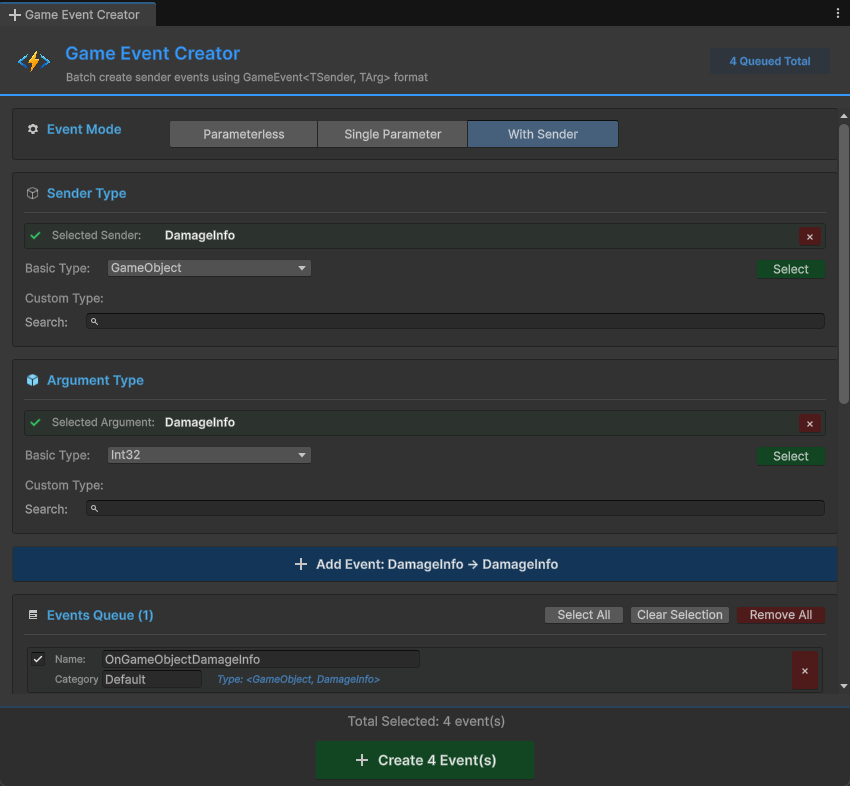
Two generic parameters means even more boilerplate in a manual system. GES generates concrete types like GameObjectDamageInfoGameEvent:
[GameEventDropdown, SerializeField] private GameObjectDamageInfoGameEvent onDamageTaken;

public void TakeDamage(DamageInfo info)
{
    currentHealth -= info.amount;
    onDamageTaken.Raise(gameObject, info);
}
The sender parameter is crucial when multiple instances share the same event type. Ten enemies all fire the same onDamageTaken event — the sender parameter lets listeners distinguish "the boss took damage" from "a random minion took damage" without any extra wiring.
Use cases: combat events (who hit whom, how much), interaction events (which NPC, what dialogue), physics events (which object, what force). Any time "who" matters as much as "what."
32 Pre-Generated Types That Cover Most Projects
GES ships with concrete implementations for 32 common types out of the box. For most projects, you won't need to generate anything.
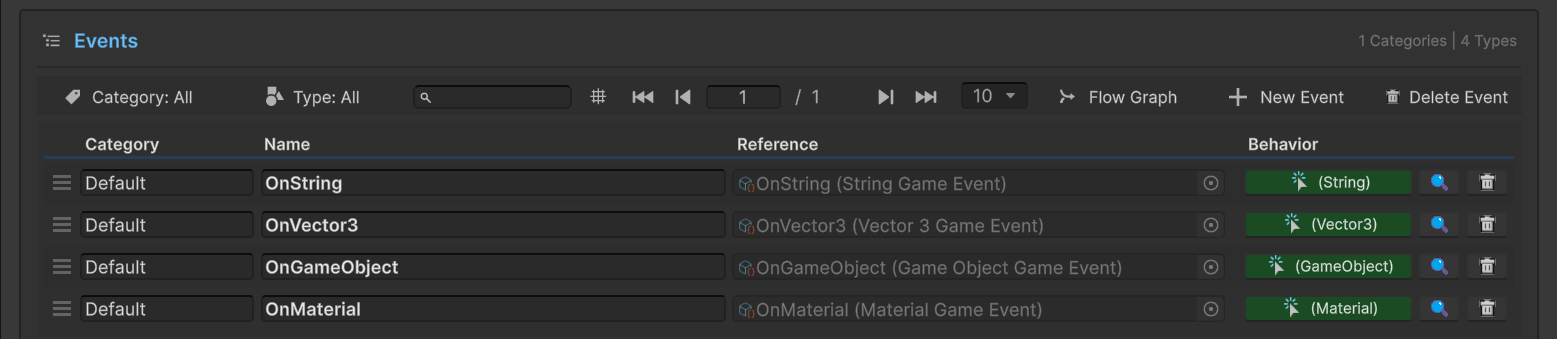
The pre-generated set includes:
- Primitives:
int,float,bool,string,byte,double,long - Unity math:
Vector2,Vector3,Vector4,Quaternion - Unity visuals:
Color,Color32 - Unity references:
GameObject,Transform,Component,Object - Unity structs:
Rect,Bounds,Ray,RaycastHit - Collections and more
In practice, these pre-generated types handle 70-80% of a typical project's event needs. Score tracking, health systems, UI updates, position broadcasting, basic game state — it's all covered without touching the code generator.
The remaining 20-30% is where your game gets interesting: custom structs like DamageInfo, QuestProgress, InventorySlot, DialogueLine. That's where the Creator comes in.
The Creator: Code Generation at Event Creation Time
Here's the key insight in GES's design: code generation isn't a separate step. It happens automatically when you create an event with a custom type.
When you open the Game Event Creator and select a type that doesn't have a concrete event class yet, GES generates it on the spot. You don't open a separate code generation tool. You don't run a command. You don't think about boilerplate at all. You just say "I want an event that carries DamageInfo" and the concrete class appears.
What Gets Generated
For a single parameter event with a custom type, the Creator generates two things:
1. The concrete event class:
// Auto-generated by GES
public class DamageInfoGameEvent : GameEvent<DamageInfo> { }
2. The partial binding class:
public partial class GameEventManager
{
    /// <summary>
    /// The field name MUST match the Event Class Name + "Action"
    /// This allows the EventBinding system to find it via reflection.
    /// </summary>
    public partial class EventBinding
    {
        [HideInInspector]
        public UnityEvent<DamageInfo> DamageInfoGameEventAction;
    }
}
The binding class is what enables the visual workflow — it's how the Behavior Window connects events to response methods without you writing any wiring code. The partial keyword means these generated files merge cleanly with the rest of the GES framework at compile time.
For sender events, the same pattern applies with two type parameters:
// Auto-generated by GES
public class GameObjectDamageInfoGameEvent : GameEvent<UnityEngine.GameObject, DamageInfo> { }

public partial class GameEventManager
{
    public partial class EventBinding
    {
        [HideInInspector]
        public UnityEvent<UnityEngine.GameObject, DamageInfo> GameObjectDamageInfoGameEventAction;
    }
}
Clean, minimal, correct. No typos. No missed attributes. No inconsistencies. The naming convention is automatic: type name + GameEvent for the class, type name + GameEvent + Action for the binding field. Every generated file follows the exact same pattern.
The CodeGen Tool: Maintenance, Not Creation
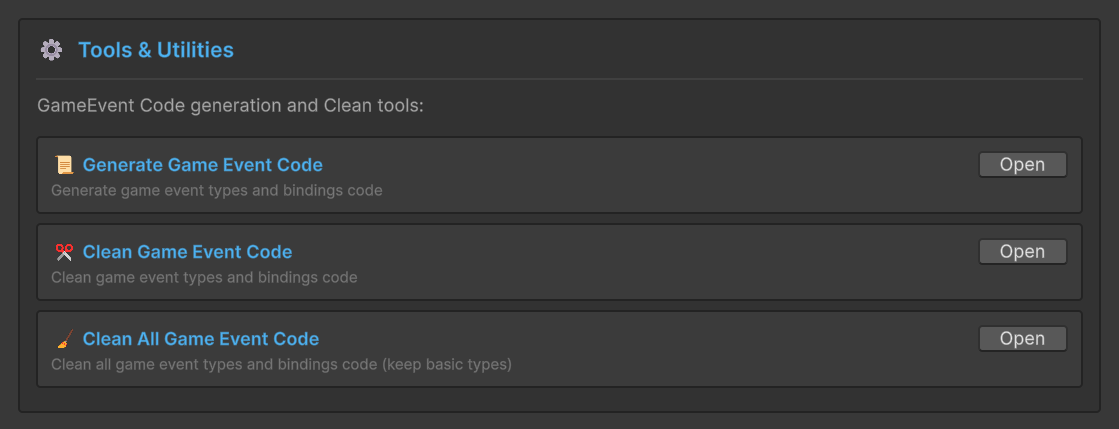
You might be wondering: if the Creator handles generation automatically, what's the separate CodeGen tool for?
The CodeGen tool exists for maintenance scenarios:
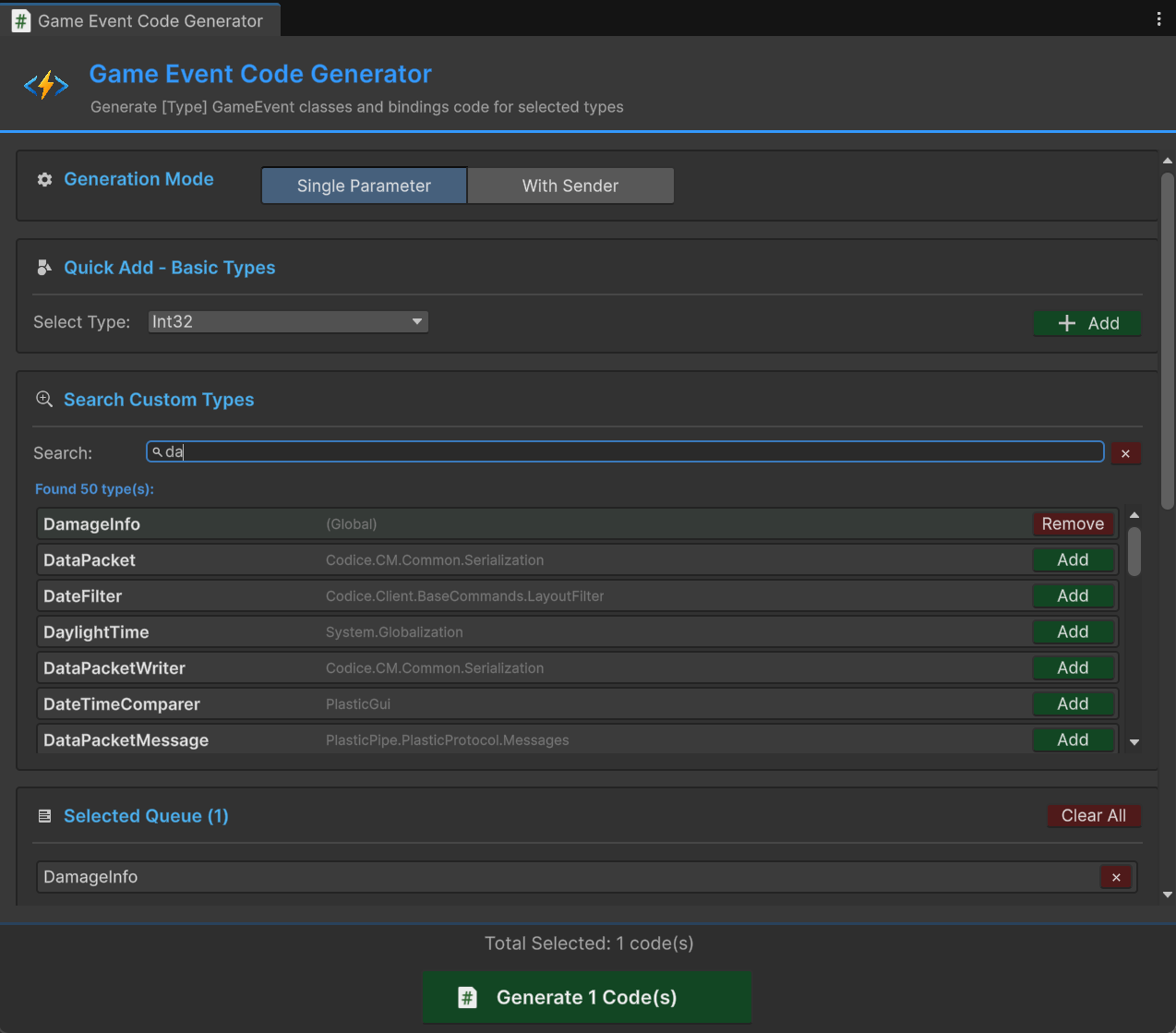
- After VCS merges. Two developers both generated events on different branches. The merge brought in new event assets but not the generated code. The CodeGen tool scans for events that are missing their concrete classes and regenerates them.
- After upgrading GES. A new version might change the generated code template. The CodeGen tool can regenerate all concrete classes to match the new template.
- Cleaning up dead types. You deleted a custom struct that had generated events. The CodeGen tool's cleanup mode finds orphaned generated files and removes them.
Think of it this way: the Creator is your day-to-day workflow. The CodeGen tool is your quarterly maintenance pass. Most developers will use the Creator constantly and the CodeGen tool rarely.
Complete Walkthrough: Custom Struct to Working Event
Let's walk through a realistic scenario end to end, showing exactly how many steps it takes to go from "I need a custom event" to "it's working in my game."
Scenario: You're building a combat system. When an entity takes damage, you need to broadcast who was hit, how much damage, what type, and where the hit landed.
Step 1: Define Your Data Struct
namespace MyGame.Combat
{
    [Serializable]
    public struct DamageInfo
    {
        public float amount;
        public DamageType type;
        public Vector3 hitPoint;
        public bool isCritical;
    }
}
This is game code you'd write regardless. Nothing GES-specific here.
Step 2: Create the Event in the Creator
Open the Game Event Creator. Select "Single Parameter" as the event type. Choose or type DamageInfo as the parameter type. Name the event asset OnDamageTaken. Click Create.
GES generates DamageInfoGameEvent and its binding field automatically. The event asset is created and ready to use. Total time: about 5 seconds.
Step 3: Wire Up the Sender
using MyGame.Combat;
using UnityEngine;

public class Health : MonoBehaviour
{
    [GameEventDropdown, SerializeField] private DamageInfoGameEvent onDamageTaken;

    private float currentHealth = 100f;

    public void TakeDamage(DamageInfo info)
    {
        currentHealth -= info.amount;
        onDamageTaken.Raise(info);
    }
}
In the Inspector, the onDamageTaken field shows a dropdown of all DamageInfoGameEvent assets in your project. Select OnDamageTaken. Done.
Step 4: Wire Up Receivers
This is the part that would normally require writing listener classes, registering callbacks, and managing subscriptions. With GES, you configure it visually in the Behavior Window:
- Find your
OnDamageTakenevent in the Game Event Editor - Open its Behavior Window
- Add actions: damage numbers UI, hit sound effect, camera shake, analytics logging
- Each action targets a GameObject and a method — no code coupling
Your receiver scripts are just normal MonoBehaviours with public methods:
public class DamageNumbersUI : MonoBehaviour
{
    public void ShowDamageNumber(DamageInfo info)
    {
        // Spawn floating text at info.hitPoint
        // Color based on info.isCritical
        // Size based on info.amount
    }
}
Step 5: Enjoy Compile-Time Safety
// All of these are caught at compile time, not runtime:
onDamageTaken.Raise(42f);           // Error: float is not DamageInfo
onDamageTaken.Raise("damage");      // Error: string is not DamageInfo
onDamageTaken.Raise(null);          // Error: DamageInfo is a struct, can't be null
Total boilerplate written by hand: zero. Total code generated: two small files, automatically. Total time from "I need a damage event" to "it's working": under a minute.
When to Use Which Event Type
| Scenario | Event Type | Concrete Example |
|---|---|---|
| Pure signal, no data needed | GameEvent (void) | Game paused, level complete |
| One piece of data to broadcast | Single parameter | Int32GameEvent for score, SingleGameEvent for health |
| Multiple related fields | Single parameter + custom struct | DamageInfoGameEvent for combat data |
| Need to know who sent it | Sender | GameObjectSingleGameEvent for per-entity health |
| Per-instance tracking with rich data | Sender + custom struct | GameObjectDamageInfoGameEvent |
| System-wide notification | GameEvent (void) | Scene transition started, save complete |
The general rule: start with void events. When you need data, use a single parameter event — if it's more than one field, wrap it in a struct. Use sender events only when the listener genuinely needs to know which specific instance fired the event.
Wrapping Up
Unity's generic serialization limitation is real, annoying, and shows no signs of going away. But it doesn't have to be your problem.
The pattern is clear: the boilerplate is predictable, so a tool should write it. GES takes this to its logical conclusion — you never interact with code generation directly. You create events through the Creator, and the concrete classes appear. You use [GameEventDropdown, SerializeField] on your fields, and the Inspector just works. The CodeGen tool handles the edge cases that come from team collaboration and version control.
The math is simple. Manual approach: 40+ files of near-identical code, maintained by hand, prone to copy-paste errors, slowing down every developer who needs a new event type. GES approach: zero hand-written boilerplate, automatic generation at creation time, type safety from end to end, and a maintenance tool for the rare occasions when generated code needs to be refreshed.
If the boilerplate is 100% predictable, a human shouldn't be writing it. That's not laziness — that's engineering.
🚀 Global Developer Service Matrix
🇨🇳 China Developer Community
- 🛒 Unity China Asset Store
- 🎥 Bilibili Video Tutorials
- 📘 Technical Documentation
- 💬 QQ Group (1071507578)
🌐 Global Developer Community
📧 Support & Collaboration