Status System
How status stacks live on units at runtime, when they tick and decay, and which events keep your UI honest.
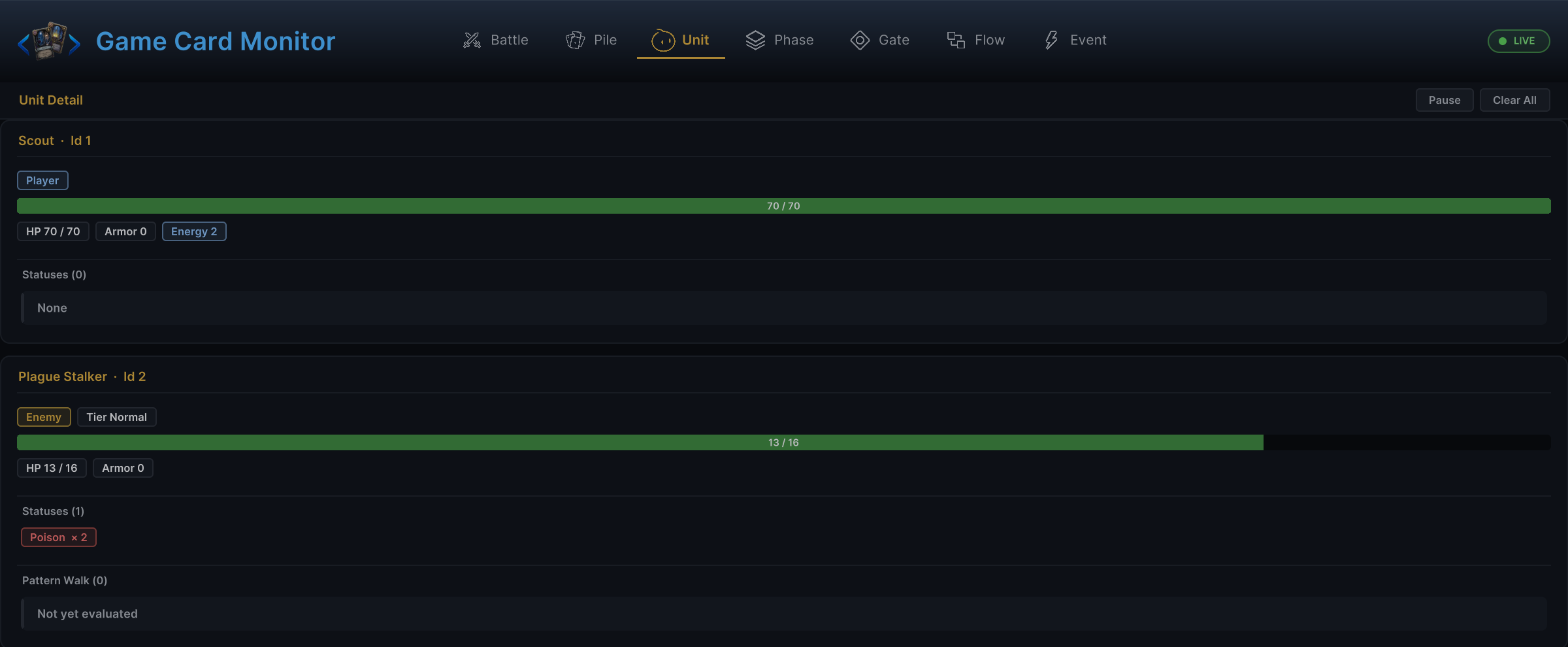
Use this when a status ticks at the wrong time, stacks show stale numbers in your UI, or a damage hook never fires.Statuses are authored as GameStatus assets and live on units as runtime stack counts. A status can display an icon, track stacks, decay over time, contribute hooks, and run FlowGraph behavior. The Unit tab of the Game Card Monitor shows every unit's current stacks live.
Authored status fields
| Field | Runtime meaning |
|---|---|
DisplayName | User-facing name. |
Description | Player-facing description with optional tokens. |
Icon | UI icon. |
IsDebuff | Marks the status as a debuff for filtering and presentation. |
StackRule | How new stacks combine with existing stacks: Additive adds them, Max keeps the higher count, Replace overwrites. |
MaxStacks | Maximum stack count; negative means no practical limit. |
DecayRule | When stacks decay: PerTurn loses one stack at the end of the owner's turn, Never waits for explicit removal. |
ShowStackCount | Whether UI should show stack numbers. |
Tags | Authoring and FlowGraph filters. |
Behavior | FlowGraph that reacts to status lifecycle, hooks, and timings. |
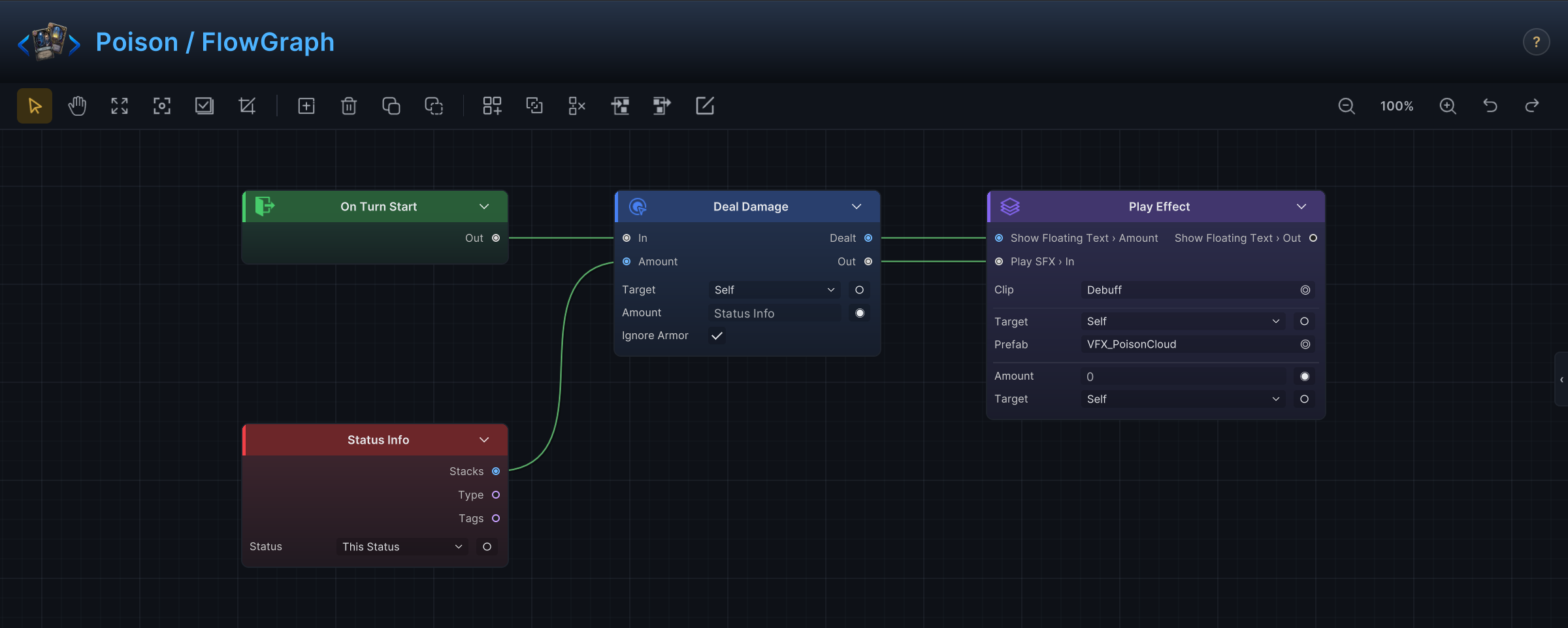
The Behavior graph is where a status earns its keep. The demo's Poison, for example, deals 1 damage per stack at the start of the owner's turn, ignores armor, then loses one stack:
Runtime storage
Each UnitState stores status data:
| Runtime data | Meaning |
|---|---|
Statuses | Dictionary from GameStatus to stack count. |
StatusAppliers | Dictionary from GameStatus to the unit that applied it. |
ActiveHooks | Hook entries contributed by status and card behavior. |
Use these public helpers instead of reading the dictionaries directly:
| Need | API |
|---|---|
| Stack count | GCSApi.GetStatusStacks(unit, status) |
| Has at least N stacks | GCSApi.HasStatus(unit, status, minStacks) |
| Who applied the status | GCSApi.GetStatusApplier(unit, status) |
| All statuses on a unit | GCSApi.StatusesOn(unit) |
StatusesOn returns an empty map when the unit is null or has no statuses.
Applying and changing statuses
| Task | API or node |
|---|---|
| Apply stacks | GCSApi.ApplyStatus(target, status, stacks, source) or the Change Status node. |
| Remove stacks | GCSApi.RemoveStatus(target, status, stacks) or Remove Statuses / Change Status. |
| Add or subtract by delta | GCSApi.ModifyStatusStacks(target, status, delta) |
| Re-run behavior without changing stacks | The Reapply Status node or the controller's RetriggerStatus. |
Status changes run through runtime rules and raise events. Avoid manually editing UnitState.Statuses.
Hooks versus lifecycle entries
Status behavior can do two different jobs.
| Behavior kind | Use for | Examples |
|---|---|---|
| Lifecycle entries | React after something happened. | On Status Received, On Status Removed, On Turn Start. |
| Hooks | Change a value before it is committed. | Damage Taken Hook, Card Cost Hook, Draw Count Hook. |
A hook that intends to change the value should end with a Write Hook node. Lifecycle entries use normal action nodes.
Decay and turn timing
Status decay and ticks are driven by the battle state machine. A status with PerTurn decay follows one loop from application to expiry:
| Timing | What can happen |
|---|---|
| PlayerTurnStart | Player armor decay, player status start-turn behavior, delayed triggers. |
| PlayerTurnEnd | Discard phase, player status end-turn behavior, status tick/decay, hook ticking. |
| EnemyPhase, per enemy | Enemy status start-turn behavior, enemy action, enemy status end-turn behavior, status tick/decay. |
| BattleEnd | Battle-end status behavior on all units. |
Use StatusTickedEventArgs when custom UI needs to animate a tick or decay. It carries the stacks and HP both before and after the tick.
Status events
| Event | Payload | Use for |
|---|---|---|
| OnStatusChanged | StatusChangedEventArgs | Refresh a unit's status widget after stack changes. |
| OnStatusTicked | StatusTickedEventArgs | Animate damage, healing, or stack changes from a tick. |
| OnStatusInflicted | StatusTransitionEventArgs | React to incoming status application. |
| OnStatusExpired | StatusTransitionEventArgs | Animate natural expiration. |
| OnStatusRemoved | StatusTransitionEventArgs | Animate cleanse or manual removal. |
StatusChangedEventArgs is the most useful UI refresh signal. The transition events are better for specialized effects and gameplay integrations.
Damage and status attribution
Damage caused by a status carries source attribution through runtime hooks and damage events. When a status applies damage, DamageEventArgs tells subscribers:
| Field | Meaning |
|---|---|
SourceUnitId | Unit responsible for the damage, when known. |
TargetUnitId | Unit receiving the damage. |
Amount | Final amount after runtime rules. |
Lethal | Whether the target died from the damage. |
Use this for UI labels, statistics, and combat log entries. Do not infer lethal damage by comparing stale HP values.
UI display rules
For status widgets:
- Listen to
OnStatusChanged,OnStatusTicked,OnUnitHpChanged, andOnUnitDiedas needed. - Refresh the unit's current status map from
GCSApi.StatusesOn(unit). - Use
GameStatus.Icon,DisplayName,IsDebuff,ShowStackCount, and the stack count for display. - Hide statuses with zero stacks.
The demo UnitView also listens to status events to drive procedural status visuals. Custom UI can use the same event channel without depending on the demo view components.
Common mistakes
| Mistake | Better approach |
|---|---|
Editing UnitState.Statuses directly. | Use ApplyStatus, RemoveStatus, or ModifyStatusStacks. |
| Using a lifecycle entry to modify damage before it happens. | Use the matching hook. |
| Showing stack counts taken from an event alone. | Refresh from GCSApi.StatusesOn(unit). |
| Assuming all statuses are debuffs. | Check GameStatus.IsDebuff or tags. |
| Treating removed and expired as the same event. | Use OnStatusRemoved for manual removal and OnStatusExpired for natural expiration. |