FlowGraph basics
Read a Behavior as one gameplay rule: at a specified time, use the current targets and values to execute actions in connection order
Take Poison Arrow as an example. Its Behavior starts at On Card Played, deals damage, uses the actual resolved result for presentation, and finally applies Poison.
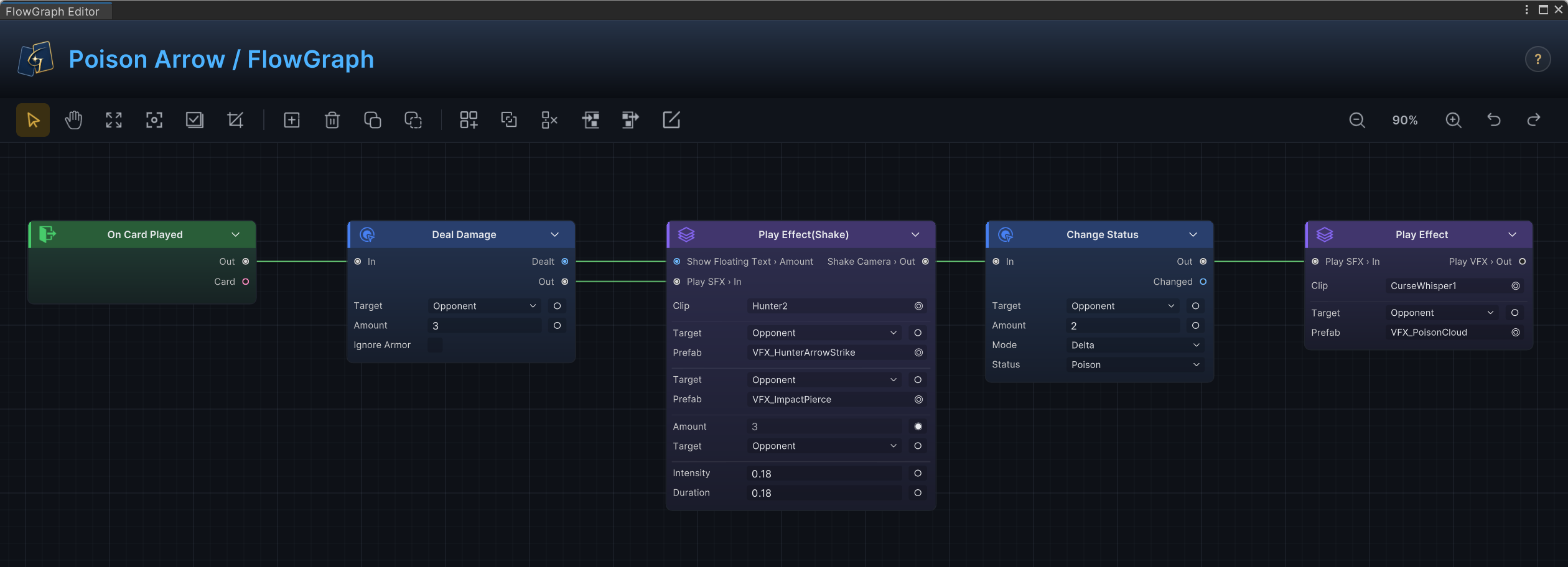
The graph above separates one card play into execution order and data relationships:
- Flow connections determine node order.
- Data connections supply targets and actual damage to the nodes that need them.
Once you can read both connection types, you can follow the canvas and determine the final result of a card.
Behavior belongs to the content asset
FlowGraph is stored directly inside a Card, Status, or Enemy. You do not create a separate graph asset. When you open Edit FlowGraph on content, you edit that asset's own Behavior.
| Owner | Rule expressed by Behavior | Common starting point |
|---|---|---|
| Card | What happens when the card is played, drawn, discarded, or reaches another lifecycle timing | On Card Played and other Card Entries |
| Status | How the status responds to battle timing, modifies values, or handles stacks | Battle/Status Entries and Hooks |
| Enemy | How the enemy chooses an Intent and what that Intent executes | On Enemy Behavior Start and an Intent Pattern |
Copying a content asset also copies its Behavior. Editing the copy does not affect the graph on the original asset.
Start from the correct trigger timing
Once a Behavior belongs to specific content, each executable path must still start from an entry point that matches the rule.
| Starting point | Applicable rule | Example |
|---|---|---|
| Entry | Execute an action when battle or content lifecycle timing is reached | Deal damage after card play or trigger a status at turn start |
| Hook | Modify or cancel a result before GCS commits it | Increase damage, change the draw count, or reject a card play |
| Intent Pattern | Choose and announce the enemy's next action | Select a Leaf Intent from a Sequence or Weighted Pattern |
Trigger timing belongs to the rule itself. A status that takes effect "at turn end" must connect to the matching turn-end Entry, not another entry that happens at a similar time. See Entry nodes, Hook nodes, and Battle lifecycle for exact timing.
Control flow determines order, data flow supplies parameters
| Connection | Question answered | Common ports |
|---|---|---|
| Control flow | Which node executes next? | Out / In, True / False, Body / Done, or a named Case |
| Data flow | Which target, collection, or value does the current node use? | Source/Result Output connected to a Consumer Input |
An Action executes only when control flow reaches it. Data nodes do not need a control connection. They provide their current values when a downstream node requests input.
Fixed fields and input ports
Fields that support dynamic input can switch between a fixed value and an input port.
Port connected -> Use the current value supplied by the connection
Port unconnected -> Use the value stored in the node field
Use fields for fixed costs, damage, or durations. Switch to a port when the value must read current armor, missing HP, status stacks, or Hook input. FlowGraph Editor explains the exact operation.
Data is evaluated when needed
Data does not broadcast across the graph in advance. When an Action begins executing, it reads the current value from its connected Source, Get, Operator, or Selector.
The diagram above shows that a data connection reads battle state at the moment the node executes. If the graph deals damage before reading HP, it receives the reduced HP value.
When several later nodes need the same snapshot, save the result in a Graph Variable or Battle Variable first.
Context determines Self, Opponent, and the current card
The same node can run in Cards, Statuses, and Enemies because a Behavior receives its current Host, actor, target, and battle state during execution.
| Data needed | Common source |
|---|---|
| Current card | This Card or an Entry Output |
| Current actor or status owner | Self, Active Unit, or an Entry Output |
| Target selected by the player or calculated by a rule | Card Selection, Source field, or a connected Selector |
| HP, armor, energy, piles, and status stacks | Matching Get nodes |
| Damage, healing, movement, and status changes | Actual Result Output from the Action node |
| Hook or event parameters | Output from the matching entry |
In player cards, Self is the current play's Source, the legacy overload uses Active Player and explicit requests use CardPlayRequest.SourceUnit, in Status it is the status owner and in Enemy Behavior it is the current enemy, see Target selection for sources and port priority
Choose the right data scope
| Transfer method | Applicable scope |
|---|---|
| Direct connection | One downstream node uses the current value immediately |
| Action Result | Later logic or presentation needs the damage, healing, movement, or stack change that actually took effect |
| Graph Variable | Several paths in the same Behavior execution share one snapshot |
| Battle Variable | The value must persist across an Entry, Card, or turn boundary |
| Internal Event | Different content assets exchange data without a direct connection |
Presentation should use actual results such as Dealt, Changed, Drawn, and Added, not raw inputs. Armor, Hooks, limits, and target validation can all change the final value. Using the Result keeps floating text, audio, and health-bar changes consistent with resolution.
Separate content fields from Behavior responsibilities
| Keep on the content asset | Put in Behavior |
|---|---|
| Name, description, cost, type, rarity, tags, art, Card Target, stacking rules, unit attributes, and Battle Rules | Damage, healing, armor, pile movement, status reactions, Hooks, enemy actions, Choice, Wait, Events, and presentation requests |
Use content fields to define the objects and stable rules that players can recognize. Use Behavior for execution order and dynamic results. Open FlowGraph Editor to create the actual connections. Node reference provides exact ports and parameters, while Card recipes, Status recipes, and Enemy recipes collect verified combinations.