Enemy Recipes
These 38 recipes cover classic enemy intent, rotation, phase, summon, escape, targeting, and boss mechanics used across deckbuilders such as Slay the Spire and Night of the Full Moon.
Recipe overview
| # | Mechanism | What it builds |
|---|---|---|
| 1 | Deterministic intent sequence | Use this for recognizable cycles such as Attack → Defend → Attack → Buff. |
| 2 | Weighted random intents | Use this when an enemy has several moves but some should be more common than others. |
| 3 | HP-threshold boss phases | Use this for bosses whose move set changes as HP crosses 75%, 50%, and 25%. |
| 4 | Opening move and periodic special | Use this for a one-time opener followed by a special every N turns and a normal fallback. |
| 5 | Charge, countdown, and delayed attack | Use this for telegraphed attacks that resolve after several enemy phases. |
| 6 | Summon, minions, and reinforcement waves | Use Spawn Unit to add minions or replace a defeated wave. |
| 7 | Sacrifice an ally and revive | Use this for cultists, necromancers, and bosses that trade another unit for a second life or large payoff. |
| 8 | Enrage and scaling over time | Use this for enemies that gain strength, armor, regeneration, or another resource every action cycle. |
| 9 | Lowest-HP, highest-armor, and priority targeting | Use collection operators to select targets by a visible combat property. |
| 10 | Multi-stage and chained enemy action | Use Sequence when one enemy move promises several ordered results. |
| 11 | Attack the player's hand | Use this for forced discard, temporary cost increases, card transformation, and hand corruption. |
| 12 | Deck top, deck bottom, discard, and shuffle control | Use this for inserting curses on top, recycling discard, burying cards, and enemy-driven shuffles. |
| 13 | Battle combo meter | Use cards played this turn as a combo count, then persist or spend that value when other graphs need it. |
| 14 | Cross-graph internal event | Use internal events when cards, statuses, and enemies inside GCS must coordinate without direct references. |
| 15 | External GES event | Use GES events when FlowGraph must coordinate with UI, quests, scene systems, or other game code outside GCS. |
| 16 | Boss phase broadcast | Use a single phase check to notify UI, music, hazards, and supporting statuses when the boss changes form. |
| 17 | Split at Half HP | Replace the normal move with a split behavior below the HP threshold. |
| 18 | Escape Countdown | Telegraph an escape and remove the enemy when the countdown completes. |
| 19 | Steal and Exhaust a Card | Choose a random card from the player's hand and move it to exhaust. |
| 20 | Time Warp Card Limit | Install a once-per-battle status that limits long card chains. |
| 21 | Opening Flight | Start combat with a finite stack of flight. |
| 22 | Mode Shift at HP Threshold | Switch from a normal attack pattern to a defensive phase. |
| 23 | Strawman | The production Strawman enemy graph is a complete intent and action implementation from the demo database. |
| 24 | Pyre Effigy | The production Pyre Effigy enemy graph is a complete intent and action implementation from the demo database. |
| 25 | Gibbet Priest | The production Gibbet Priest enemy graph is a complete intent and action implementation from the demo database. |
| 26 | Stitched Hound | The production Stitched Hound enemy graph is a complete intent and action implementation from the demo database. |
| 27 | Hex Acolyte | The production Hex Acolyte enemy graph is a complete intent and action implementation from the demo database. |
| 28 | Candle Magus | The production Candle Magus enemy graph is a complete intent and action implementation from the demo database. |
| 29 | Ashen Hierarch | The production Ashen Hierarch enemy graph is a complete intent and action implementation from the demo database. |
| 30 | Hex Hound | The production Hex Hound enemy graph is a complete intent and action implementation from the demo database. |
| 31 | Plague Stalker | The production Plague Stalker enemy graph is a complete intent and action implementation from the demo database. |
| 32 | Spore Brute | The production Spore Brute enemy graph is a complete intent and action implementation from the demo database. |
| 33 | Mire Reaper | The production Mire Reaper enemy graph is a complete intent and action implementation from the demo database. |
| 34 | Bog Polyp | The production Bog Polyp enemy graph is a complete intent and action implementation from the demo database. |
| 35 | Lantern Sister | The production Lantern Sister enemy graph is a complete intent and action implementation from the demo database. |
| 36 | Order Knight | The production Order Knight enemy graph is a complete intent and action implementation from the demo database. |
| 37 | Gilded Bishop | The production Gilded Bishop enemy graph is a complete intent and action implementation from the demo database. |
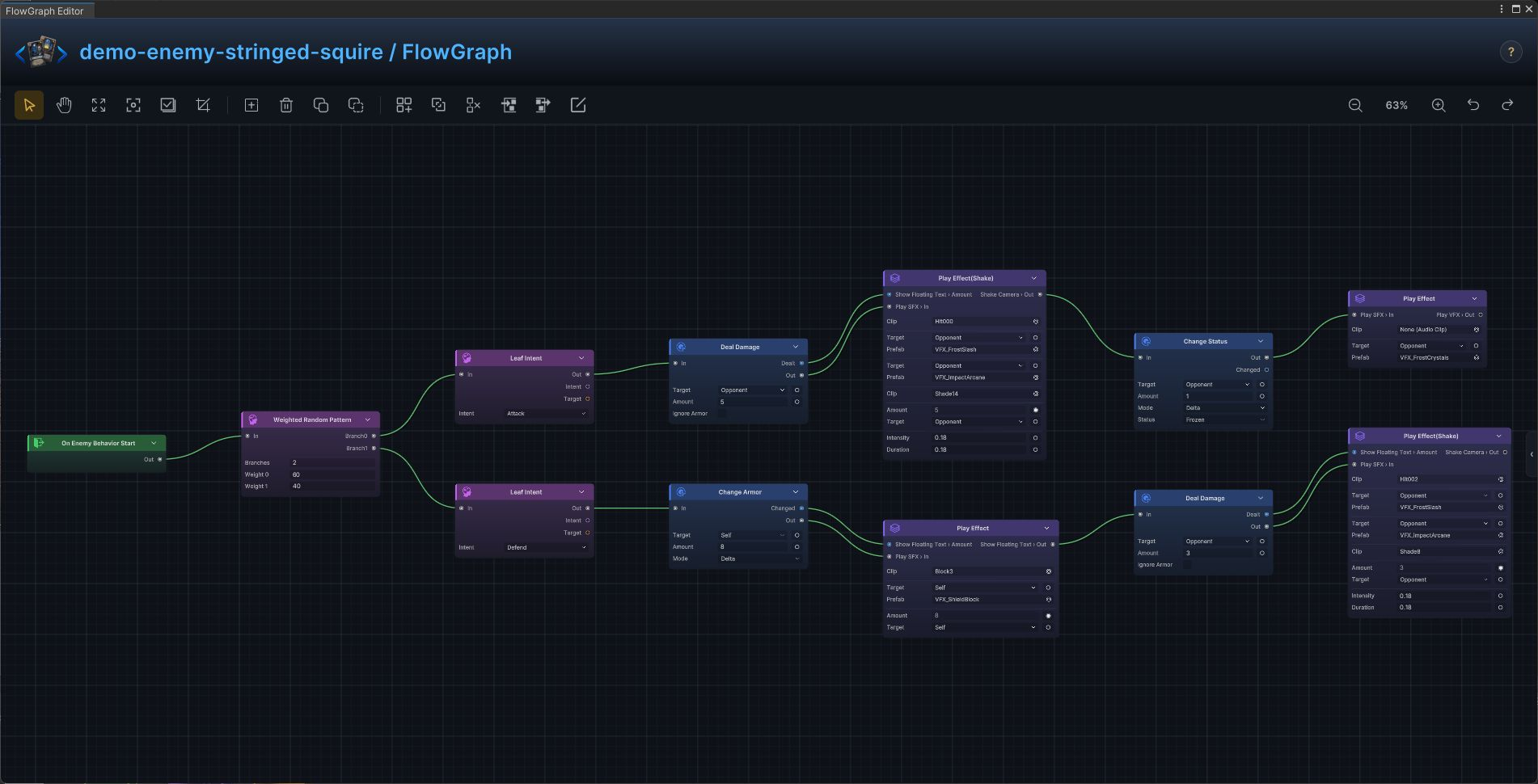
| 38 | Stringed Squire | The production Stringed Squire enemy graph is a complete intent and action implementation from the demo database. |
Open a mechanism to follow its node-by-node build and inspect the full-resolution FlowGraph.
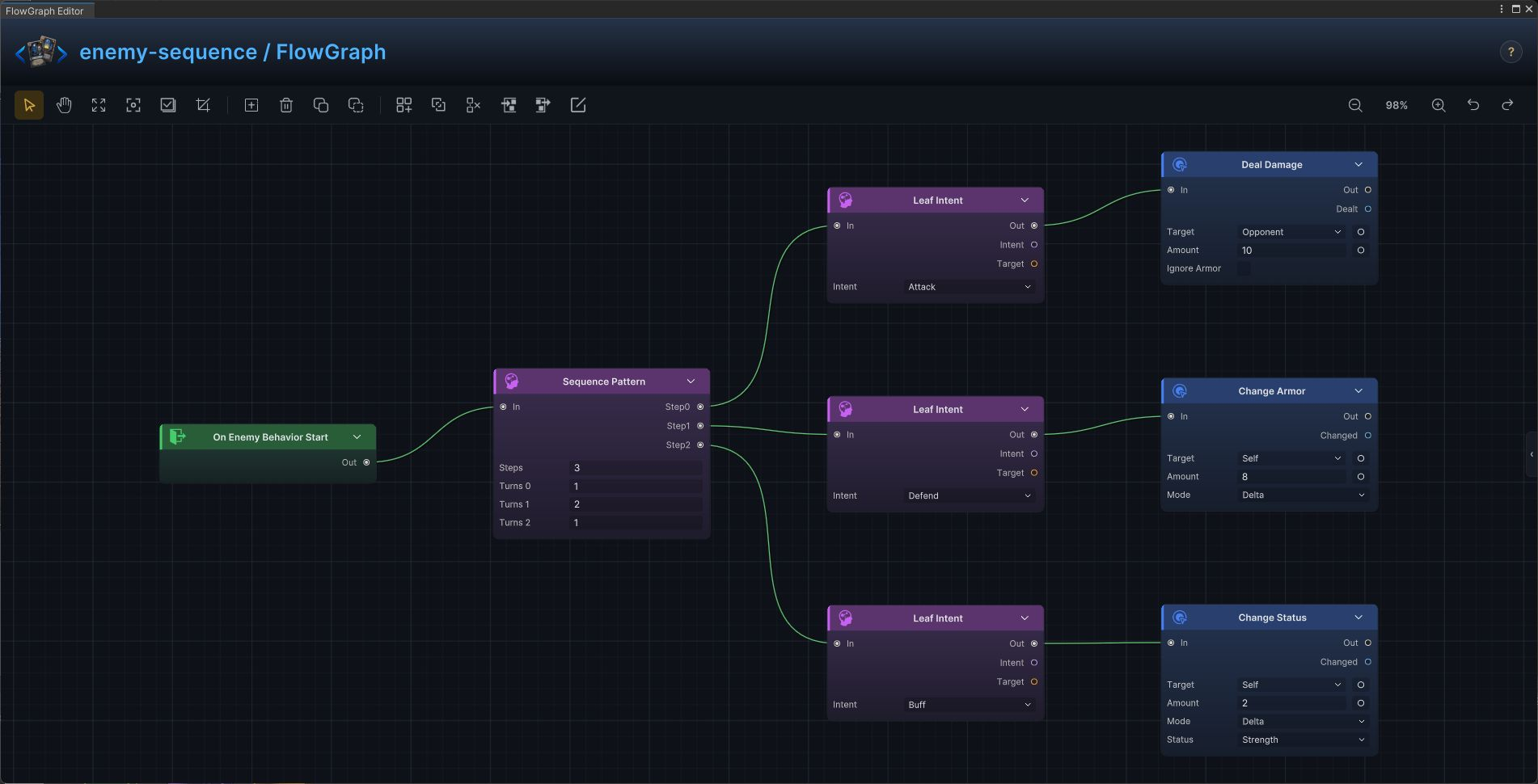
Deterministic intent sequence
Use this for recognizable cycles such as Attack → Defend → Attack → Buff.
Build it
- Connect
On Enemy Behavior StarttoSequence Pattern - Add one output step per move and set
Repeat Countswhen a step repeats - Connect each step to a matching
Leaf Intent - Connect the leaf to the action that fulfills it: damage, armor, status, heal, or another visible result
The enemy advances through the same readable move cycle each turn.
Weighted random intents
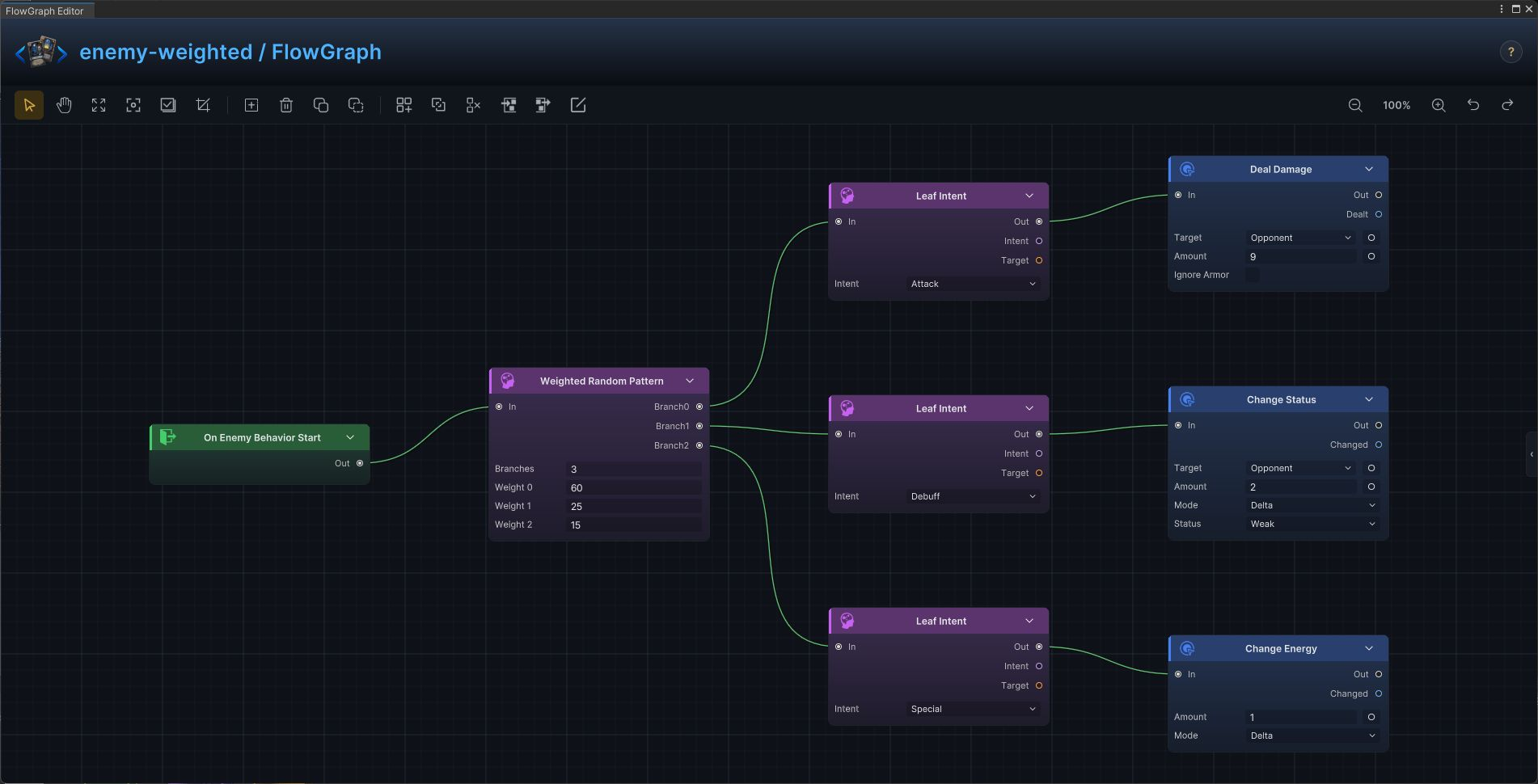
Use this when an enemy has several moves but some should be more common than others.
Build it
- Connect the behavior entry to
Weighted Random Pattern - Create one branch per move and enter matching weights
- Add a
Leaf Intentand its action to every branch - Keep dangerous specials at a lower weight, then use separate gates if they also have cooldowns or phase limits
One branch is selected according to the configured weight distribution.
HP-threshold boss phases
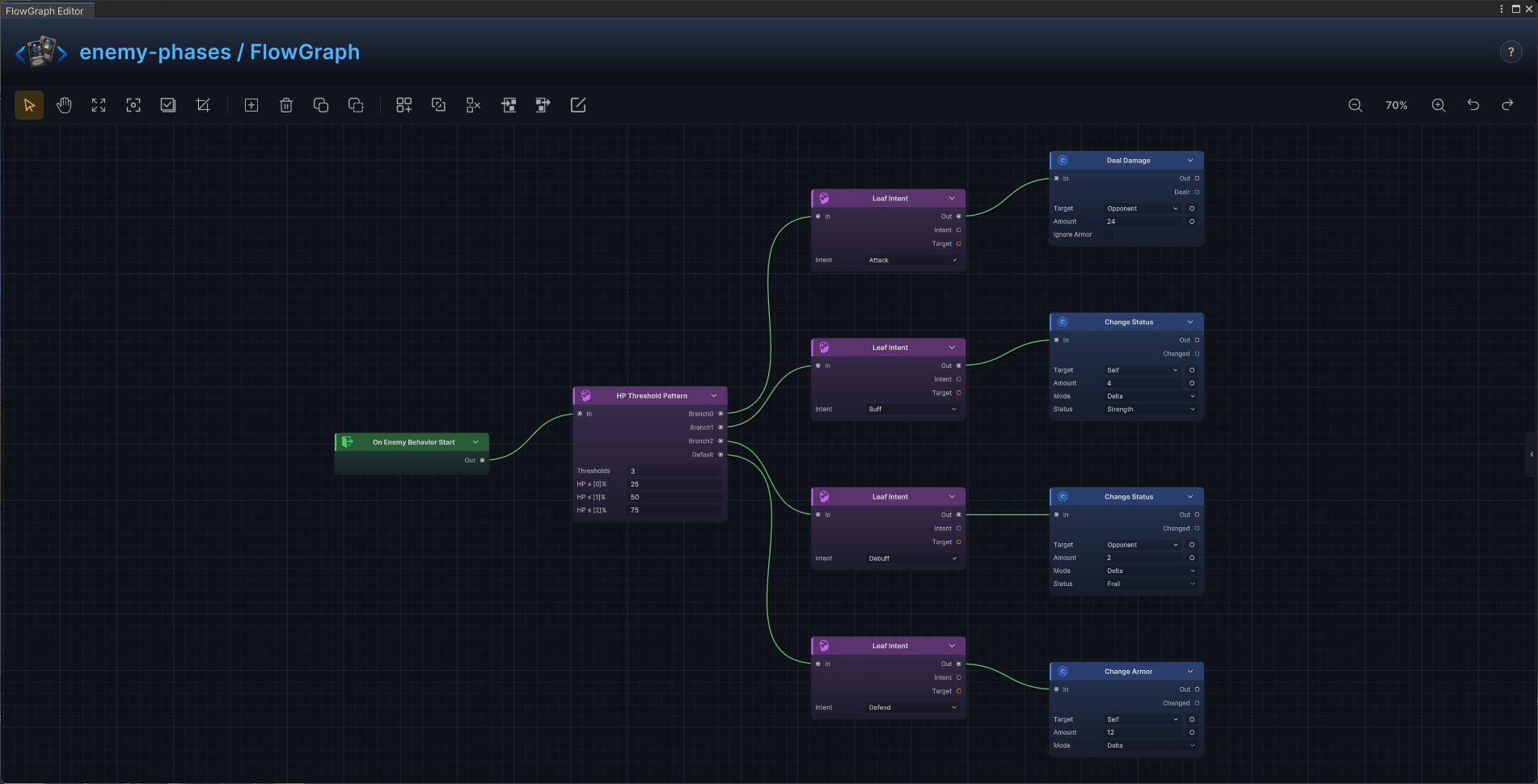
Use this for bosses whose move set changes as HP crosses 75%, 50%, and 25%.
Build it
- Connect the behavior entry to
HP Threshold Pattern - Enter thresholds in ascending order
- Attach an intent and complete action to every threshold branch
- Use
Defaultfor the healthy opening phase
The current HP band selects the boss move family before its intent is shown.
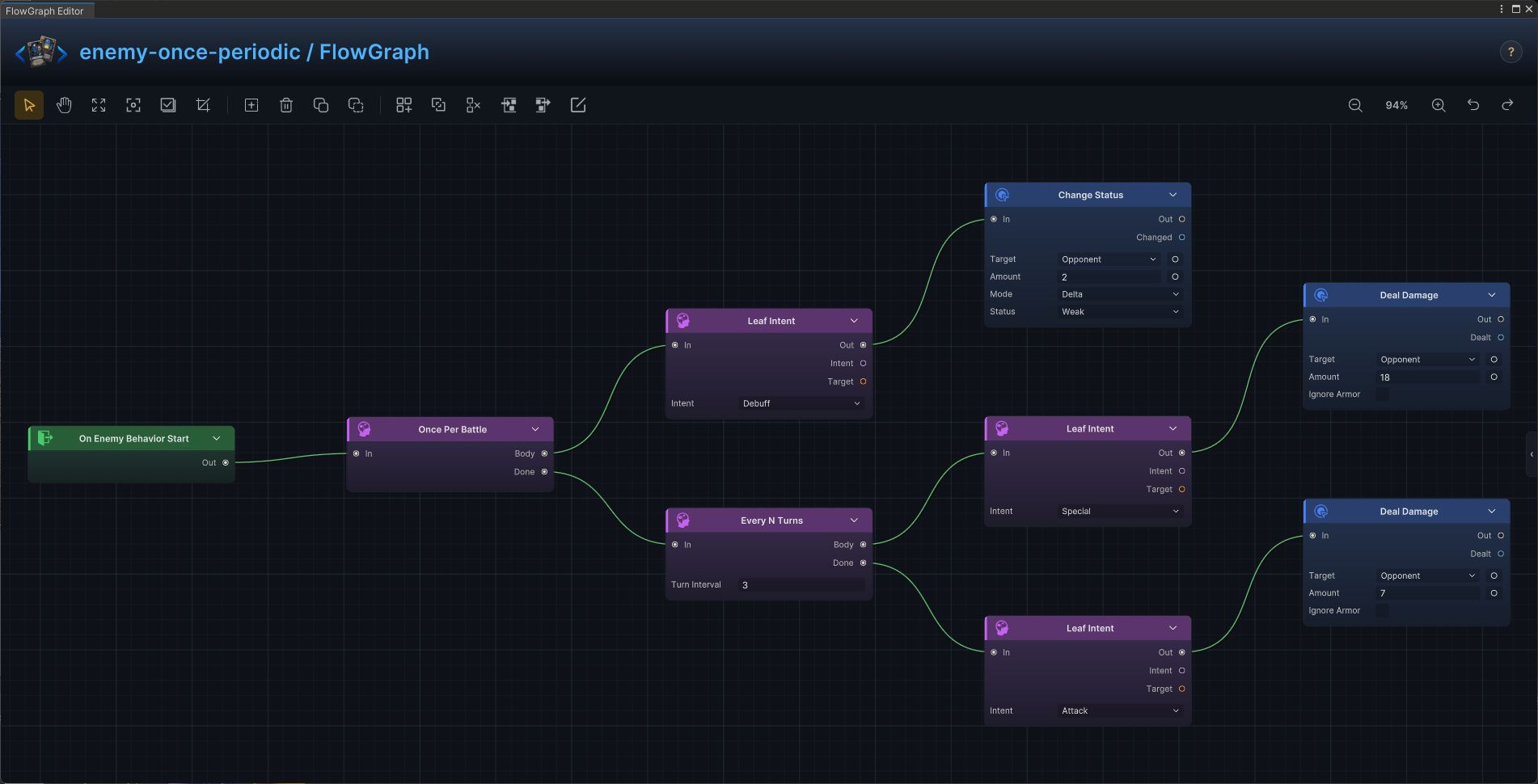
Opening move and periodic special
Use this for a one-time opener followed by a special every N turns and a normal fallback.
Build it
- Pass the behavior entry through
Once Per Battle - Put the opening intent and action on
Body - Continue from
DoneintoEvery N Turns - Put the periodic special on
Bodyand the ordinary move onDone
The opener runs once; later turns alternate between the periodic gate and fallback.
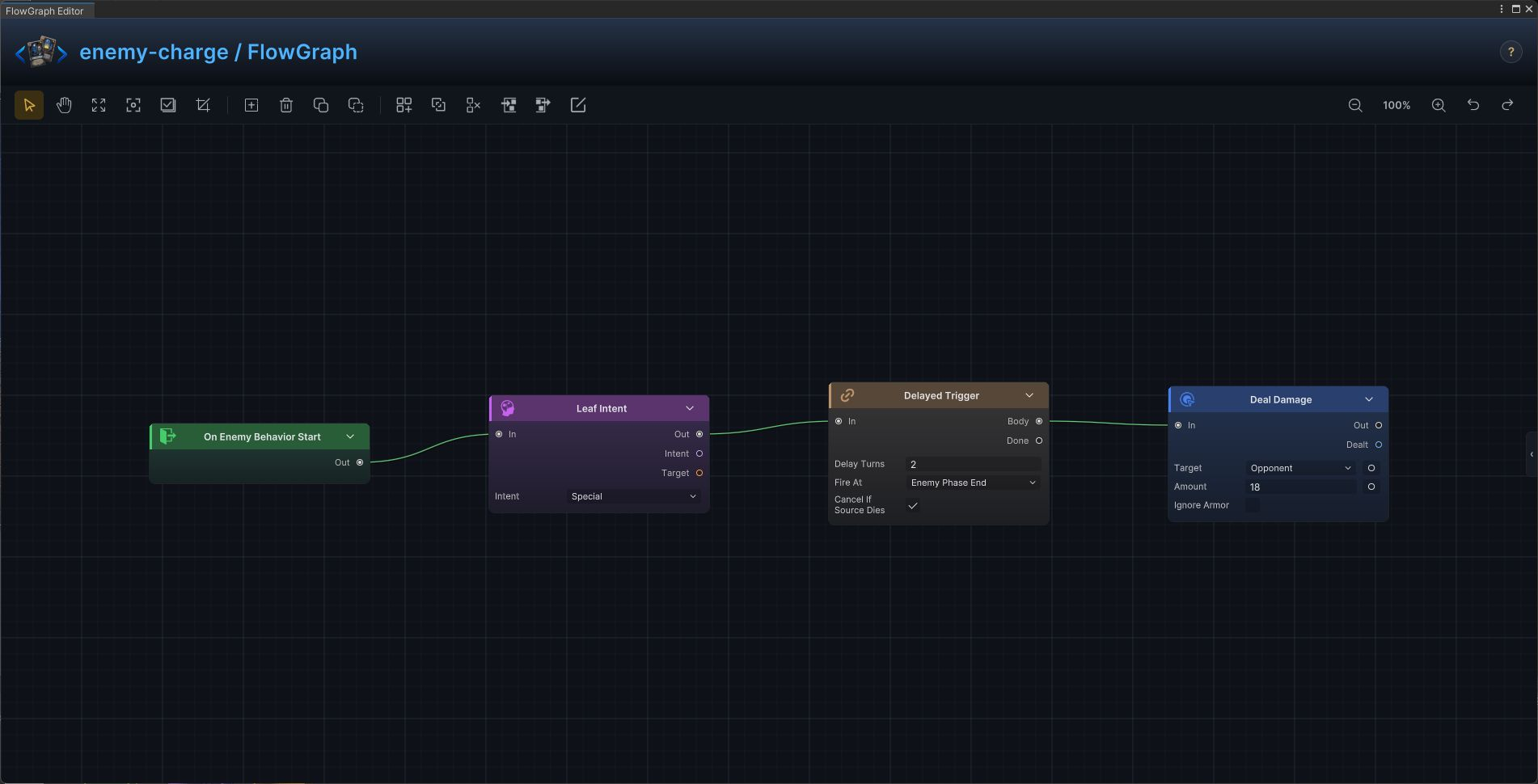
Charge, countdown, and delayed attack
Use this for telegraphed attacks that resolve after several enemy phases.
Build it
- Show a
Specialor attack intent when charging begins - Connect to
Delayed Trigger - Set
Delay TurnsandFire At = Enemy Phase Endor the exact promised timing - Connect the future attack from
Body, notDone
The player sees the warning first and receives the attack only when the countdown completes.
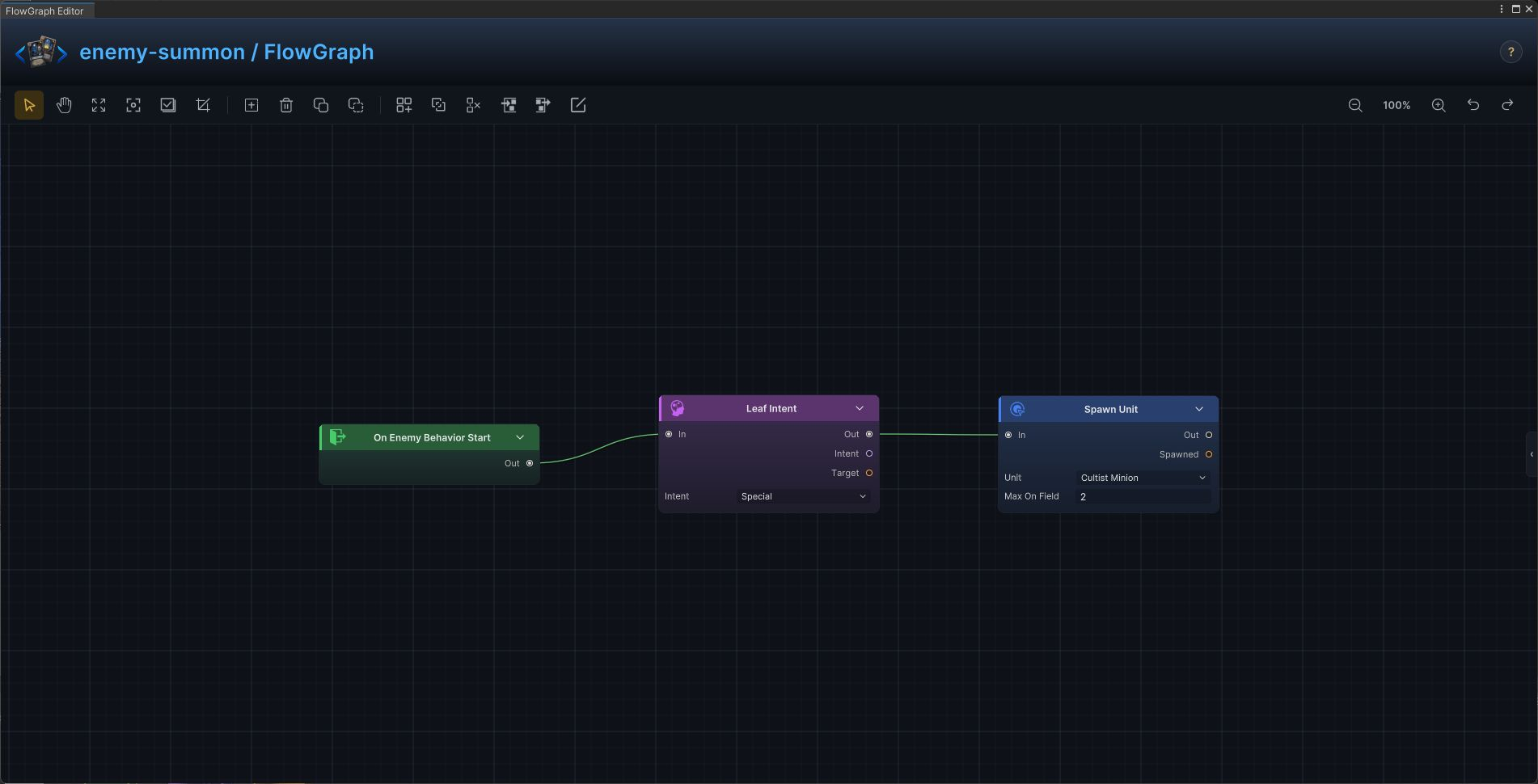
Summon, minions, and reinforcement waves
Use Spawn Unit to add minions or replace a defeated wave.
Build it
- Select a summon branch from the enemy's intent pattern
- Add a
Specialintent so the player can read the action - Connect it to
Spawn Unitand choose the enemy asset - Add
Once Per Battle, a phase gate, or a living-minion condition to prevent uncontrolled summoning
The selected enemy unit joins the battle when the summon move resolves.
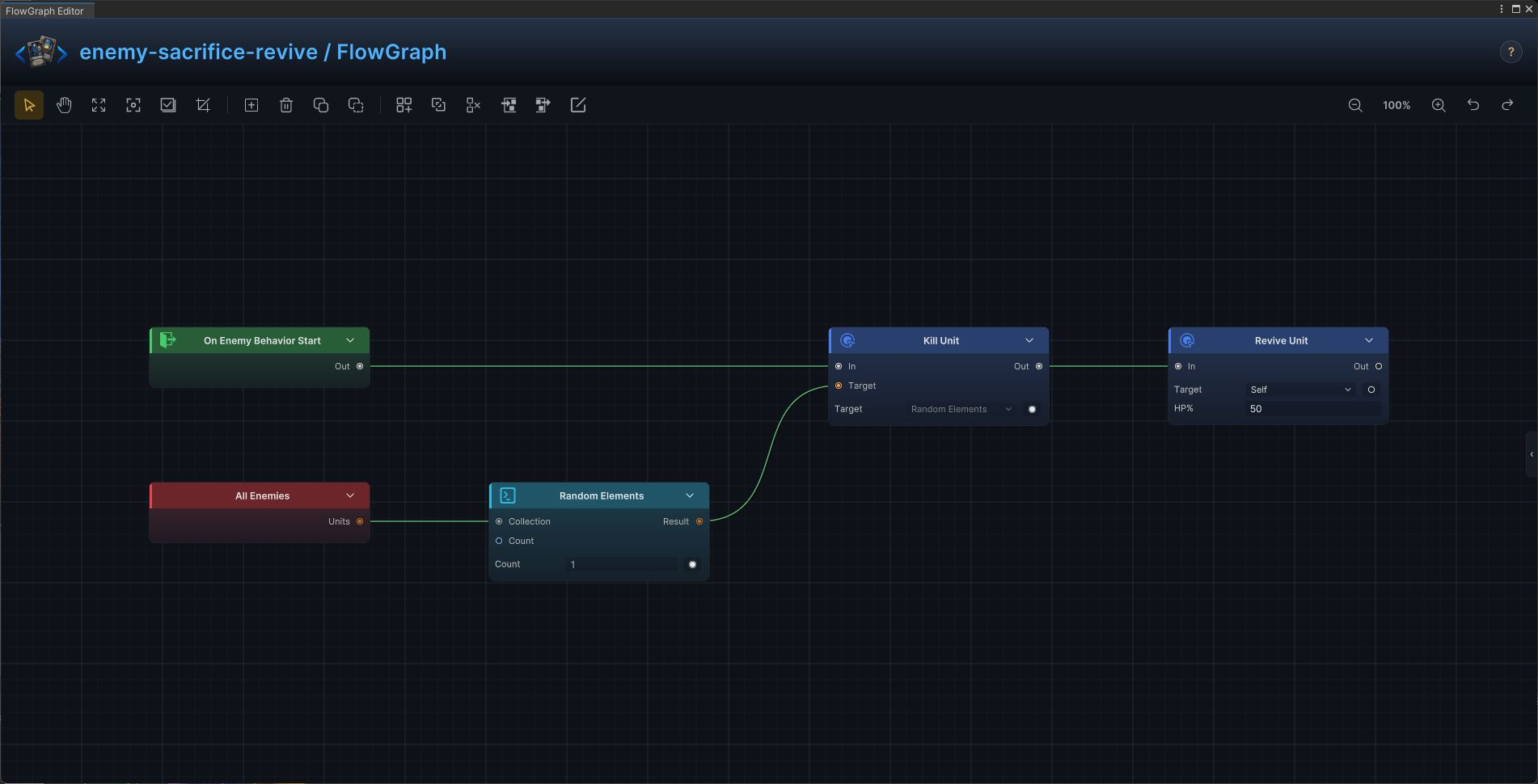
Sacrifice an ally and revive
Use this for cultists, necromancers, and bosses that trade another unit for a second life or large payoff.
Build it
- Read
All Enemiesand filter out the acting unit when self-sacrifice is not allowed - Pick a target with
Random Elementsor a deterministic selector - Feed it into
Kill Unit - Chain
Revive Unitor the sacrifice reward after the kill
One valid ally is removed before the enemy receives its revival or reward.
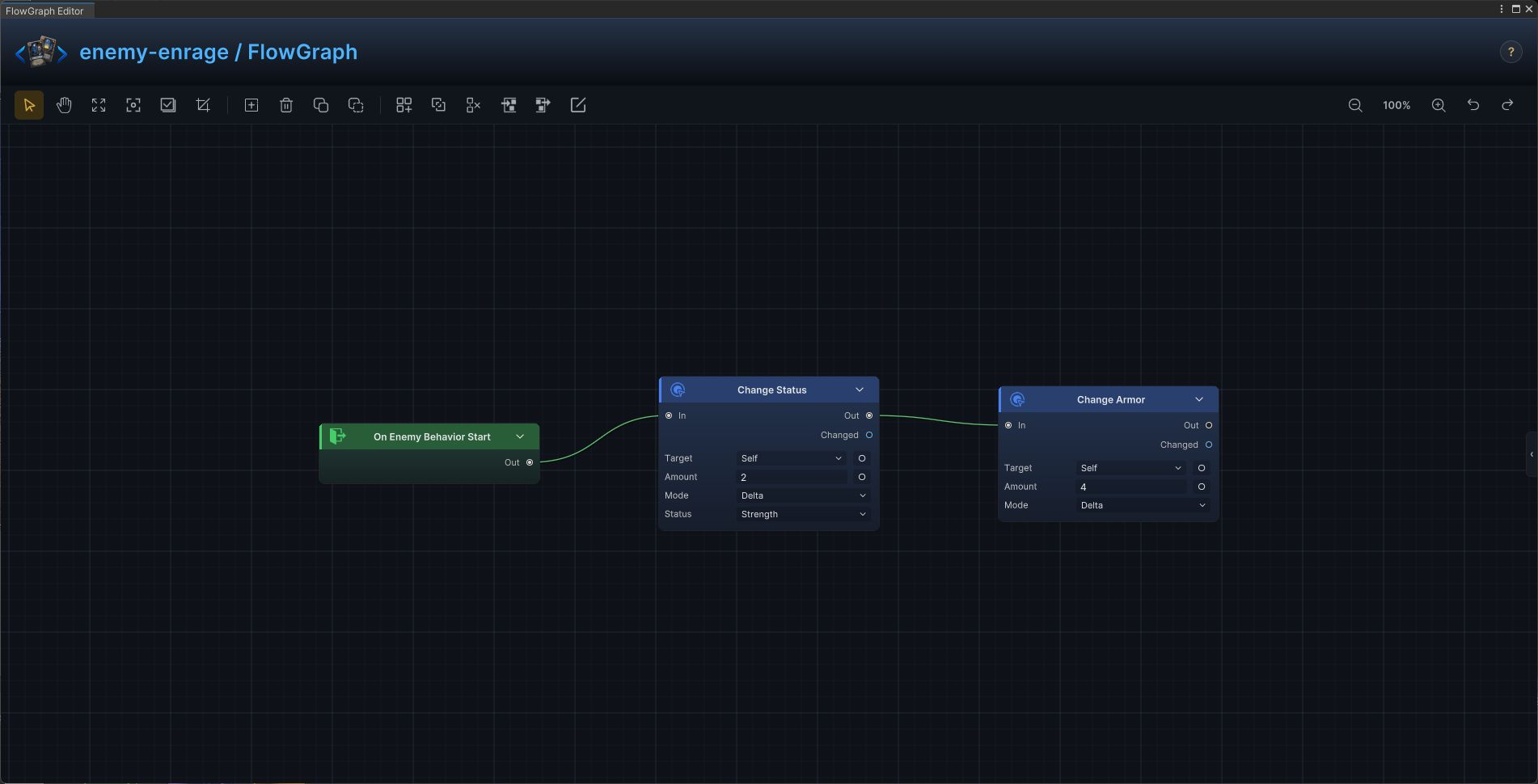
Enrage and scaling over time
Use this for enemies that gain strength, armor, regeneration, or another resource every action cycle.
Build it
- Start from
On Enemy Behavior Start - Apply the growth with
Change Status,Change Armor, or another resource action - Chain the actual move after the growth when both happen in one turn
- Use a phase or turn condition if scaling begins later in the fight
The enemy becomes stronger at a predictable pace without hidden state.
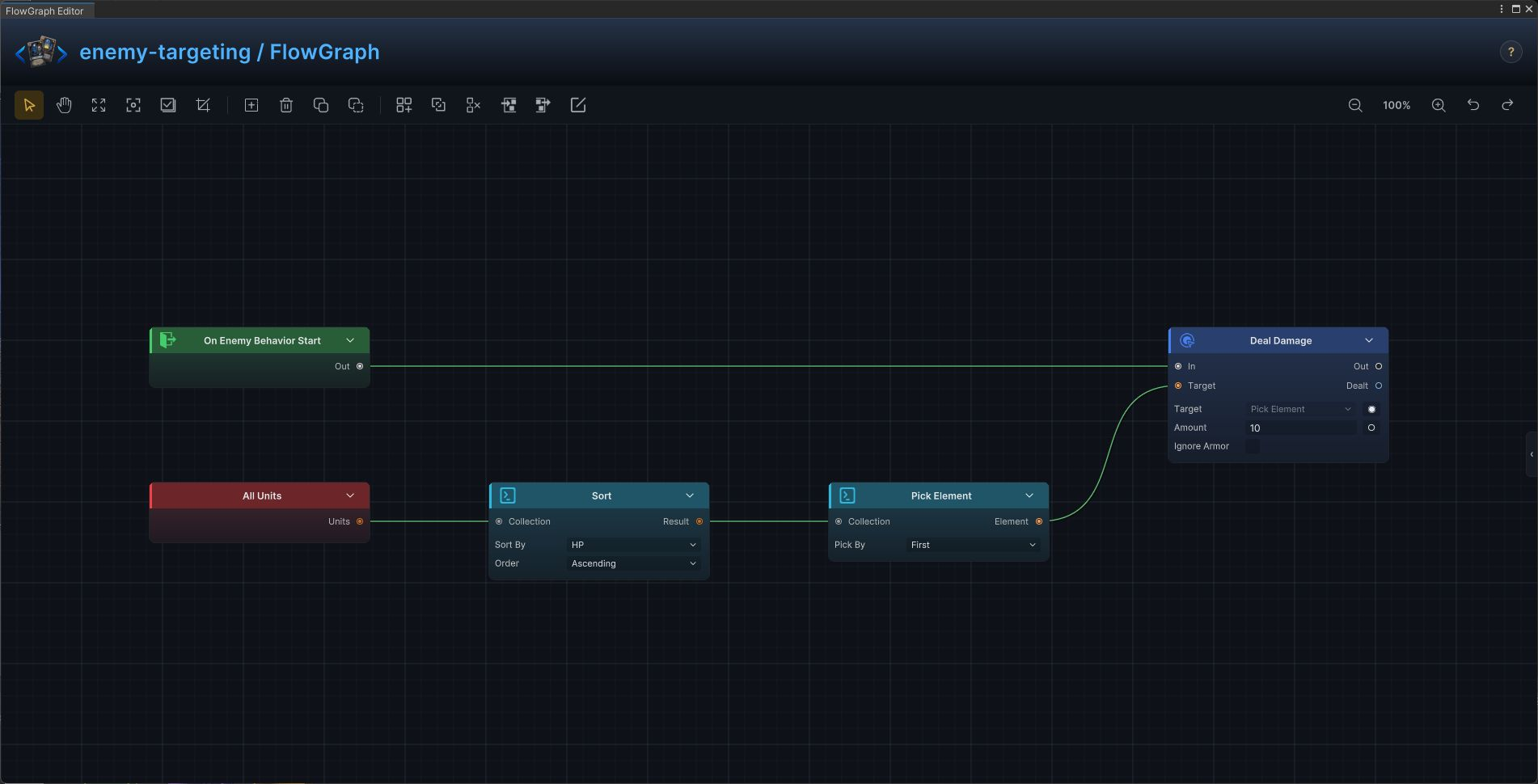
Lowest-HP, highest-armor, and priority targeting
Use collection operators to select targets by a visible combat property.
Build it
- Start with the candidate collection such as
All Enemies - Use
Sortand select the relevant unit field and order - Use
Pick ElementwithFirstorLast - Feed the chosen unit into the action's exposed target port
The same priority rule is applied consistently every time the move runs.
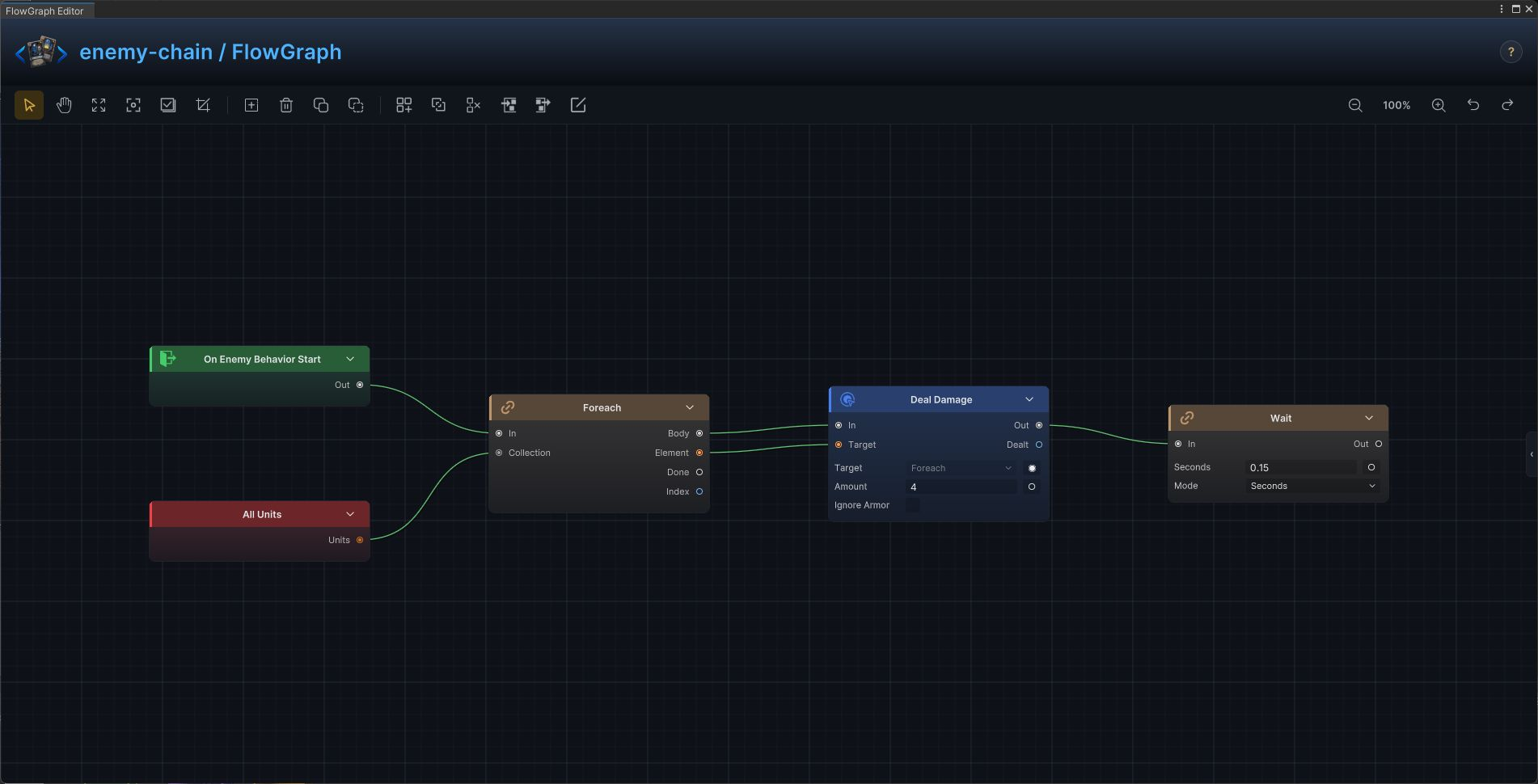
Multi-stage and chained enemy action
Use Sequence when one enemy move promises several ordered results.
Build it
- Connect the behavior entry to
Sequence - Place one action on each numbered step
- Keep dependent effects in the required order, such as damage before lifesteal or debuff before detonation
- Use a matching
MultiorSpecialintent before the sequence
Every stage completes in order as one enemy move.
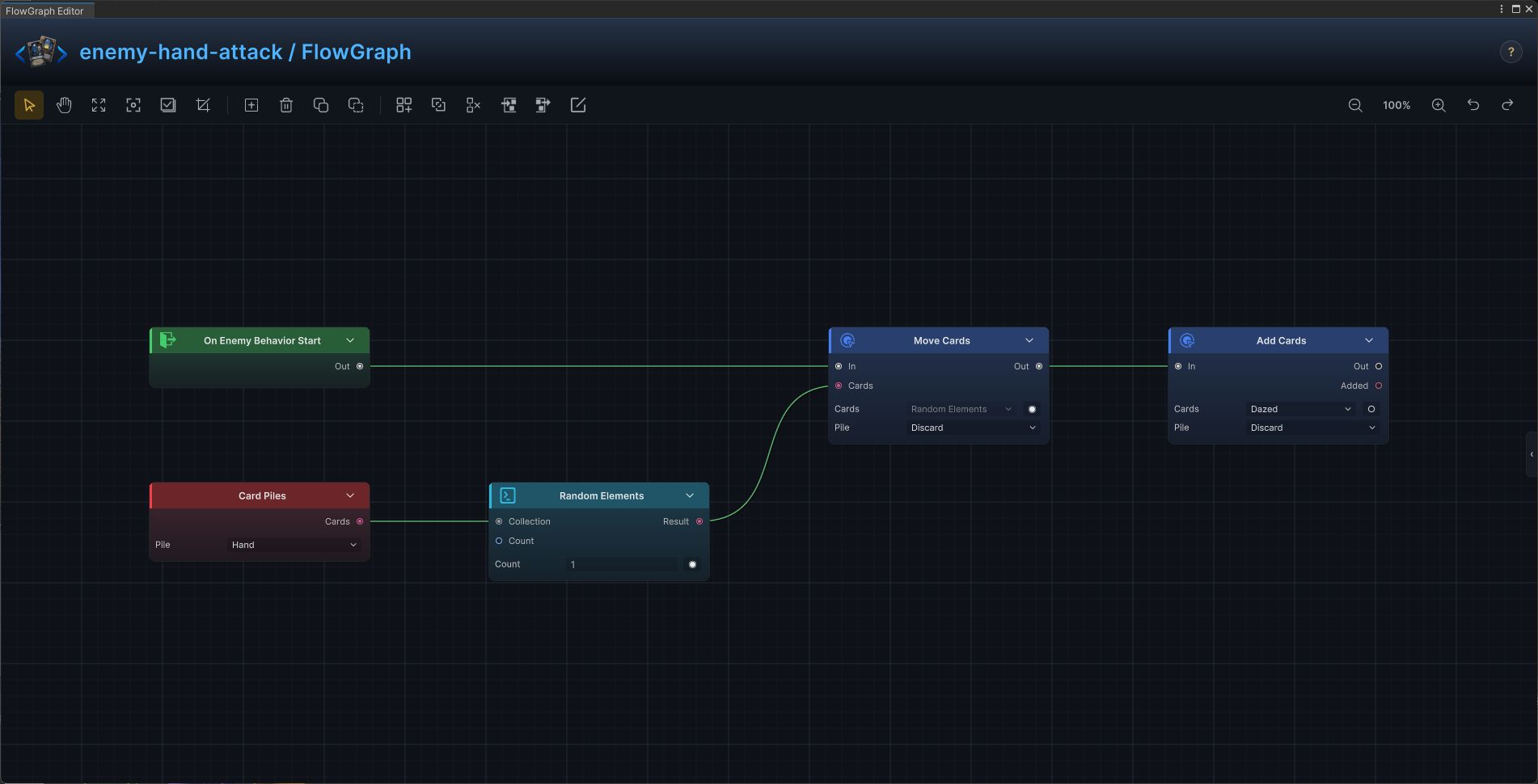
Attack the player's hand
Use this for forced discard, temporary cost increases, card transformation, and hand corruption.
Build it
- Read
Card Piles.Hand - Select cards with
Random Elements,Filter, orChoicewhen the player decides - Send the collection to
Move Cards,Modify Card Cost,Transform Card, orExhaust Cards - Show a debuff or special intent that communicates the kind of disruption
Only the selected hand cards are changed.
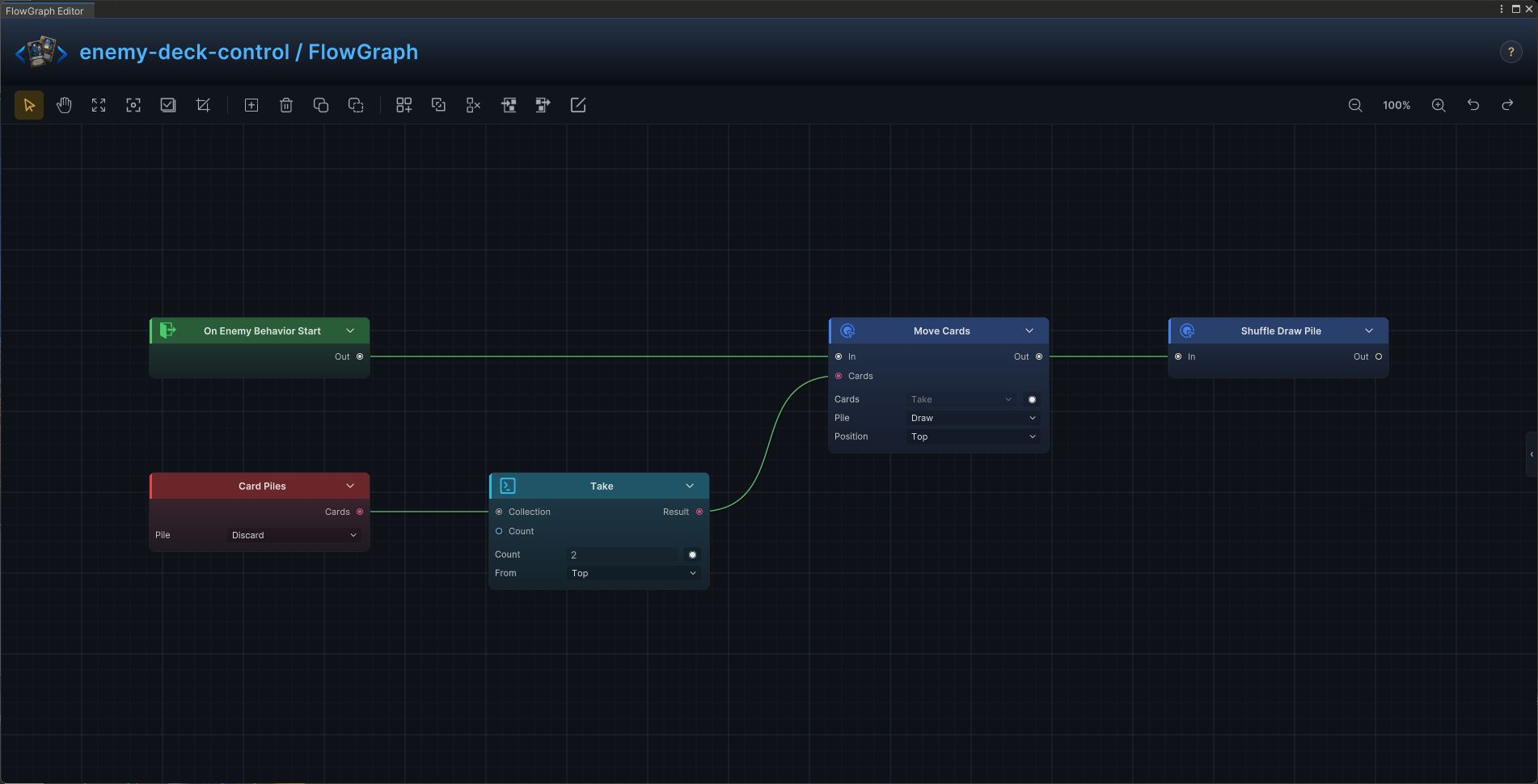
Deck top, deck bottom, discard, and shuffle control
Use this for inserting curses on top, recycling discard, burying cards, and enemy-driven shuffles.
Build it
- Read the source pile with
Card Piles - Select the exact segment with
Takeor another collection operator - Move it with
Move Cards, choosing destination pile and position - Run
Shuffle Draw Pileonly when the mechanic promises loss of order
The cards move to a known destination, and order changes only when explicitly requested.
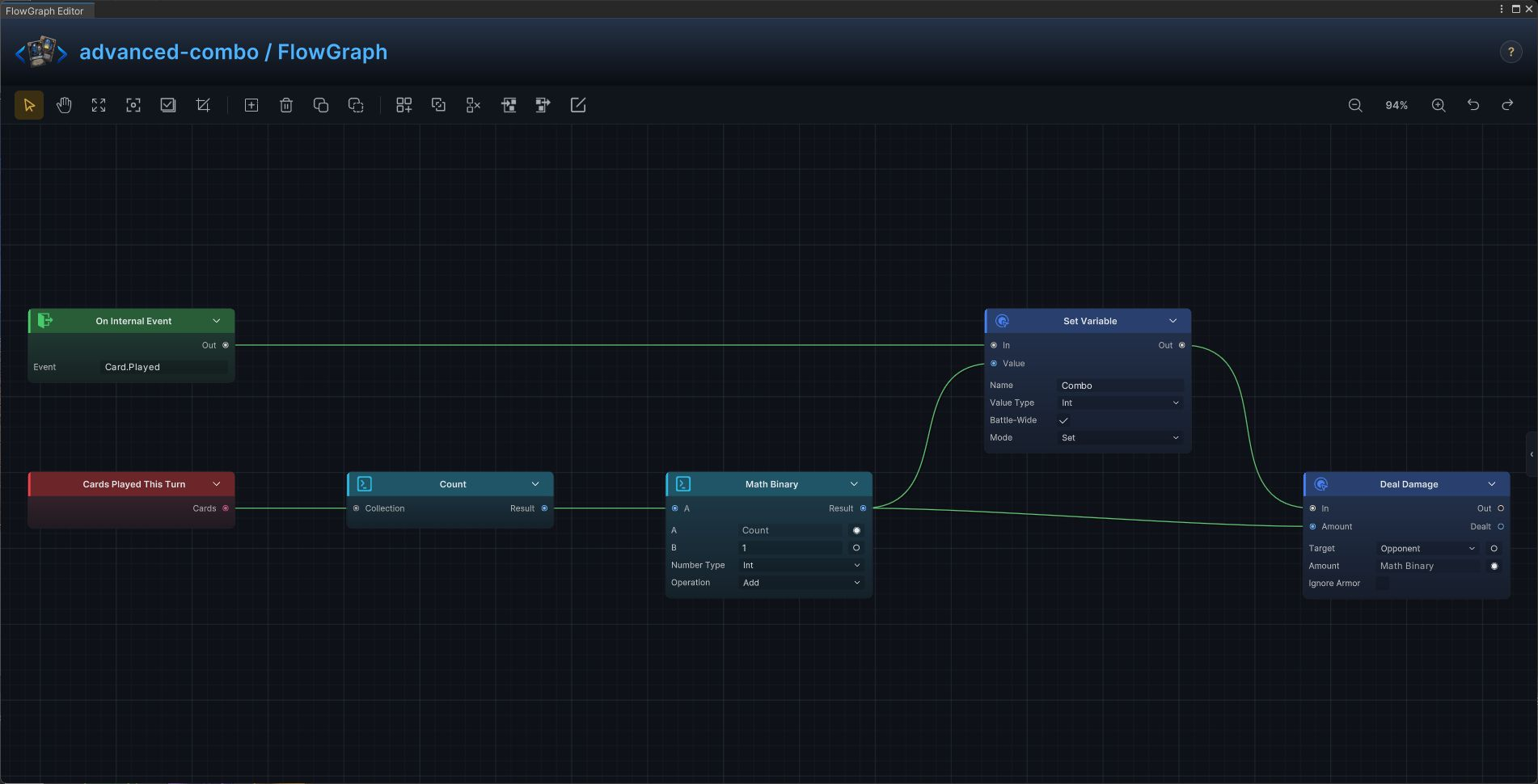
Battle combo meter
Use cards played this turn as a combo count, then persist or spend that value when other graphs need it.
Build it
- Read
Cards Played This Turn - Count the collection and apply any offset or multiplier
- Save the result with
Set Variable,Battle-Wide = true - Feed the same value into damage, rewards, thresholds, or UI events
Every card play updates one shared combo value from observable battle history.
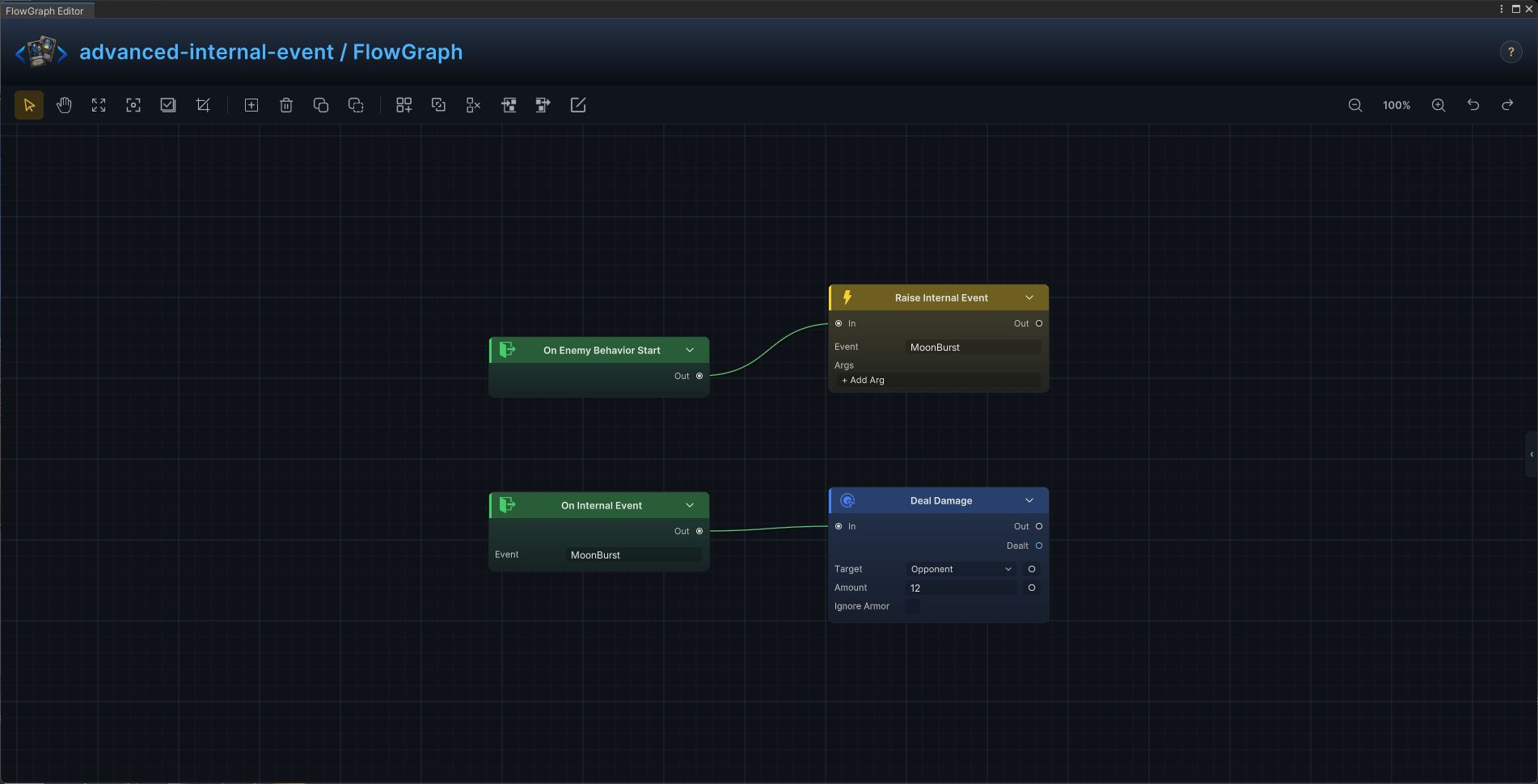
Cross-graph internal event
Use internal events when cards, statuses, and enemies inside GCS must coordinate without direct references.
Build it
- Choose a stable event name such as
MoonBurst - Connect the sender's flow to
Raise Internal Event - Add
On Internal Eventwith the same name on every receiver graph - Attach each receiver's local action to that entry
One sender can trigger several independent GCS graph owners in the same battle.
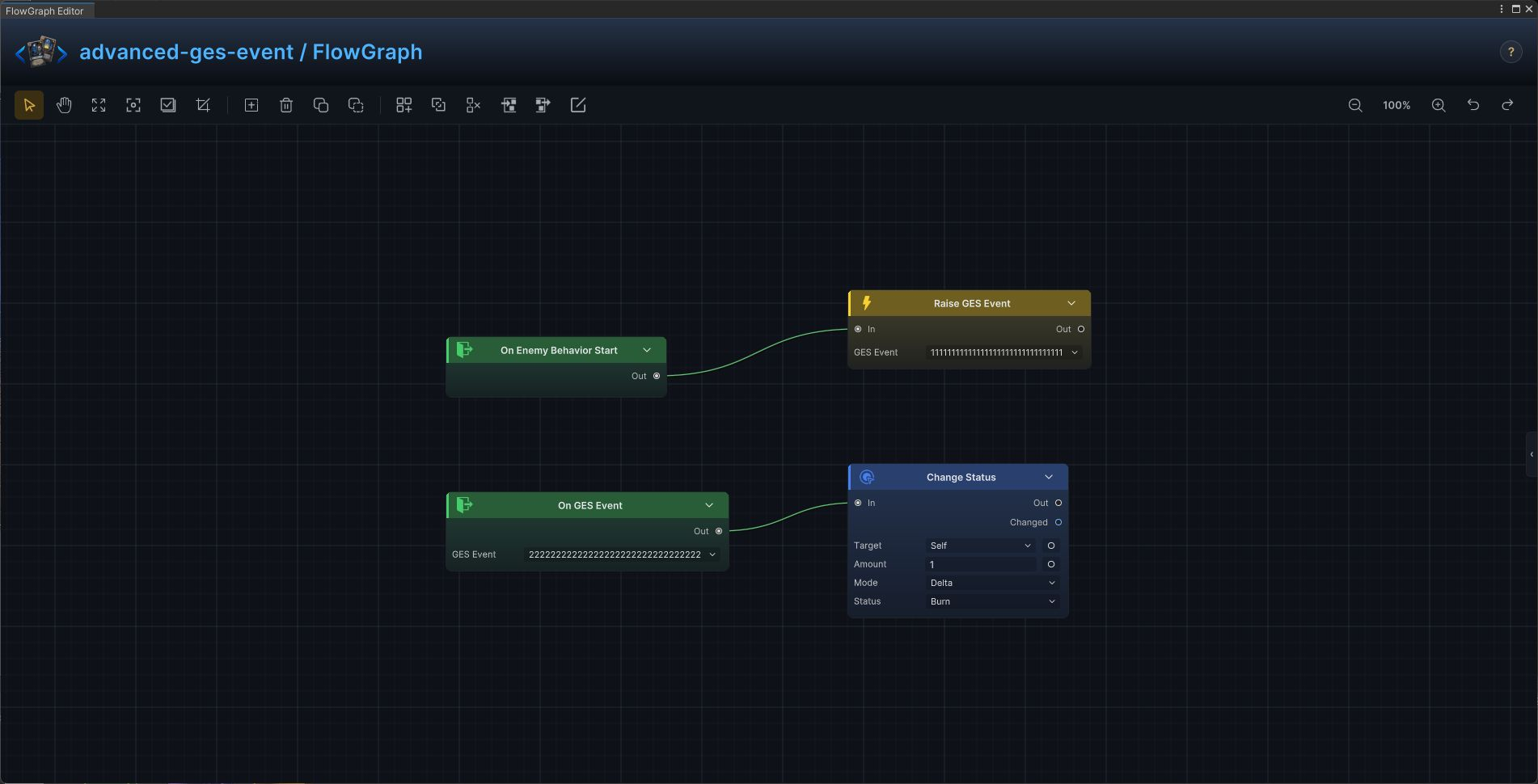
External GES event
Use GES events when FlowGraph must coordinate with UI, quests, scene systems, or other game code outside GCS.
Build it
- Ensure the GES bridge is installed
- Select the real GES asset on
Raise GES Event - Use
On GES Eventon a graph that must respond to an external event - Keep event assets named by gameplay meaning, not by the current receiver
GCS can publish to and receive from the wider game's event network.
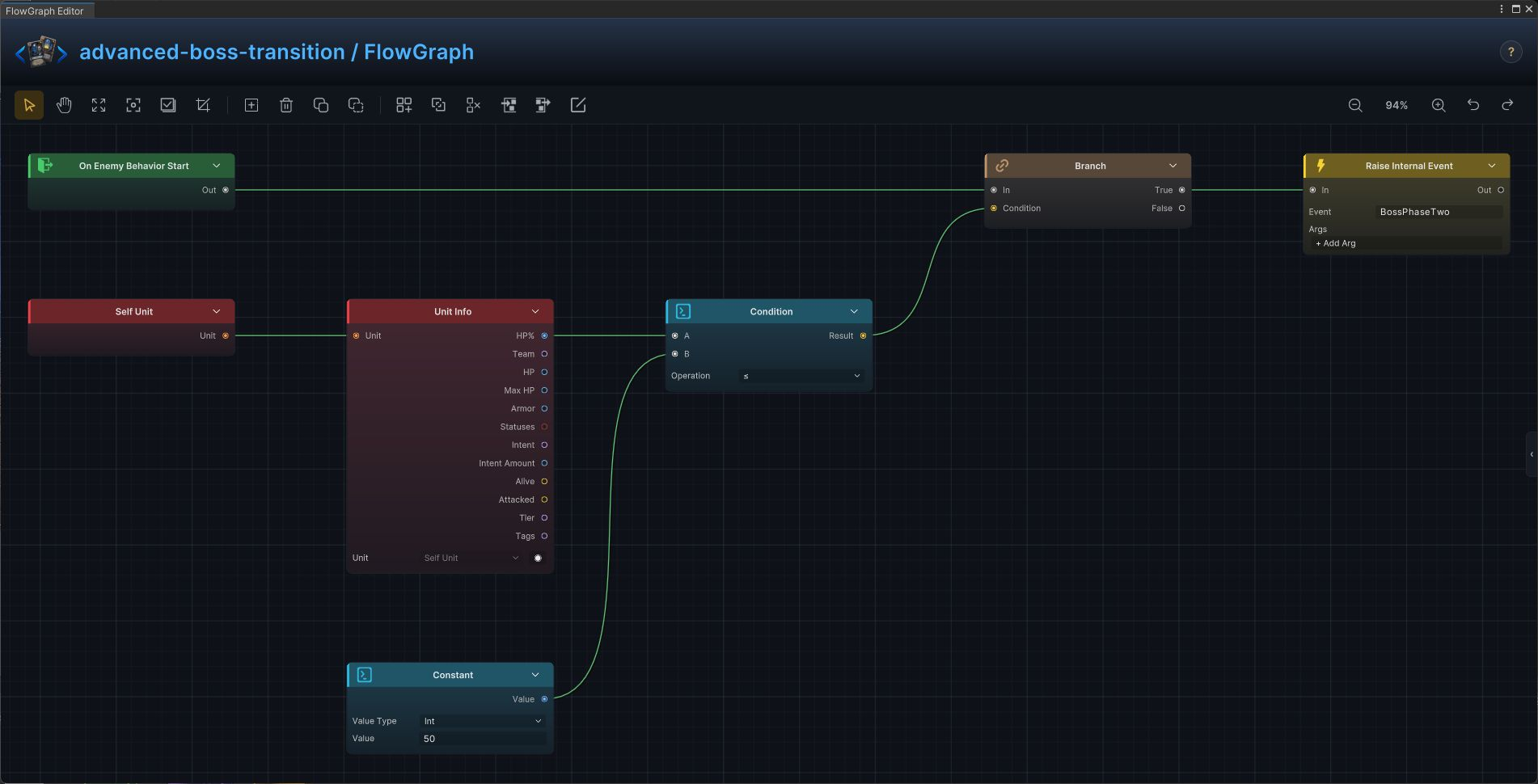
Boss phase broadcast
Use a single phase check to notify UI, music, hazards, and supporting statuses when the boss changes form.
Build it
- At enemy behavior start, read
Self Unit → Unit Info.HP% - Compare it with the phase threshold through
Condition - Feed the result into
Branch - On
True, raise a stable internal event such asBossPhaseTwo; guard it withOnce Per Battlewhen it must fire only once
Every listening graph receives the same phase transition at the same moment.
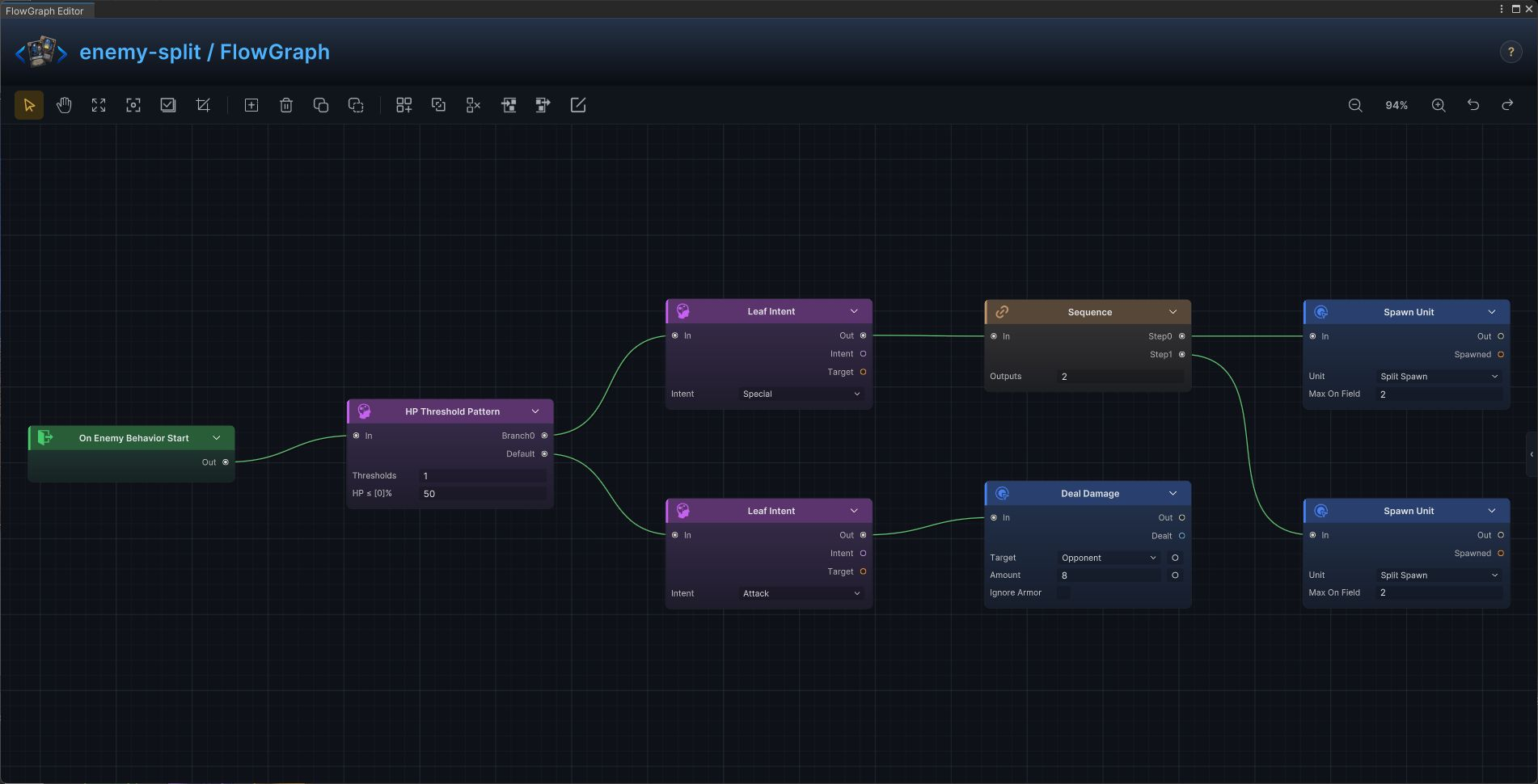
Split at Half HP
Replace the normal move with a split behavior below the HP threshold.
Build it
- Open
Split at Half HPin FlowGraph and useOn Enemy Behavior Startas the entry - Add the graph in this order:
On Enemy Behavior Start→HP Threshold Pattern→Leaf Intent→Sequence→Spawn Unit→Deal Damage - Configure keep the values shown in the graph and replace only content references that belong to your project
- Connect control flow from left to right, then connect each data output to the exposed input shown in the screenshot
The graph resolves the named mechanic without hiding any work in code.
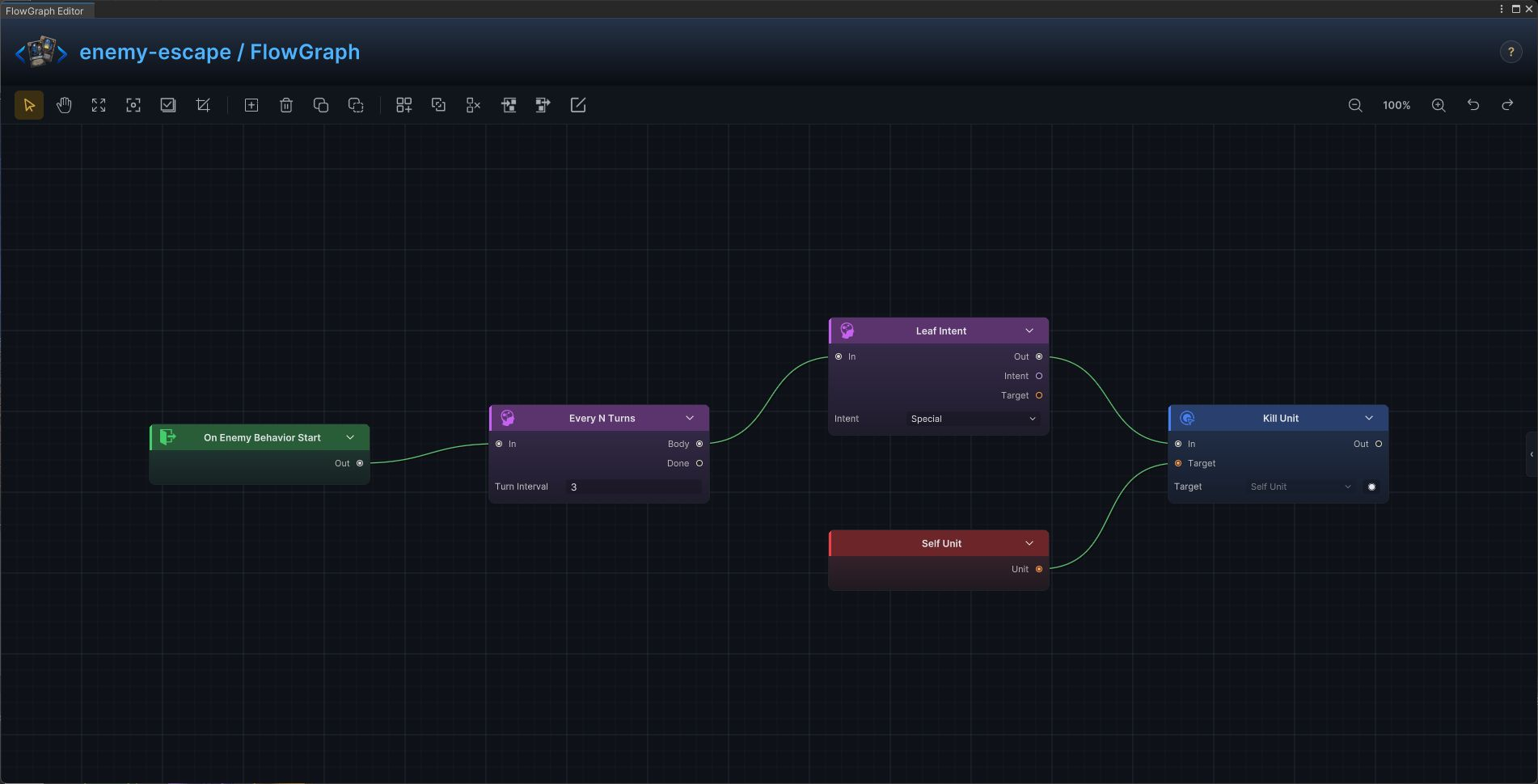
Escape Countdown
Telegraph an escape and remove the enemy when the countdown completes.
Build it
- Open
Escape Countdownin FlowGraph and useOn Enemy Behavior Startas the entry - Add the graph in this order:
On Enemy Behavior Start→Every N Turns→Leaf Intent→Self Unit→Kill Unit - Configure keep the values shown in the graph and replace only content references that belong to your project
- Connect control flow from left to right, then connect each data output to the exposed input shown in the screenshot
The graph resolves the named mechanic without hiding any work in code.
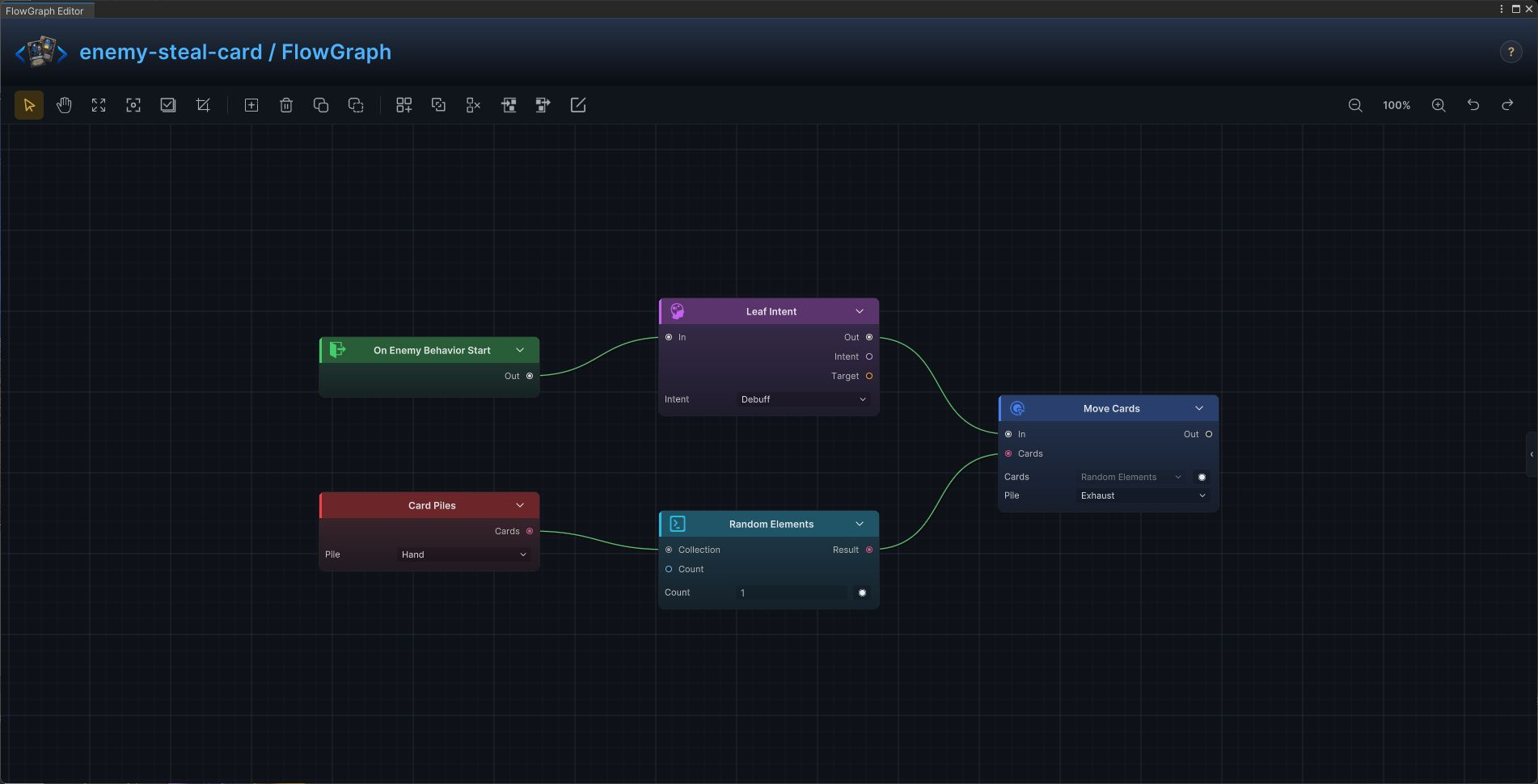
Steal and Exhaust a Card
Choose a random card from the player's hand and move it to exhaust.
Build it
- Open
Steal and Exhaust a Cardin FlowGraph and useOn Enemy Behavior Startas the entry - Add the graph in this order:
On Enemy Behavior Start→Leaf Intent→Card Piles→Random Elements→Move Cards - Configure keep the values shown in the graph and replace only content references that belong to your project
- Connect control flow from left to right, then connect each data output to the exposed input shown in the screenshot
The graph resolves the named mechanic without hiding any work in code.
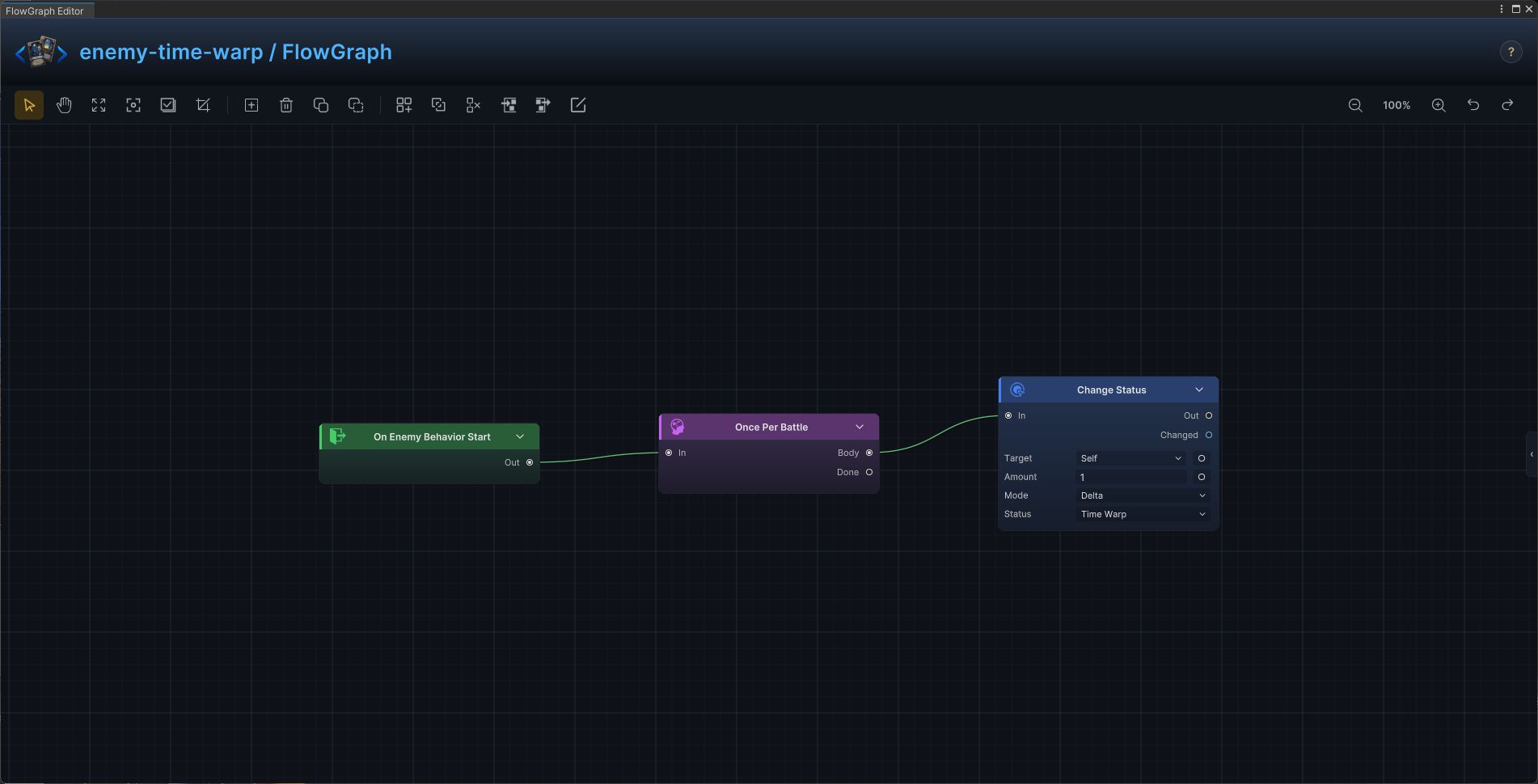
Time Warp Card Limit
Install a once-per-battle status that limits long card chains.
Build it
- Open
Time Warp Card Limitin FlowGraph and useOn Enemy Behavior Startas the entry - Add the graph in this order:
On Enemy Behavior Start→Once Per Battle→Change Status - Configure keep the values shown in the graph and replace only content references that belong to your project
- Connect control flow from left to right, then connect each data output to the exposed input shown in the screenshot
The graph resolves the named mechanic without hiding any work in code.
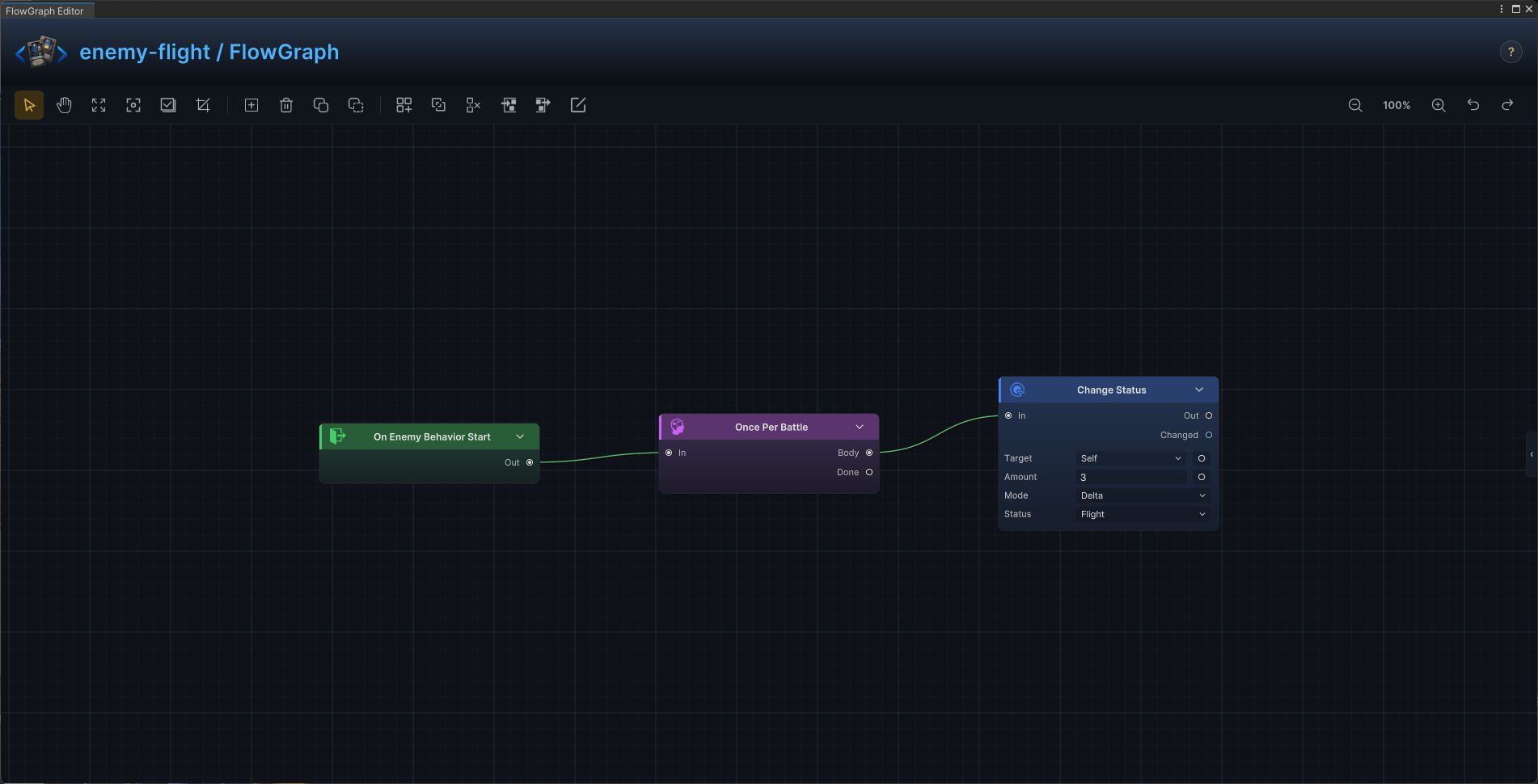
Opening Flight
Start combat with a finite stack of flight.
Build it
- Open
Opening Flightin FlowGraph and useOn Enemy Behavior Startas the entry - Add the graph in this order:
On Enemy Behavior Start→Once Per Battle→Change Status - Configure keep the values shown in the graph and replace only content references that belong to your project
- Connect control flow from left to right, then connect each data output to the exposed input shown in the screenshot
The graph resolves the named mechanic without hiding any work in code.
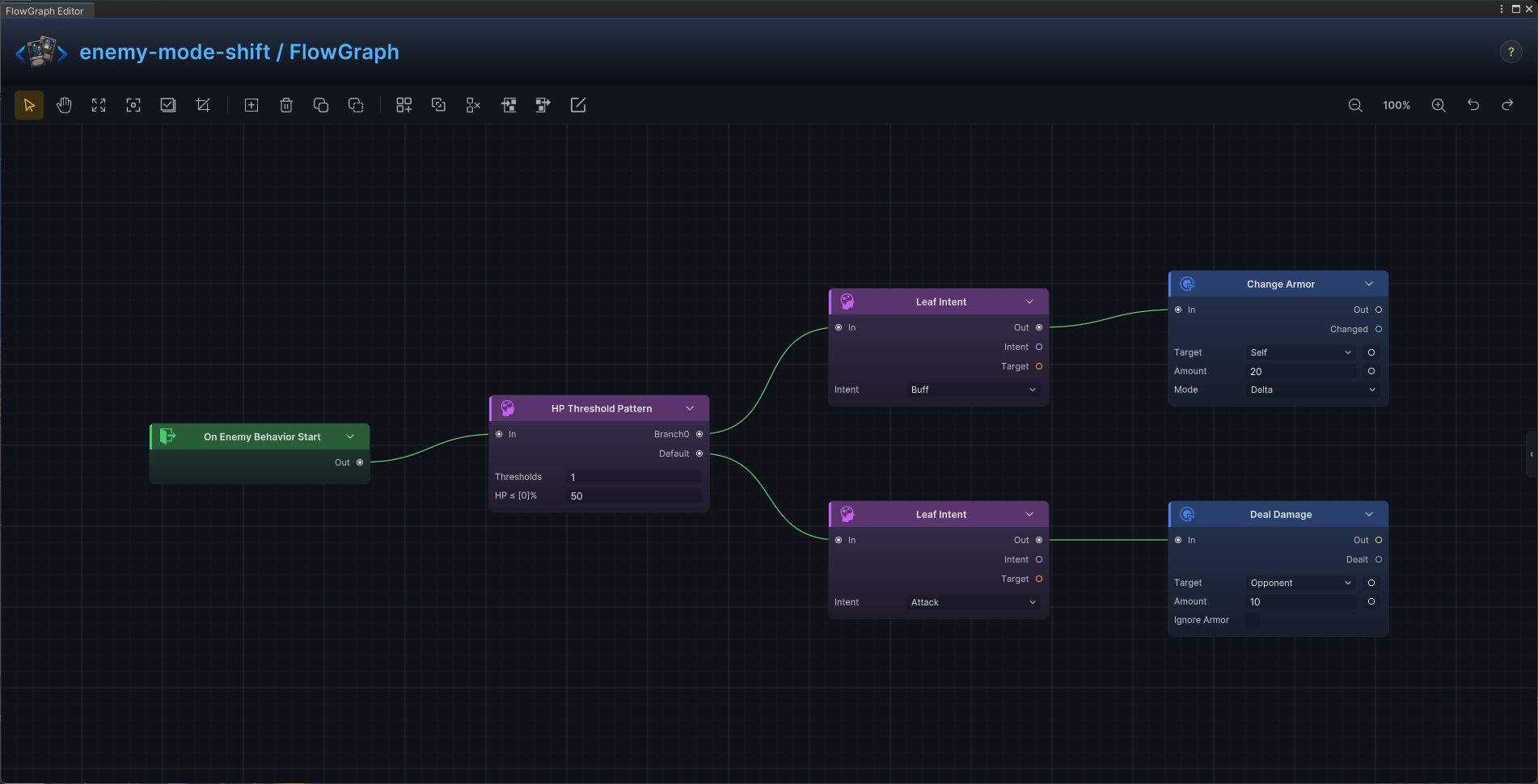
Mode Shift at HP Threshold
Switch from a normal attack pattern to a defensive phase.
Build it
- Open
Mode Shift at HP Thresholdin FlowGraph and useOn Enemy Behavior Startas the entry - Add the graph in this order:
On Enemy Behavior Start→HP Threshold Pattern→Leaf Intent→Change Armor→Deal Damage - Configure keep the values shown in the graph and replace only content references that belong to your project
- Connect control flow from left to right, then connect each data output to the exposed input shown in the screenshot
The graph resolves the named mechanic without hiding any work in code.
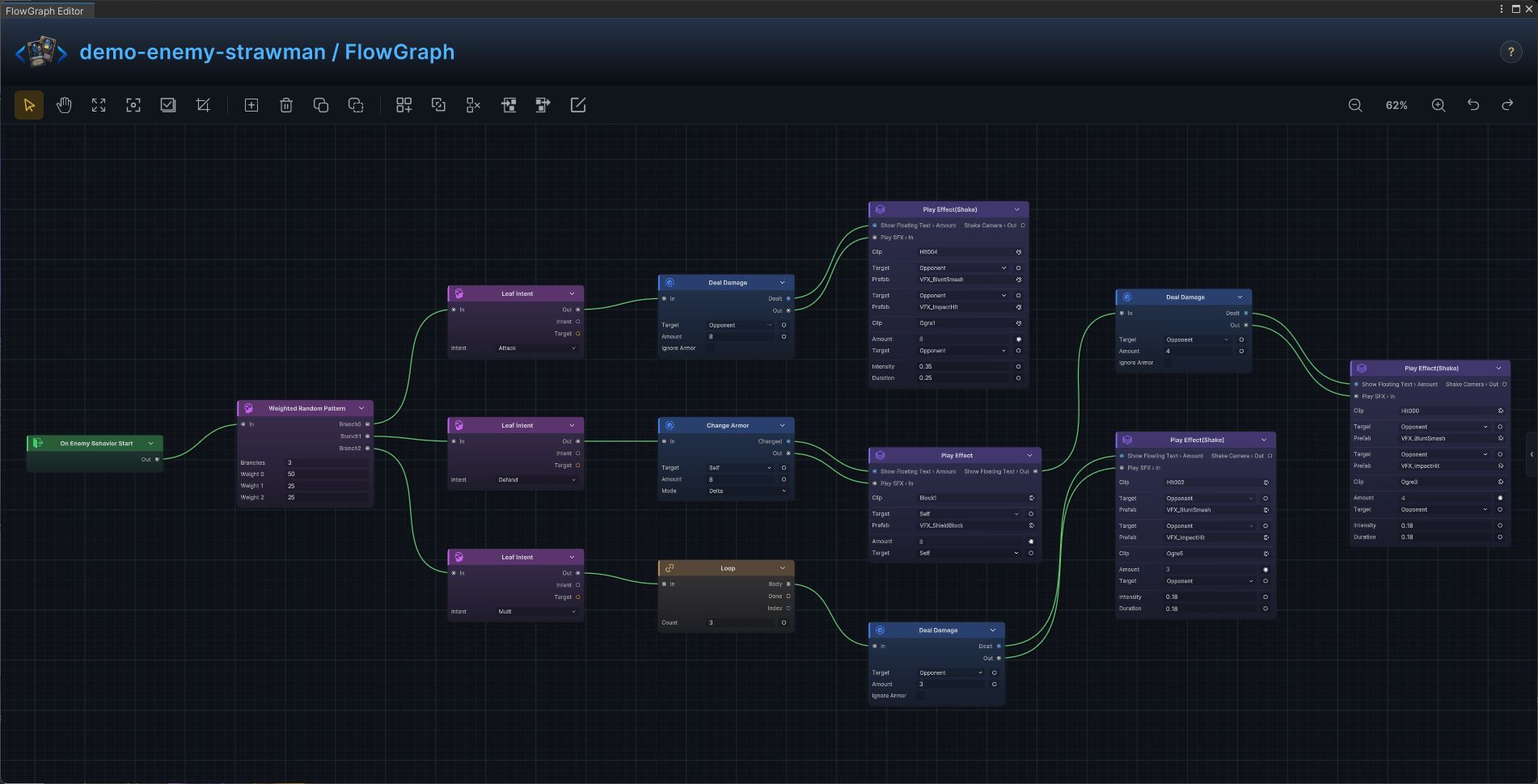
Strawman
The production Strawman enemy graph is a complete intent and action implementation from the demo database.
Build it
- Open
Strawmanin FlowGraph and useOn Enemy Behavior Startas the entry - Add the graph in this order:
On Enemy Behavior Start→Deal Damage→Play Effect(Shake)→Leaf Intent→Change Armor→Play Effect→Loop→Weighted Random Pattern - Configure
Deal Damage:TargetSource = Opponent,Amount = 8;Leaf Intent:Intent = Attack;Change Armor:TargetSource = Self,Mode = Delta,Amount = 8;Deal Damage:TargetSource = Opponent,Amount = 4;Leaf Intent:Intent = Defend;Loop:Count = 3;Deal Damage:TargetSource = Opponent,Amount = 3;Leaf Intent:Intent = Multi;Weighted Random Pattern:Weights = [50,25,25] - Connect control flow from left to right, then connect each data output to the exposed input shown in the screenshot
At runtime, the selected intent is followed by the exact action chain shown in the graph.
Pyre Effigy
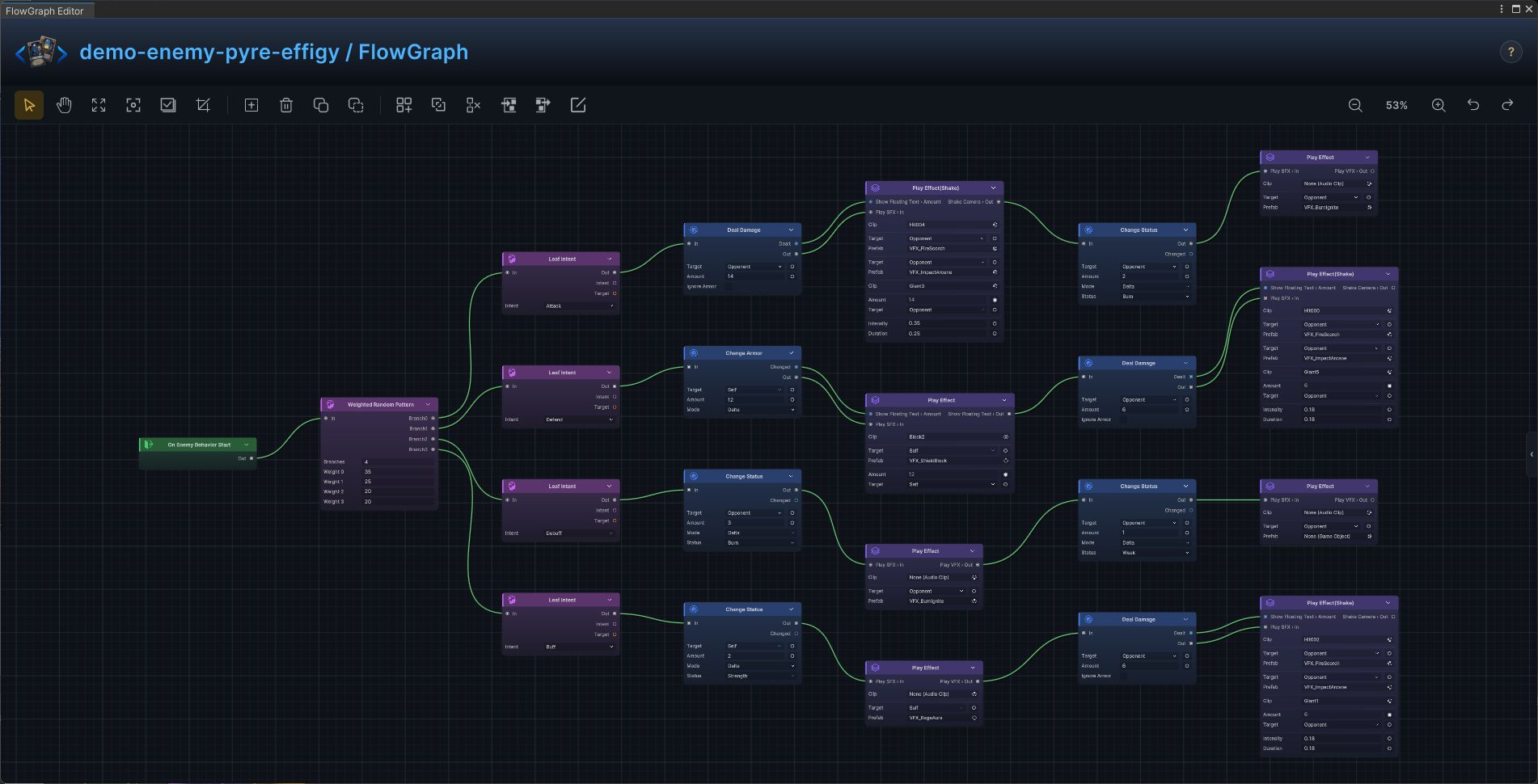
The production Pyre Effigy enemy graph is a complete intent and action implementation from the demo database.
Build it
- Open
Pyre Effigyin FlowGraph and useOn Enemy Behavior Startas the entry - Add the graph in this order:
On Enemy Behavior Start→Deal Damage→Play Effect(Shake)→Change Status→Play Effect→Leaf Intent→Change Armor→Weighted Random Pattern - Configure
Deal Damage:TargetSource = Opponent,Amount = 14;Change Status:TargetSource = Opponent,Status = Burn,Mode = Delta,Amount = 2;Leaf Intent:Intent = Attack;Change Armor:TargetSource = Self,Mode = Delta,Amount = 12;Deal Damage:TargetSource = Opponent,Amount = 6;Leaf Intent:Intent = Defend;Change Status:TargetSource = Opponent,Status = Burn,Mode = Delta,Amount = 3;Change Status:TargetSource = Opponent,Status = Weak,Mode = Delta,Amount = 1;Leaf Intent:Intent = Debuff;Change Status:TargetSource = Self,Status = Strength,Mode = Delta,Amount = 2;Deal Damage:TargetSource = Opponent,Amount = 6;Leaf Intent:Intent = Buff;Weighted Random Pattern:Weights = [35,25,20,20] - Connect control flow from left to right, then connect each data output to the exposed input shown in the screenshot
At runtime, the selected intent is followed by the exact action chain shown in the graph.
Gibbet Priest
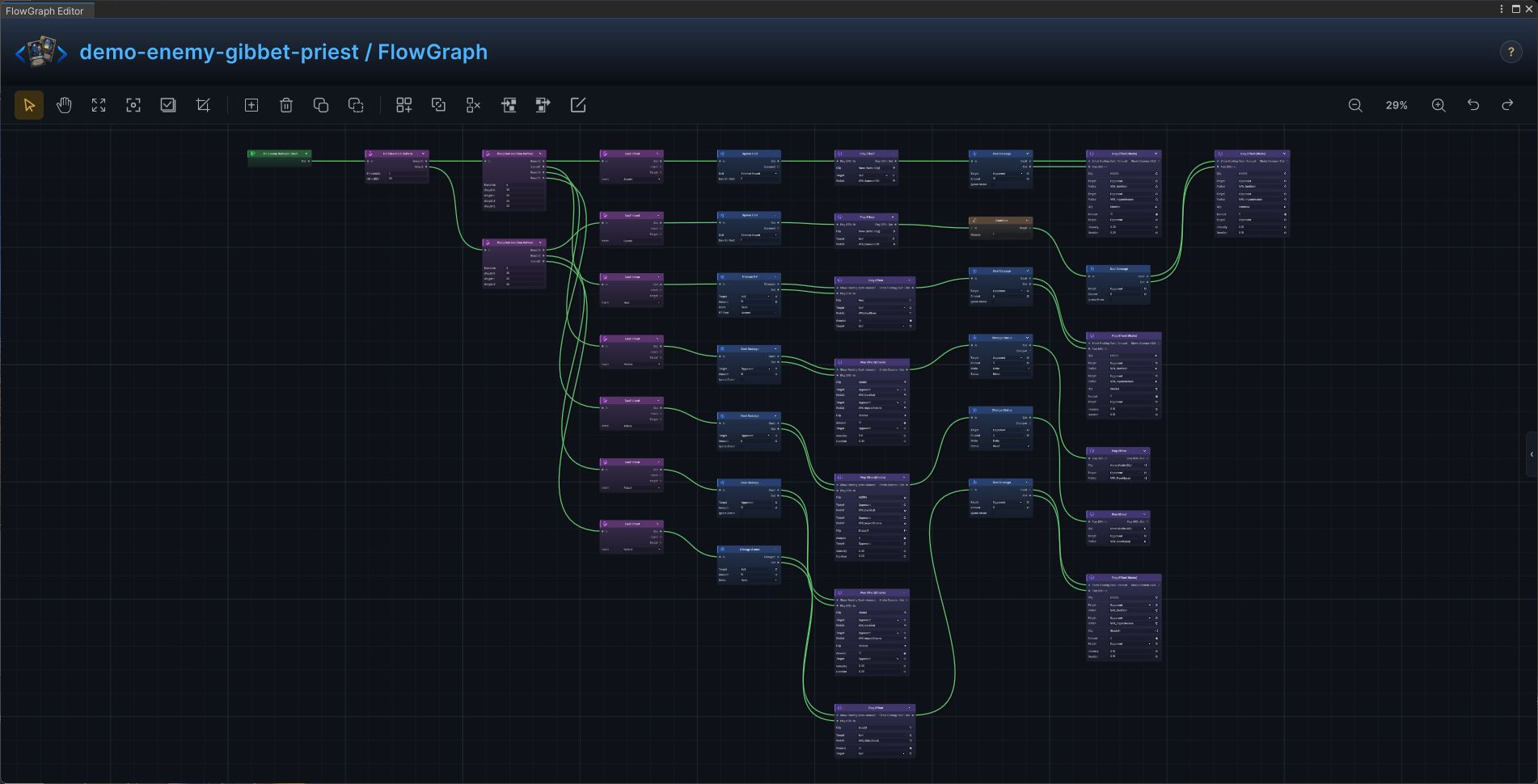
The production Gibbet Priest enemy graph is a complete intent and action implementation from the demo database.
Build it
- Open
Gibbet Priestin FlowGraph and useOn Enemy Behavior Startas the entry - Add the graph in this order:
On Enemy Behavior Start→Deal Damage→Play Effect(Shake)→Leaf Intent→Change Armor→Play Effect→Spawn Unit→Weighted Random Pattern→Change HP→Change Status→HP Threshold Pattern - Configure
Deal Damage:TargetSource = Opponent,Amount = 12;Leaf Intent:Intent = Attack;Change Armor:TargetSource = Self,Mode = Delta,Amount = 10;Deal Damage:TargetSource = Opponent,Amount = 6;Leaf Intent:Intent = Defend;Spawn Unit:Unit = Stitched Hound,MaxOnField = 1;Deal Damage:TargetSource = Opponent,Amount = 6;Leaf Intent:Intent = Special;Weighted Random Pattern:Weights = [45,25,30];Spawn Unit:Unit = Stitched Hound,MaxOnField = 2;Deal Damage:TargetSource = Opponent,Amount = 10;Leaf Intent:Intent = Special;Change HP:TargetSource = Self,Mode = Delta,Amount = 14;Deal Damage:TargetSource = Opponent,Amount = 6;Leaf Intent:Intent = Heal;Deal Damage:TargetSource = Opponent,Amount = 18;Change Status:TargetSource = Opponent,Status = Bleed,Mode = Delta,Amount = 2;Leaf Intent:Intent = Hidden;Deal Damage:TargetSource = Opponent,Amount = 8;Change Status:TargetSource = Opponent,Status = Bleed,Mode = Delta,Amount = 2;Leaf Intent:Intent = Attack;Weighted Random Pattern:Weights = [30,25,25,20];HP Threshold Pattern:Thresholds = [50] - Connect control flow from left to right, then connect each data output to the exposed input shown in the screenshot
At runtime, the selected intent is followed by the exact action chain shown in the graph.
Stitched Hound
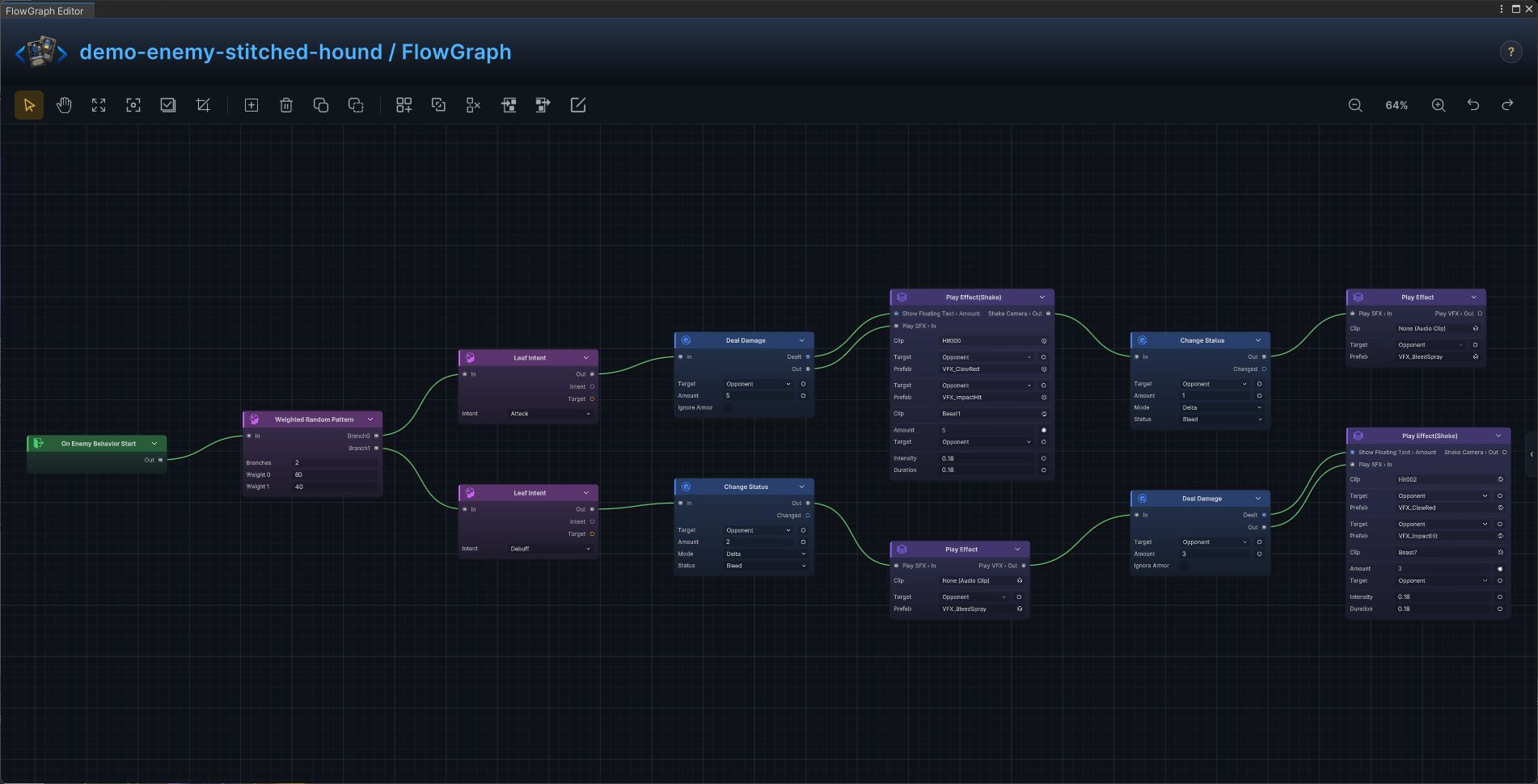
The production Stitched Hound enemy graph is a complete intent and action implementation from the demo database.
Build it
- Open
Stitched Houndin FlowGraph and useOn Enemy Behavior Startas the entry - Add the graph in this order:
On Enemy Behavior Start→Deal Damage→Play Effect(Shake)→Change Status→Play Effect→Leaf Intent→Weighted Random Pattern - Configure
Deal Damage:TargetSource = Opponent,Amount = 5;Change Status:TargetSource = Opponent,Status = Bleed,Mode = Delta,Amount = 1;Leaf Intent:Intent = Attack;Change Status:TargetSource = Opponent,Status = Bleed,Mode = Delta,Amount = 2;Deal Damage:TargetSource = Opponent,Amount = 3;Leaf Intent:Intent = Debuff;Weighted Random Pattern:Weights = [60,40] - Connect control flow from left to right, then connect each data output to the exposed input shown in the screenshot
At runtime, the selected intent is followed by the exact action chain shown in the graph.
Hex Acolyte
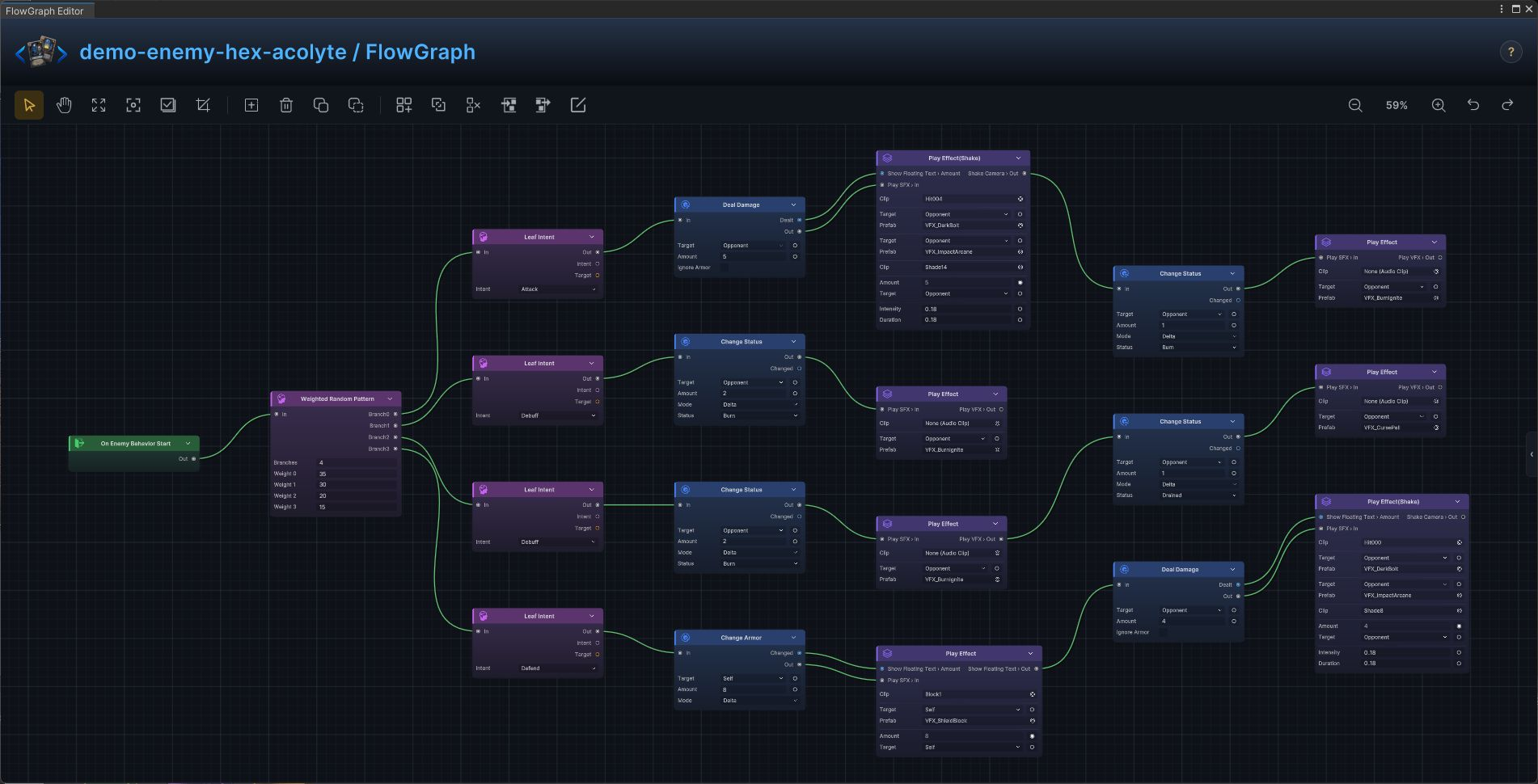
The production Hex Acolyte enemy graph is a complete intent and action implementation from the demo database.
Build it
- Open
Hex Acolytein FlowGraph and useOn Enemy Behavior Startas the entry - Add the graph in this order:
On Enemy Behavior Start→Deal Damage→Play Effect(Shake)→Change Status→Play Effect→Leaf Intent→Change Armor→Weighted Random Pattern - Configure
Deal Damage:TargetSource = Opponent,Amount = 5;Change Status:TargetSource = Opponent,Status = Burn,Mode = Delta,Amount = 1;Leaf Intent:Intent = Attack;Change Status:TargetSource = Opponent,Status = Burn,Mode = Delta,Amount = 2;Leaf Intent:Intent = Debuff;Change Status:TargetSource = Opponent,Status = Burn,Mode = Delta,Amount = 2;Change Status:TargetSource = Opponent,Status = Drained,Mode = Delta,Amount = 1;Leaf Intent:Intent = Debuff;Change Armor:TargetSource = Self,Mode = Delta,Amount = 8;Deal Damage:TargetSource = Opponent,Amount = 4;Leaf Intent:Intent = Defend;Weighted Random Pattern:Weights = [35,30,20,15] - Connect control flow from left to right, then connect each data output to the exposed input shown in the screenshot
At runtime, the selected intent is followed by the exact action chain shown in the graph.
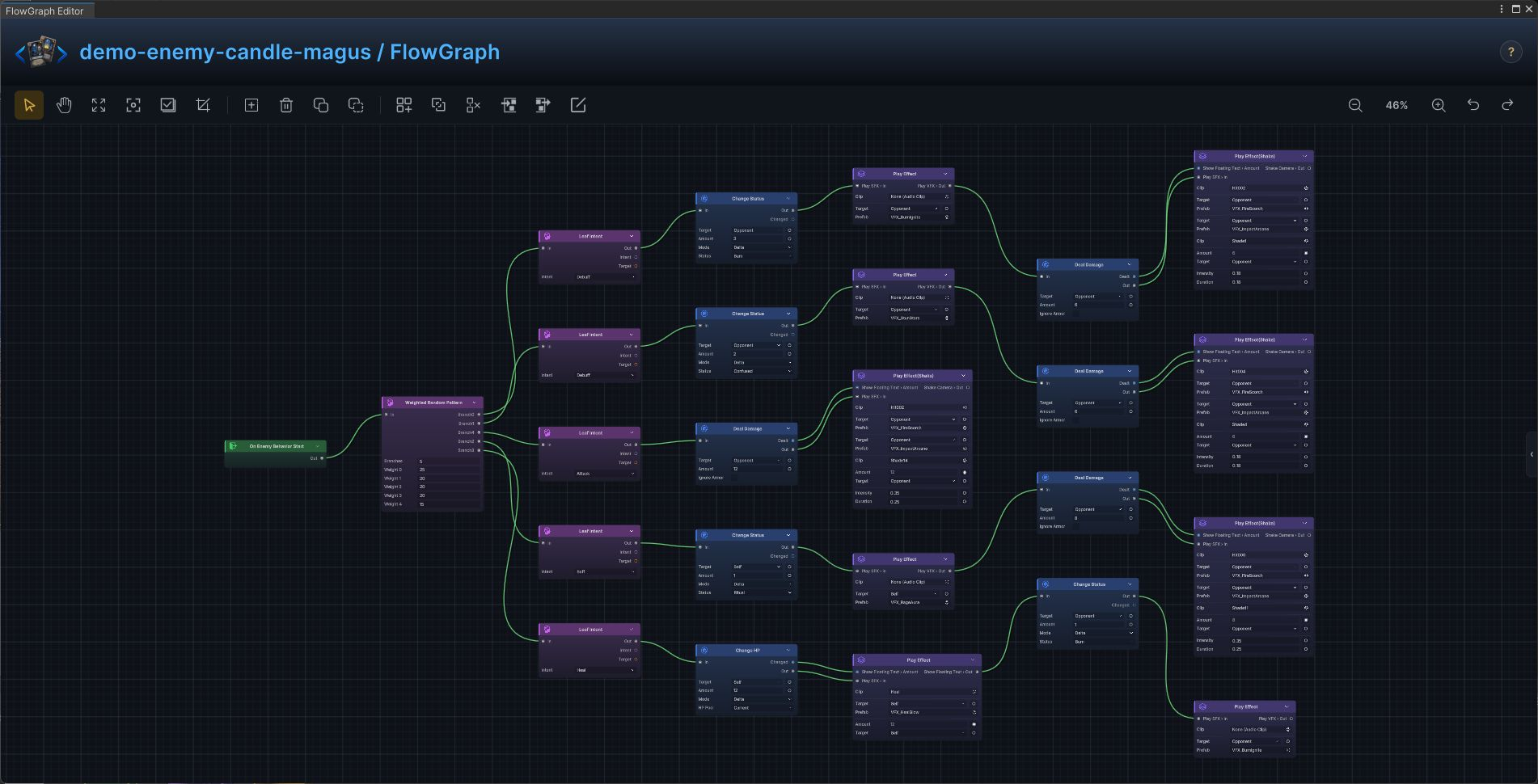
Candle Magus
The production Candle Magus enemy graph is a complete intent and action implementation from the demo database.
Build it
- Open
Candle Magusin FlowGraph and useOn Enemy Behavior Startas the entry - Add the graph in this order:
On Enemy Behavior Start→Change Status→Play Effect→Deal Damage→Play Effect(Shake)→Leaf Intent→Change HP→Weighted Random Pattern - Configure
Change Status:TargetSource = Opponent,Status = Burn,Mode = Delta,Amount = 3;Deal Damage:TargetSource = Opponent,Amount = 6;Leaf Intent:Intent = Debuff;Change Status:TargetSource = Opponent,Status = Confused,Mode = Delta,Amount = 2;Deal Damage:TargetSource = Opponent,Amount = 6;Leaf Intent:Intent = Debuff;Change Status:TargetSource = Self,Status = Ritual,Mode = Delta,Amount = 1;Deal Damage:TargetSource = Opponent,Amount = 8;Leaf Intent:Intent = Buff;Change HP:TargetSource = Self,Mode = Delta,Amount = 12;Change Status:TargetSource = Opponent,Status = Burn,Mode = Delta,Amount = 1;Leaf Intent:Intent = Heal;Deal Damage:TargetSource = Opponent,Amount = 12;Leaf Intent:Intent = Attack;Weighted Random Pattern:Weights = [25,20,20,20,15] - Connect control flow from left to right, then connect each data output to the exposed input shown in the screenshot
At runtime, the selected intent is followed by the exact action chain shown in the graph.
Ashen Hierarch
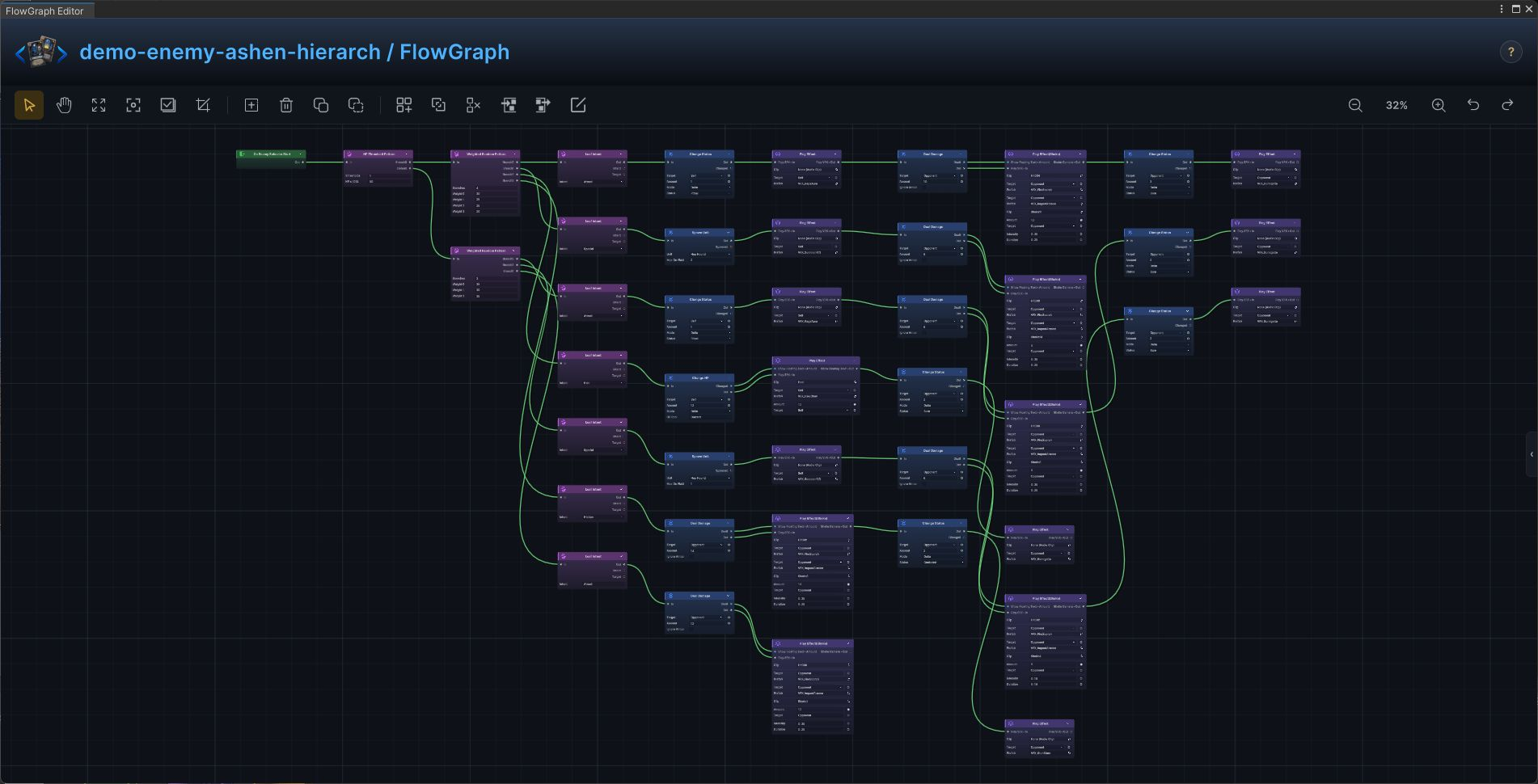
The production Ashen Hierarch enemy graph is a complete intent and action implementation from the demo database.
Build it
- Open
Ashen Hierarchin FlowGraph and useOn Enemy Behavior Startas the entry - Add the graph in this order:
On Enemy Behavior Start→Change Status→Play Effect→Deal Damage→Play Effect(Shake)→Leaf Intent→Spawn Unit→Weighted Random Pattern→Change HP→HP Threshold Pattern - Configure
Change Status:TargetSource = Self,Status = Ritual,Mode = Delta,Amount = 1;Deal Damage:TargetSource = Opponent,Amount = 8;Change Status:TargetSource = Opponent,Status = Burn,Mode = Delta,Amount = 2;Leaf Intent:Intent = Attack;Deal Damage:TargetSource = Opponent,Amount = 12;Leaf Intent:Intent = Attack;Spawn Unit:Unit = Hex Hound,MaxOnField = 1;Deal Damage:TargetSource = Opponent,Amount = 6;Change Status:TargetSource = Opponent,Status = Burn,Mode = Delta,Amount = 2;Leaf Intent:Intent = Special;Weighted Random Pattern:Weights = [35,30,35];Change Status:TargetSource = Self,Status = Ritual,Mode = Delta,Amount = 1;Deal Damage:TargetSource = Opponent,Amount = 10;Change Status:TargetSource = Opponent,Status = Burn,Mode = Delta,Amount = 3;Leaf Intent:Intent = Attack;Spawn Unit:Unit = Hex Hound,MaxOnField = 2;Deal Damage:TargetSource = Opponent,Amount = 8;Leaf Intent:Intent = Special;Change HP:TargetSource = Self,Mode = Delta,Amount = 12;Change Status:TargetSource = Opponent,Status = Burn,Mode = Delta,Amount = 2;Leaf Intent:Intent = Heal;Deal Damage:TargetSource = Opponent,Amount = 14;Change Status:TargetSource = Opponent,Status = Confused,Mode = Delta,Amount = 2;Leaf Intent:Intent = Hidden;Weighted Random Pattern:Weights = [30,25,25,20];HP Threshold Pattern:Thresholds = [50] - Connect control flow from left to right, then connect each data output to the exposed input shown in the screenshot
At runtime, the selected intent is followed by the exact action chain shown in the graph.
Hex Hound
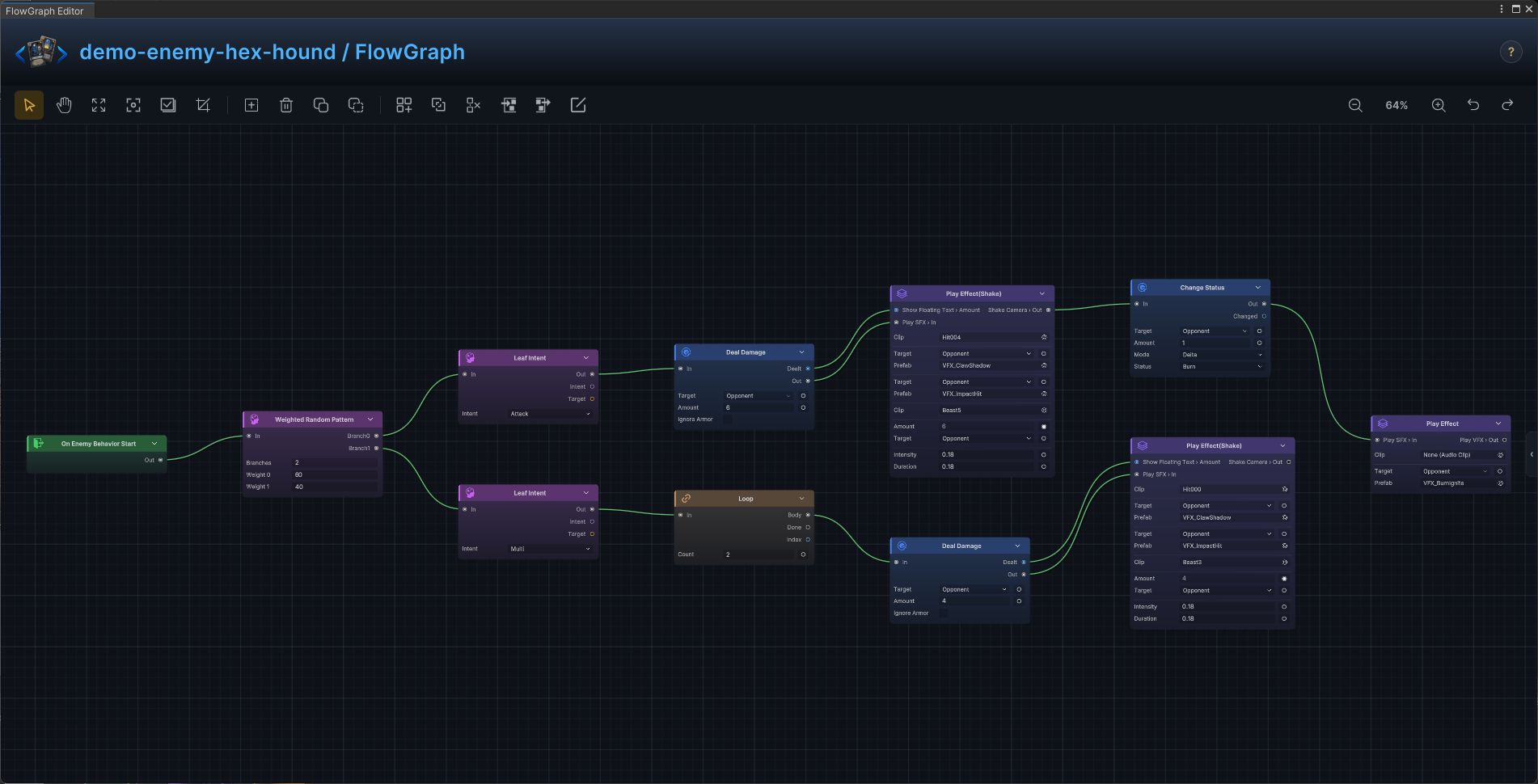
The production Hex Hound enemy graph is a complete intent and action implementation from the demo database.
Build it
- Open
Hex Houndin FlowGraph and useOn Enemy Behavior Startas the entry - Add the graph in this order:
On Enemy Behavior Start→Deal Damage→Play Effect(Shake)→Change Status→Play Effect→Leaf Intent→Loop→Weighted Random Pattern - Configure
Deal Damage:TargetSource = Opponent,Amount = 6;Change Status:TargetSource = Opponent,Status = Burn,Mode = Delta,Amount = 1;Leaf Intent:Intent = Attack;Loop:Count = 2;Deal Damage:TargetSource = Opponent,Amount = 4;Leaf Intent:Intent = Multi;Weighted Random Pattern:Weights = [60,40] - Connect control flow from left to right, then connect each data output to the exposed input shown in the screenshot
At runtime, the selected intent is followed by the exact action chain shown in the graph.
Plague Stalker
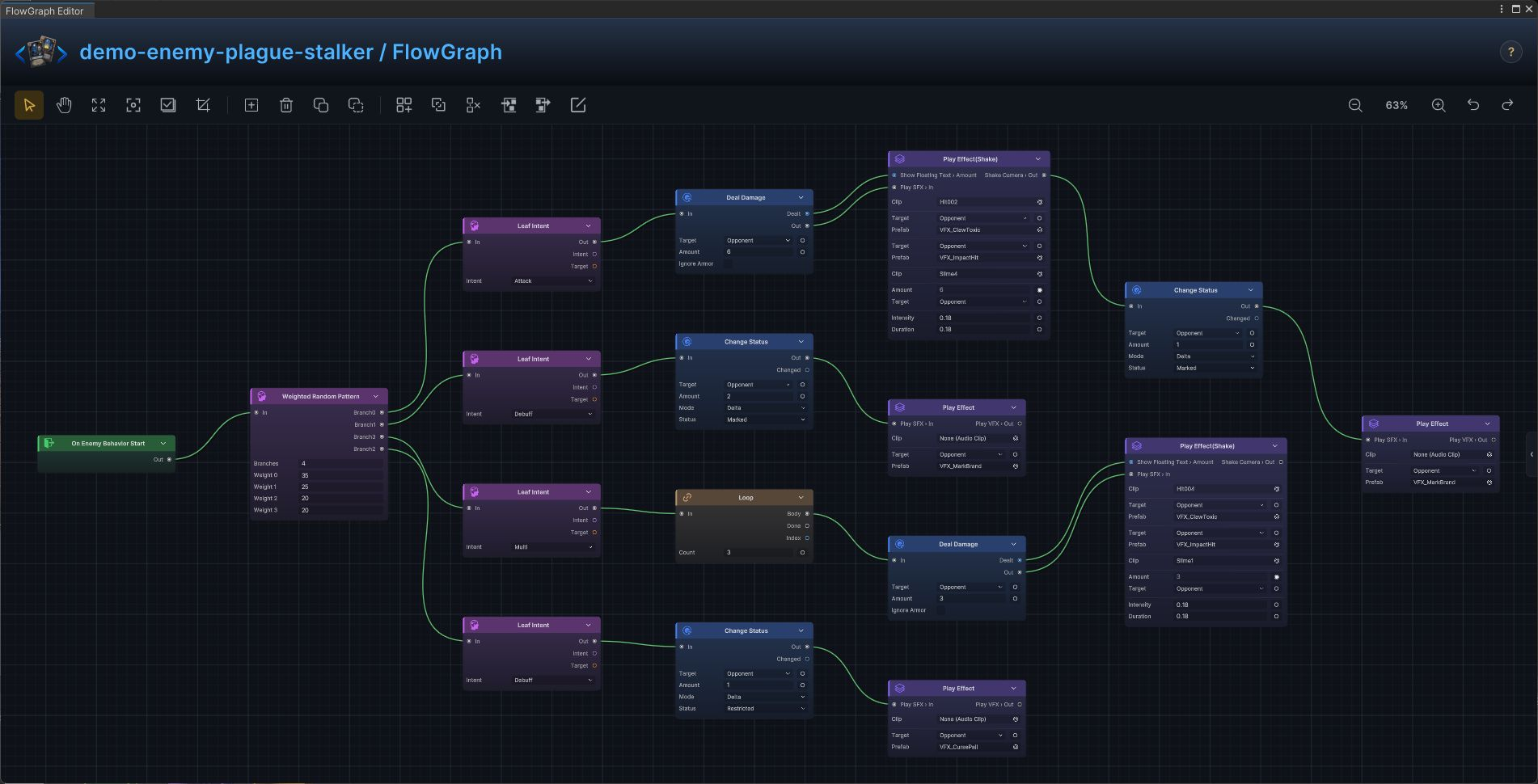
The production Plague Stalker enemy graph is a complete intent and action implementation from the demo database.
Build it
- Open
Plague Stalkerin FlowGraph and useOn Enemy Behavior Startas the entry - Add the graph in this order:
On Enemy Behavior Start→Deal Damage→Play Effect(Shake)→Change Status→Play Effect→Leaf Intent→Loop→Weighted Random Pattern - Configure
Deal Damage:TargetSource = Opponent,Amount = 6;Change Status:TargetSource = Opponent,Status = Marked,Mode = Delta,Amount = 1;Leaf Intent:Intent = Attack;Change Status:TargetSource = Opponent,Status = Marked,Mode = Delta,Amount = 2;Leaf Intent:Intent = Debuff;Change Status:TargetSource = Opponent,Status = Restricted,Mode = Delta,Amount = 1;Leaf Intent:Intent = Debuff;Loop:Count = 3;Deal Damage:TargetSource = Opponent,Amount = 3;Leaf Intent:Intent = Multi;Weighted Random Pattern:Weights = [35,25,20,20] - Connect control flow from left to right, then connect each data output to the exposed input shown in the screenshot
At runtime, the selected intent is followed by the exact action chain shown in the graph.
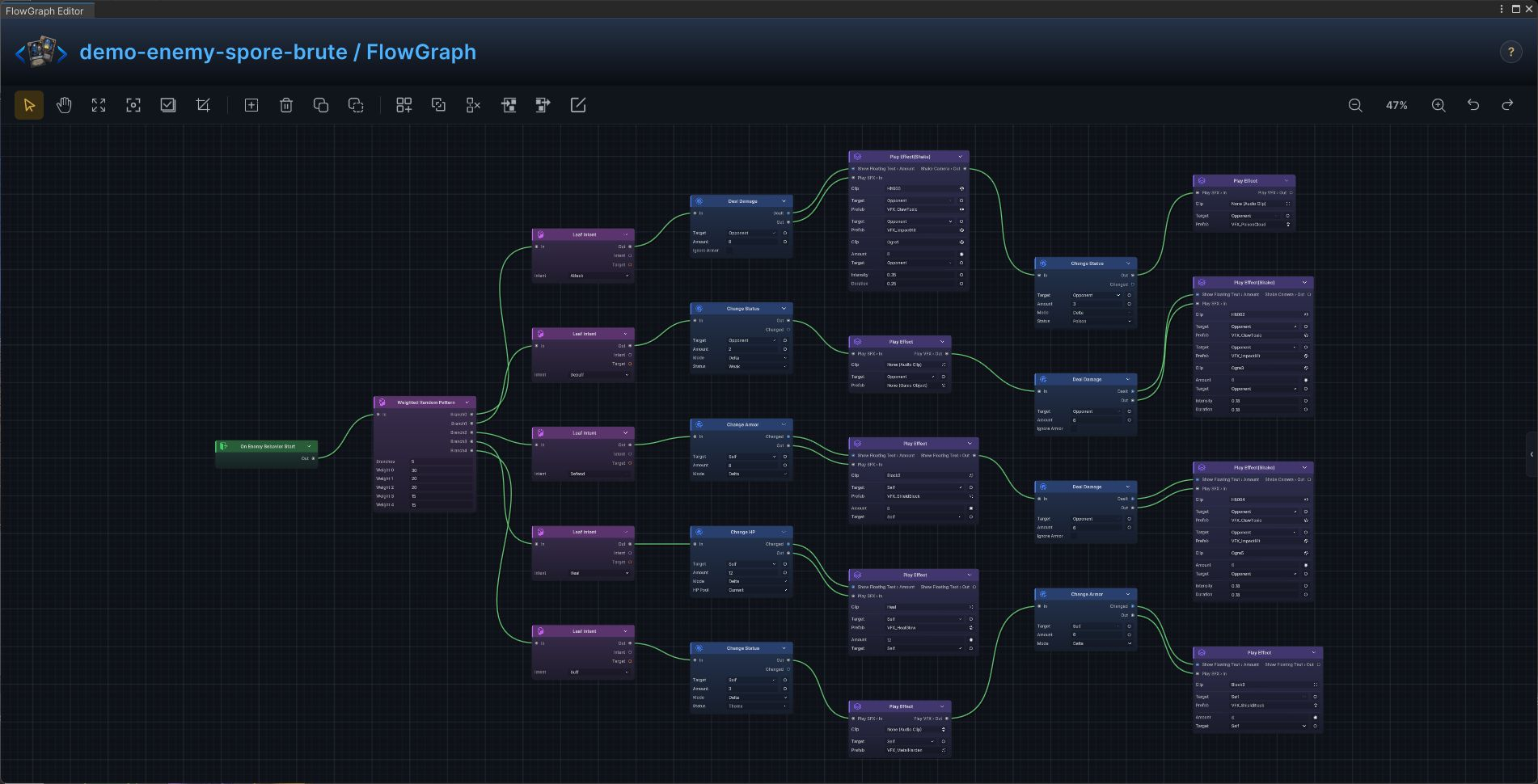
Spore Brute
The production Spore Brute enemy graph is a complete intent and action implementation from the demo database.
Build it
- Open
Spore Brutein FlowGraph and useOn Enemy Behavior Startas the entry - Add the graph in this order:
On Enemy Behavior Start→Deal Damage→Play Effect(Shake)→Change Status→Play Effect→Leaf Intent→Change Armor→Change HP→Weighted Random Pattern - Configure
Deal Damage:TargetSource = Opponent,Amount = 8;Change Status:TargetSource = Opponent,Status = Poison,Mode = Delta,Amount = 3;Leaf Intent:Intent = Attack;Change Status:TargetSource = Opponent,Status = Weak,Mode = Delta,Amount = 2;Deal Damage:TargetSource = Opponent,Amount = 6;Leaf Intent:Intent = Debuff;Change Armor:TargetSource = Self,Mode = Delta,Amount = 8;Deal Damage:TargetSource = Opponent,Amount = 6;Leaf Intent:Intent = Defend;Change HP:TargetSource = Self,Mode = Delta,Amount = 12;Leaf Intent:Intent = Heal;Change Status:TargetSource = Self,Status = Thorns,Mode = Delta,Amount = 3;Change Armor:TargetSource = Self,Mode = Delta,Amount = 6;Leaf Intent:Intent = Buff;Weighted Random Pattern:Weights = [30,20,20,15,15] - Connect control flow from left to right, then connect each data output to the exposed input shown in the screenshot
At runtime, the selected intent is followed by the exact action chain shown in the graph.
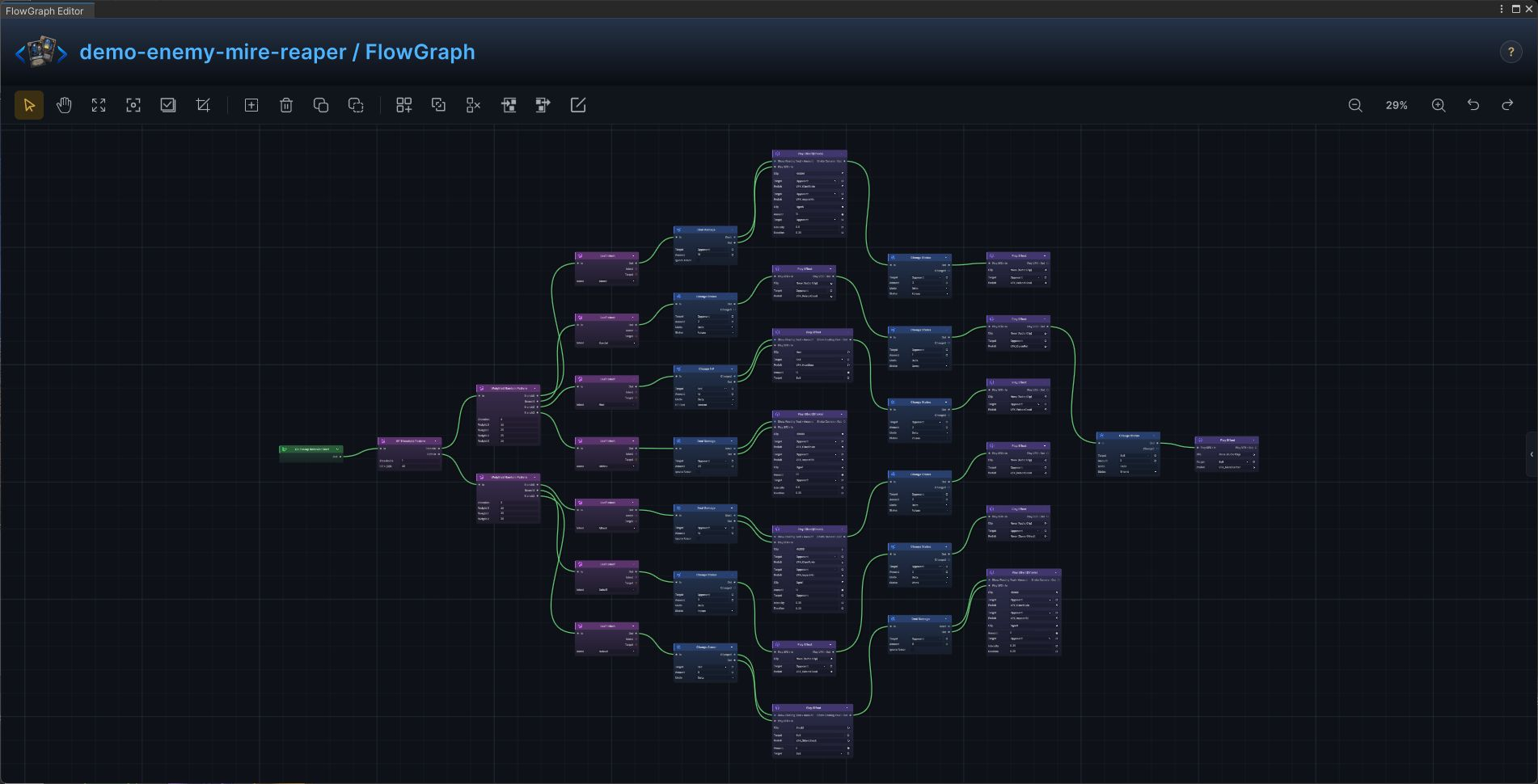
Mire Reaper
The production Mire Reaper enemy graph is a complete intent and action implementation from the demo database.
Build it
- Open
Mire Reaperin FlowGraph and useOn Enemy Behavior Startas the entry - Add the graph in this order:
On Enemy Behavior Start→Deal Damage→Play Effect(Shake)→Change Status→Play Effect→Leaf Intent→Change Armor→Weighted Random Pattern→Change HP→HP Threshold Pattern - Configure
Deal Damage:TargetSource = Opponent,Amount = 14;Change Status:TargetSource = Opponent,Status = Poison,Mode = Delta,Amount = 2;Leaf Intent:Intent = Attack;Change Status:TargetSource = Opponent,Status = Poison,Mode = Delta,Amount = 3;Change Status:TargetSource = Opponent,Status = Weak,Mode = Delta,Amount = 2;Leaf Intent:Intent = Debuff;Change Armor:TargetSource = Self,Mode = Delta,Amount = 8;Deal Damage:TargetSource = Opponent,Amount = 8;Leaf Intent:Intent = Defend;Weighted Random Pattern:Weights = [40,30,30];Deal Damage:TargetSource = Opponent,Amount = 18;Change Status:TargetSource = Opponent,Status = Poison,Mode = Delta,Amount = 3;Leaf Intent:Intent = Attack;Change Status:TargetSource = Opponent,Status = Poison,Mode = Delta,Amount = 2;Change Status:TargetSource = Opponent,Status = Curse,Mode = Delta,Amount = 1;Change Status:TargetSource = Self,Status = Thorns,Mode = Delta,Amount = 3;Leaf Intent:Intent = Special;Change HP:TargetSource = Self,Mode = Delta,Amount = 14;Change Status:TargetSource = Opponent,Status = Poison,Mode = Delta,Amount = 2;Leaf Intent:Intent = Heal;Deal Damage:TargetSource = Opponent,Amount = 20;Leaf Intent:Intent = Hidden;Weighted Random Pattern:Weights = [30,25,25,20];HP Threshold Pattern:Thresholds = [40] - Connect control flow from left to right, then connect each data output to the exposed input shown in the screenshot
At runtime, the selected intent is followed by the exact action chain shown in the graph.
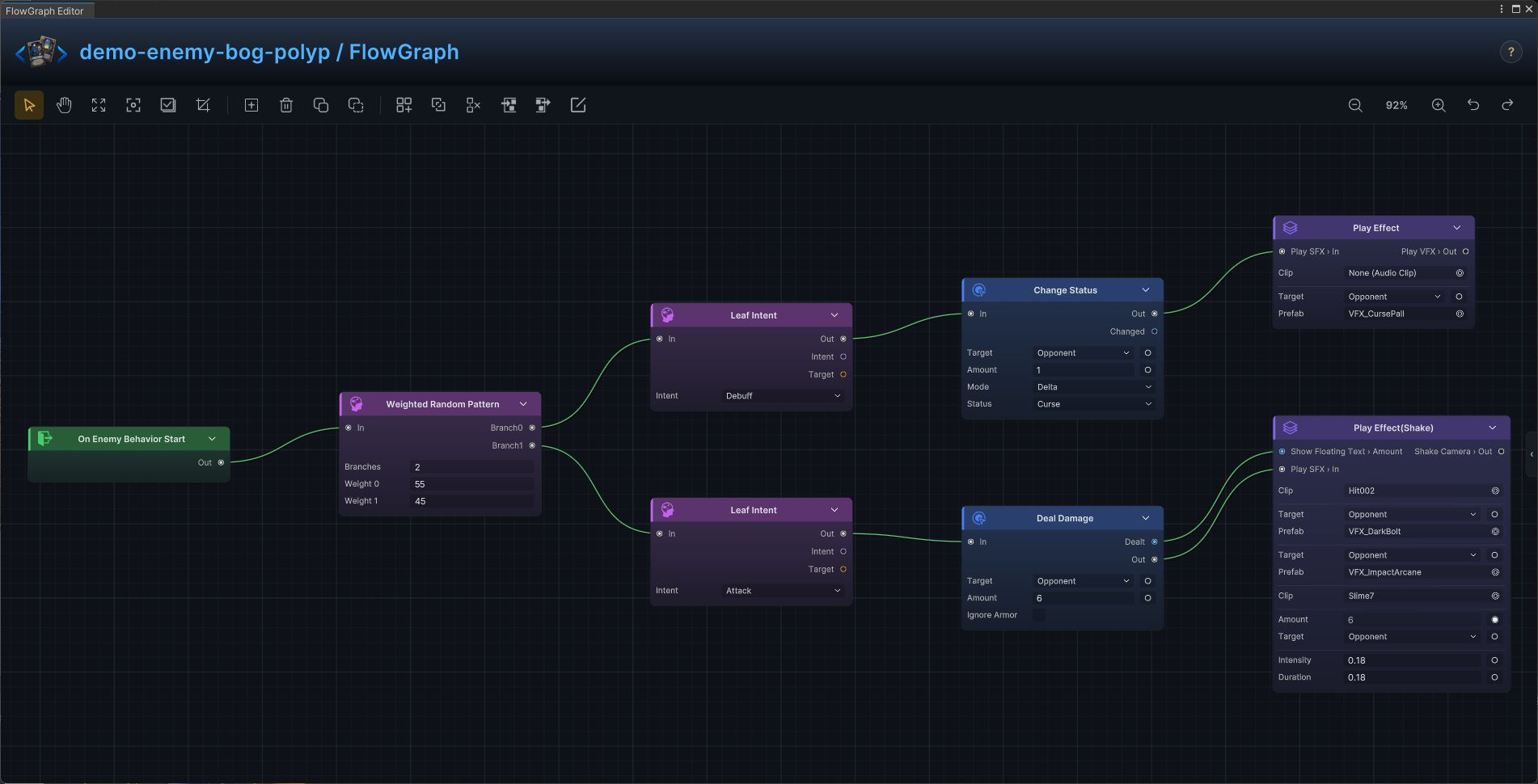
Bog Polyp
The production Bog Polyp enemy graph is a complete intent and action implementation from the demo database.
Build it
- Open
Bog Polypin FlowGraph and useOn Enemy Behavior Startas the entry - Add the graph in this order:
On Enemy Behavior Start→Change Status→Play Effect→Leaf Intent→Deal Damage→Play Effect(Shake)→Weighted Random Pattern - Configure
Change Status:TargetSource = Opponent,Status = Curse,Mode = Delta,Amount = 1;Leaf Intent:Intent = Debuff;Deal Damage:TargetSource = Opponent,Amount = 6;Leaf Intent:Intent = Attack;Weighted Random Pattern:Weights = [55,45] - Connect control flow from left to right, then connect each data output to the exposed input shown in the screenshot
At runtime, the selected intent is followed by the exact action chain shown in the graph.
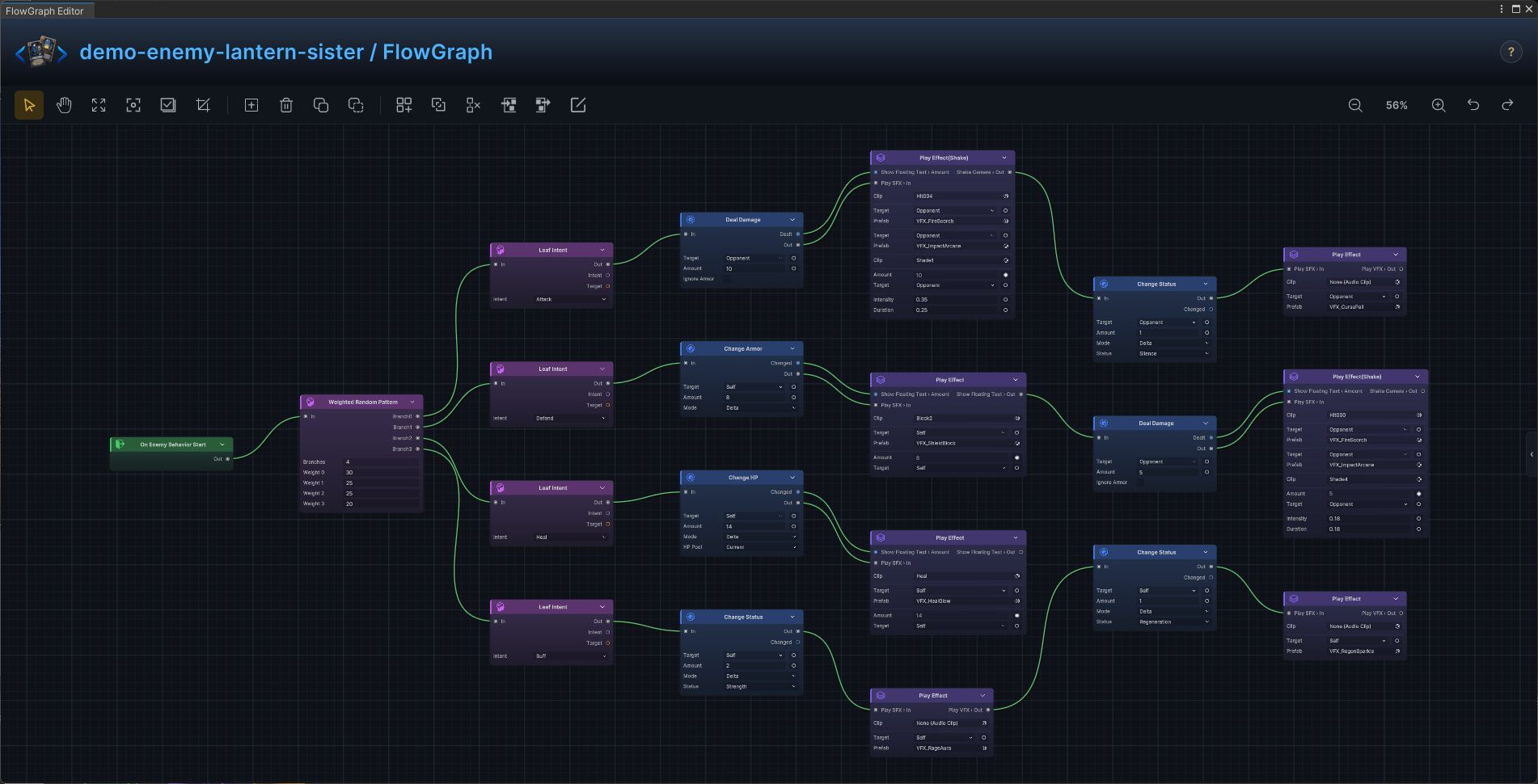
Lantern Sister
The production Lantern Sister enemy graph is a complete intent and action implementation from the demo database.
Build it
- Open
Lantern Sisterin FlowGraph and useOn Enemy Behavior Startas the entry - Add the graph in this order:
On Enemy Behavior Start→Deal Damage→Play Effect(Shake)→Change Status→Play Effect→Leaf Intent→Change Armor→Change HP→Weighted Random Pattern - Configure
Deal Damage:TargetSource = Opponent,Amount = 10;Change Status:TargetSource = Opponent,Status = Silence,Mode = Delta,Amount = 1;Leaf Intent:Intent = Attack;Change Armor:TargetSource = Self,Mode = Delta,Amount = 8;Deal Damage:TargetSource = Opponent,Amount = 5;Leaf Intent:Intent = Defend;Change HP:TargetSource = Self,Mode = Delta,Amount = 14;Leaf Intent:Intent = Heal;Change Status:TargetSource = Self,Status = Strength,Mode = Delta,Amount = 2;Change Status:TargetSource = Self,Status = Regeneration,Mode = Delta,Amount = 1;Leaf Intent:Intent = Buff;Weighted Random Pattern:Weights = [30,25,25,20] - Connect control flow from left to right, then connect each data output to the exposed input shown in the screenshot
At runtime, the selected intent is followed by the exact action chain shown in the graph.
Order Knight
The production Order Knight enemy graph is a complete intent and action implementation from the demo database.
Build it
- Open
Order Knightin FlowGraph and useOn Enemy Behavior Startas the entry - Add the graph in this order:
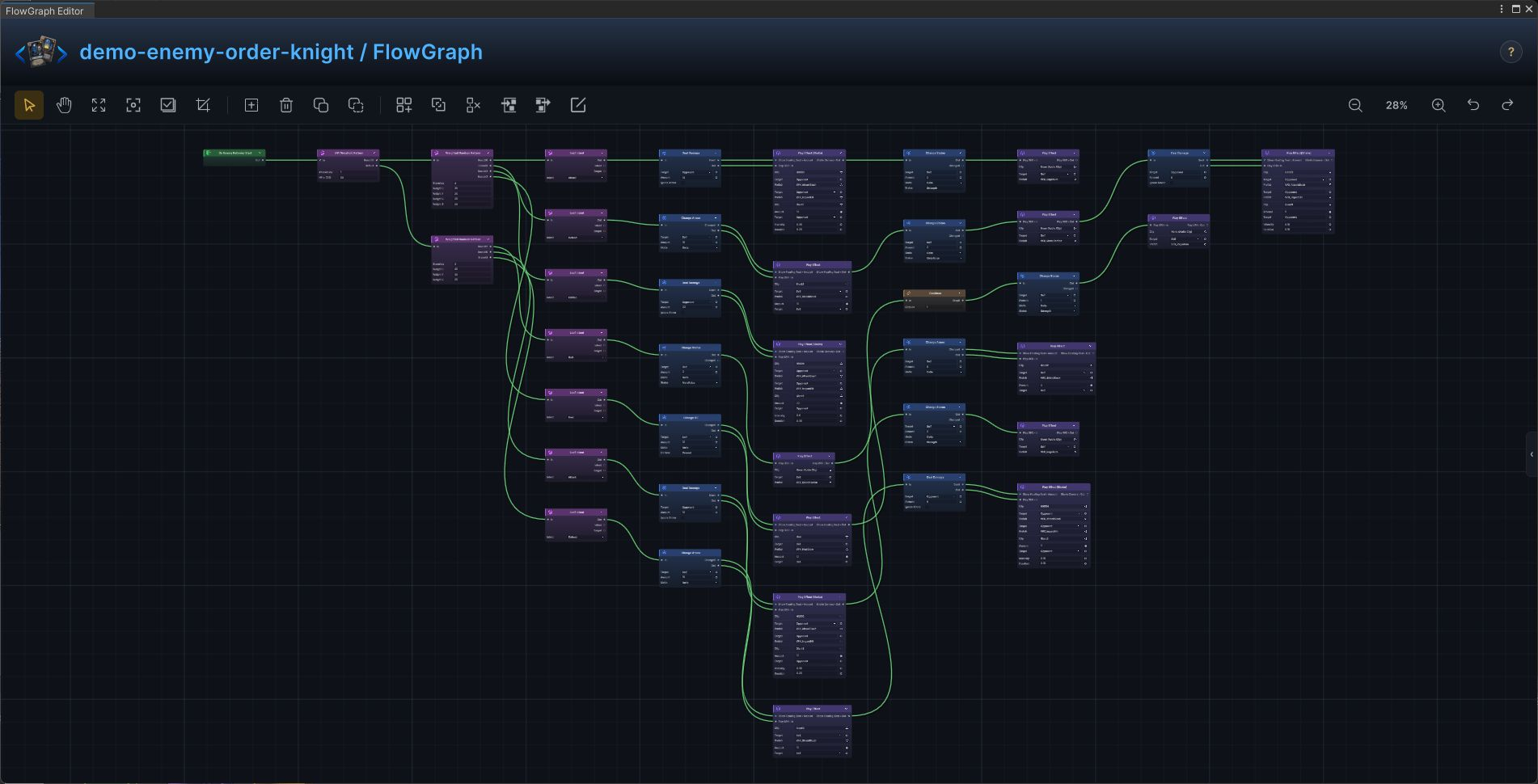
On Enemy Behavior Start→Deal Damage→Play Effect(Shake)→Change Status→Play Effect→Leaf Intent→Change Armor→Weighted Random Pattern→Change HP→HP Threshold Pattern - Configure
Deal Damage:TargetSource = Opponent,Amount = 12;Change Status:TargetSource = Self,Status = Strength,Mode = Delta,Amount = 2;Leaf Intent:Intent = Attack;Change Armor:TargetSource = Self,Mode = Delta,Amount = 10;Deal Damage:TargetSource = Opponent,Amount = 6;Leaf Intent:Intent = Defend;Change Status:TargetSource = Self,Status = Metallicize,Mode = Delta,Amount = 2;Change Status:TargetSource = Self,Status = Strength,Mode = Delta,Amount = 1;Leaf Intent:Intent = Buff;Weighted Random Pattern:Weights = [45,30,25];Deal Damage:TargetSource = Opponent,Amount = 14;Change Status:TargetSource = Self,Status = Strength,Mode = Delta,Amount = 2;Leaf Intent:Intent = Attack;Change Armor:TargetSource = Self,Mode = Delta,Amount = 10;Change Status:TargetSource = Self,Status = Metallicize,Mode = Delta,Amount = 2;Deal Damage:TargetSource = Opponent,Amount = 6;Leaf Intent:Intent = Defend;Deal Damage:TargetSource = Opponent,Amount = 22;Leaf Intent:Intent = Hidden;Change HP:TargetSource = Self,Mode = Delta,Amount = 12;Change Armor:TargetSource = Self,Mode = Delta,Amount = 8;Leaf Intent:Intent = Heal;Weighted Random Pattern:Weights = [35,25,20,20];HP Threshold Pattern:Thresholds = [50] - Connect control flow from left to right, then connect each data output to the exposed input shown in the screenshot
At runtime, the selected intent is followed by the exact action chain shown in the graph.
Gilded Bishop
The production Gilded Bishop enemy graph is a complete intent and action implementation from the demo database.
Build it
- Open
Gilded Bishopin FlowGraph and useOn Enemy Behavior Startas the entry - Add the graph in this order:
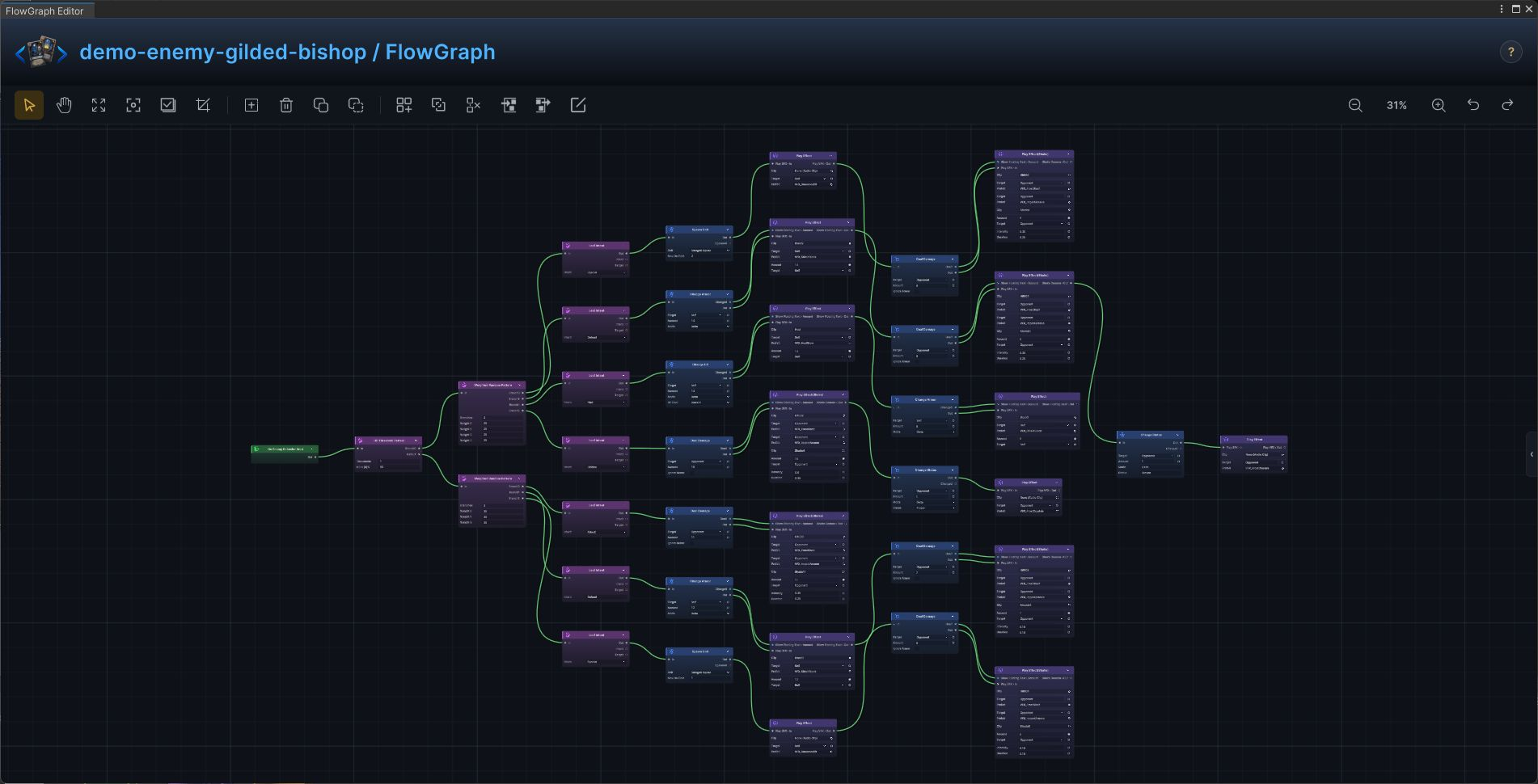
On Enemy Behavior Start→Deal Damage→Play Effect(Shake)→Leaf Intent→Change Armor→Play Effect→Spawn Unit→Weighted Random Pattern→Change HP→Change Status→HP Threshold Pattern - Configure
Deal Damage:TargetSource = Opponent,Amount = 11;Leaf Intent:Intent = Attack;Change Armor:TargetSource = Self,Mode = Delta,Amount = 12;Deal Damage:TargetSource = Opponent,Amount = 7;Leaf Intent:Intent = Defend;Spawn Unit:Unit = Stringed Squire,MaxOnField = 1;Deal Damage:TargetSource = Opponent,Amount = 6;Leaf Intent:Intent = Special;Weighted Random Pattern:Weights = [35,30,35];Spawn Unit:Unit = Stringed Squire,MaxOnField = 2;Deal Damage:TargetSource = Opponent,Amount = 9;Leaf Intent:Intent = Special;Change HP:TargetSource = Self,Mode = Delta,Amount = 14;Change Armor:TargetSource = Self,Mode = Delta,Amount = 8;Leaf Intent:Intent = Heal;Deal Damage:TargetSource = Opponent,Amount = 16;Change Status:TargetSource = Opponent,Status = Frozen,Mode = Delta,Amount = 1;Leaf Intent:Intent = Hidden;Change Armor:TargetSource = Self,Mode = Delta,Amount = 14;Deal Damage:TargetSource = Opponent,Amount = 8;Change Status:TargetSource = Opponent,Status = Frozen,Mode = Delta,Amount = 1;Leaf Intent:Intent = Defend;Weighted Random Pattern:Weights = [25,25,25,25];HP Threshold Pattern:Thresholds = [50] - Connect control flow from left to right, then connect each data output to the exposed input shown in the screenshot
At runtime, the selected intent is followed by the exact action chain shown in the graph.
Stringed Squire
The production Stringed Squire enemy graph is a complete intent and action implementation from the demo database.
Build it
- Open
Stringed Squirein FlowGraph and useOn Enemy Behavior Startas the entry - Add the graph in this order:
On Enemy Behavior Start→Deal Damage→Play Effect(Shake)→Change Status→Play Effect→Leaf Intent→Change Armor→Weighted Random Pattern - Configure
Deal Damage:TargetSource = Opponent,Amount = 5;Change Status:TargetSource = Opponent,Status = Frozen,Mode = Delta,Amount = 1;Leaf Intent:Intent = Attack;Change Armor:TargetSource = Self,Mode = Delta,Amount = 8;Deal Damage:TargetSource = Opponent,Amount = 3;Leaf Intent:Intent = Defend;Weighted Random Pattern:Weights = [60,40] - Connect control flow from left to right, then connect each data output to the exposed input shown in the screenshot
At runtime, the selected intent is followed by the exact action chain shown in the graph.