Custom Node Examples
GCS ships three custom-node samples: a starter template, a state-changing card effect with a condition, and a pure value node
GCS ships its custom node samples under:
Assets/TinyGiants/GameCardSystem/Samples~/CustomNodes/
Unity ignores folders whose name ends in ~, so these files ship as reference source and are never compiled in place; copy the .cs file you want into one of your own runtime assemblies to build it; each sample is small on purpose and exercises the public surface: [Serializable], [FlowNode], the node base classes, inferred fields, declared ports, and the context helpers
FlowNodeTemplate
FlowNodeTemplate.cs is the broad starting point: every required moving part in one file, registered as Action / Your Node Name
| Part | Purpose |
|---|---|
[Serializable] | Lets Unity save node instances inside FlowGraph assets |
[FlowNode("Action", "Your Node Name")] | Adds the node to the Add Node menu |
MutatorNode | Runs writable battle logic in Execute |
UnitSource TargetSource | Auto-creates a Target unit input (defaults to Opponent) |
int Amount | Auto-creates an Amount scalar input |
DamageStyle Style | An enum configuration row, shown on the node body instead of a port |
INodePorts | Declares the Result output field inference cannot create |
ctx.PullInputOr | Reads wired values, falling back to the node's fields |
ctx.ResolveUnits | Handles both the target dropdown and a connected target port |
ctx.Controller.DealDamage | Mutates battle state through the supported gateway |
ctx.StoreResult | Publishes the declared Result output for downstream nodes |
Start here when your node will change battle state and may expose an output
Safe edits:
- Change the category and display name
- Replace
TargetSource,Amount, and the enum with your own author-facing fields - Replace the controller call with the battle change your node performs
- Rename the result output, as long as no saved content connects to it yet
Risky edits:
- Removing
[Serializable] - Moving the file into an editor-only assembly
- Mutating unit, card, or pile fields directly
- Renaming fields or outputs after saved graphs already connect to them
HealIfBelowHalfNode
HealIfBelowHalfNode.cs shows a complete card effect: heal the selected units, optionally only those at or below half HP
| Field | What you configure |
|---|---|
TargetSource | Who can be healed; defaults to Self; can be exposed and wired |
HealAmount | How much HP to restore; A fixed value or a connected input |
OnlyBelowHalf | Whether the half-HP condition applies |
How it behaves:
HealAmountis read throughctx.PullInputOr(this, nameof(HealAmount), HealAmount)- Targets come from
ctx.ResolveUnits(this, TargetSource, nameof(TargetSource)) - Dead and null units are skipped, and the half-HP check compares each target's current and max HP
- Healing goes through
ctx.Controller.GainHp - The
Healedoutput publishes the HP actually restored, measured before and after each heal; A target already at full HP contributes 0
Copy this pattern for project-specific actions such as healing allies under a custom condition, bonus damage against marked enemies, armor scaled by missing HP, or counting how many targets passed a check and feeding that count onward
AddValuesNode
AddValuesNode.cs is the minimal pure value sample, registered as Operator / Add Values: read two inputs, return their sum
| Field | Meaning |
|---|---|
A | First number, with the field as fallback |
B | Second number, with the field as fallback |
How it behaves:
- The class subclasses
OperatorNodeand never callsctx.Controller - It declares
ResultwithNodePort.ResultOut("Result", PortDataType.Int) - It returns the sum from
Evaluate(IEvaluationContext ctx, string outPort)
Copy this pattern for math, comparisons, score calculations, converters, and any project formula meant to be wired into another node's input; A node with several outputs declares each one and switches on outPort:
public override object Evaluate(IEvaluationContext ctx, string outPort)
{
    int value = ctx.PullInputOr(this, nameof(Value), Value);
    return outPort == "Double" ? value * 2 : value;
}
Recommended starting sample
| You want to create | Start from |
|---|---|
| A state-changing card effect | HealIfBelowHalfNode or FlowNodeTemplate |
| A calculated value | AddValuesNode |
| A custom selector | AddValuesNode, base class switched to SelectorNode, returning units or cards |
| A custom branch node | FlowNodeTemplate, base class switched to ControlNode, with declared ControlOut ports |
| A presentation beat | FlowNodeTemplate, base class switched to VfxNode, implementing Play |
Verify the adapted node
- Unity compiles with no C# errors
- The node appears in the Add Node menu under its
[FlowNode]category - Scalar fields show as editable values that can be exposed as ports
<Name>Sourcefields expose their matching unit or card inputs- Declared result outputs are visible for downstream connections
- A test battle shows the expected state changes in the Monitor
The Monitor's Flow tab is the fastest proof that your node actually ran; every graph execution is captured with its trigger, node count, and timing, so a played card that reaches your node shows up as a row:
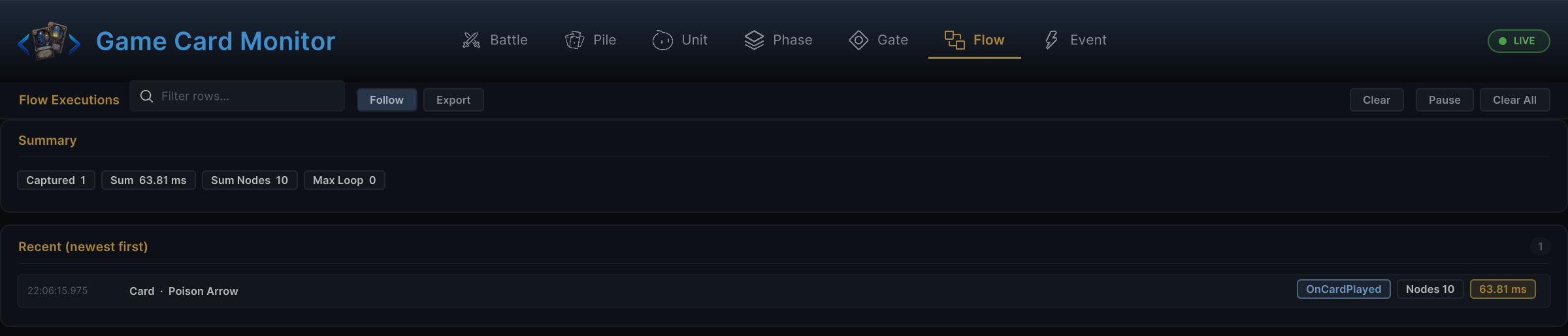
If a node compiles but behaves strangely, test it with fixed field values before wiring dynamic ports; once the fixed version works, expose one port at a time
Common mistakes
| Symptom | Likely cause |
|---|---|
| Node missing from Add Node | Missing [FlowNode], an abstract class, or the assembly does not reference TinyGiants.GCS.Runtime |
| Connected value is ignored | Code reads the field directly instead of ctx.PullInputOr |
| Connected target is ignored | Code skips ctx.ResolveUnits / ctx.ResolveCards |
| Output cannot be connected | Output was never declared with NodePort.ResultOut or NodePort.Out |
| Output value is always missing | The StoreResult name does not match the declared output name |
| No events or visuals fire | Code mutates battle objects directly instead of calling ctx.Controller |