Player Party
Configure up to three players and choose action sources and targets while sharing turns, card piles, and energy
A GameEncounter supports one to three players with independent HP, armor, statuses, hooks, and presentation, sharing turns, card piles, and energy by default while remaining compatible with existing single-player configurations
The diagram above follows the party from Encounter setup and slot assignment through shared resources to FlowGraph execution by the selected source, with unit IDs connecting events and presentation to the actual source and targets
Player parties support local battles with custom activation and card-play policies, networking, replication, rollback, rooms, and accounts require separate systems
Build the initial party with an Encounter
Configure Player Units in list order, row 1 is the primary player and rows 2 and 3 add members, both the editor and runtime support up to three players
| Setting | Runtime result |
|---|---|
Player Units[0] | Creates the primary player in slot 0, legacy PlayerUnit and GCSApi.Player() return this member |
Player Units[1..2] | Creates additional PlayerUnitState instances in row order |
| Row order | Maps directly to scene slots 0, 1, and 2 without separate slot configuration |
Workbench reports missing members, more than three players, invalid slots, and duplicate slots, check the party to the left of VS in the Encounter preview before entering Play Mode
Identify members throughout the battle
Use UnitId to find an instance, Team and TeamId to identify its side, SlotIndex to place its view, and JoinOrder to track when it joined, asset names and list indexes do not replace these fields
| Identity | Purpose |
|---|---|
UnitId | Identifies one battle instance, creating the same Player Unit asset twice produces different IDs |
Team / TeamId | Determines ally and opponent relationships, built-in players and enemies use Player and Enemy |
SlotIndex | Maps the runtime unit to a visible slot on its side |
JoinOrder | Preserves arrival order, reinforcements and primary-player changes do not reorder other members |
GCSApi.Player() returns the primary player, GCSApi.ActivePlayer() returns the current action source, and GCSApi.PlayerParty() returns all members including dead members, use AlivePlayers() or DeadPlayers() to read only living or dead members
Complete one turn as a party
The default policy opens one player phase per turn, prepares each member's armor, statuses, and turn triggers, then refreshes energy and draws once for the party, players can switch members and play cards during this phase, End Turn ends the party turn and starts the enemy phase
SkipNextTurns affects only that member, other members can still act, the party turn ends immediately when all living members are skipped
The default loss rule requires every party member to be dead, so surviving members can continue after the primary player dies, victory checks require HasEncounteredEnemy to be true, allowing an Encounter to start without enemies and spawn its first enemy later
For ordered actions, set BattlePolicySet.ActivationPolicy to OrderedPartyActivationPolicy and call EndActivePlayerActivation() to finish one member's action and advance to the next
Pass the BattlePolicySet to GCSApi.StartBattle, GCS fills in omitted policies before creating units and cards, ActivePolicies is read-only for that battle, pass a new set to the next battle to change the rules
| Policy | Rule |
|---|---|
IPartyActivationPolicy | Free selection or ordered member activation |
IAutomaticPartyActivationPolicy | Automatic companion actions during ordered turns |
IActionWindowPolicy | Phases that accept player card requests |
IReactionWindowPolicy | Pausable reaction windows before enemy actions |
ICardPlayPolicy | Project rules for action sources and card permission |
IUnitTargetPolicy | Default opposing targets resolved without relying on the selected view |
IBattleResultPolicy | Whether the battle enters victory or defeat |
Share cards and energy
The party uses one Hand, Draw pile, Discard pile, Exhaust pile, and energy value, initialization, turn draws, reshuffles, hand limits, energy changes, and card movement settle once for the party
When the persistent Master Deck is empty, Player Unit 1 supplies the Starting Deck for the shared Draw pile, later members' Starting Decks are not merged into this battle, those assets can still use their own decks as the primary player in another Encounter
OwnerUnitId records the card's original owner at creation and stays unchanged when the action source changes, other eligible members can play shared cards
Specify the card's action source
TryPlayCard(card, target) uses the current ActivePlayer() as its source, FlowGraph Self, source hooks, and card-play events use that member while the card's OwnerUnitId stays unchanged
Use CardPlayRequest to submit an explicit SourceUnit and target, check that at least two members are alive before selecting the second living member by index
PlayerUnitState member = GCSApi.AlivePlayers()[1] as PlayerUnitState;
GCSApi.TrySetActivePlayerUnit(member);

foreach (CardInstance card in GCSApi.Hand(member))
{
    var request = new CardPlayRequest(card, member, GCSApi.FirstAliveEnemy());
    if (GCSApi.GetEffectiveEnergyCost(card) <= GCSApi.Energy(member)
        && GCSApi.CanPlayCard(request))
    {
        GCSApi.TryPlayCard(request);
    }
}
After a successful play, CardInstance.LastPlayContext records the origin zone, original owner, actual source, and targets, OnCardPlayed also exposes these identities for UI and statistics
Target allies and relative teams
Card Target adds Single Ally, Other Ally, All Allies, Random Ally, Random Opponent, and Any Unit to enemy targeting, single-ally and any-unit modes use the Demo targeting arrow and legal-target highlight, group and random targets resolve automatically
| Card Target | Player input | Behavior source |
|---|---|---|
Single Ally | Select any living ally, including the source | Use the submitted Target or target port, Opponent does not select an ally |
Other Ally | Select a living ally other than the source | Use the submitted Target, the runtime rejects the source itself |
All Allies | No single-target input | All Allies |
Random Ally | No single-target input | Selects one living ally and supplies it through Target |
Random Opponent | No single-target input | Selects one living unit on the source's opposing side and supplies it through Target |
Any Unit | Select any living player or enemy | Use the submitted Target without a team restriction |
FlowGraph All Allies and All Opponents read living units relative to the current host, so cards, enemies, and statuses can use them, Active Player returns the selected living player and All Dead Allies provides revival targets, see Target selection for the full rules
Reinforce, replace, and revive members
Spawn Unit creates a player or enemy according to Team, player reinforcements receive a slot and publish OnPlayerUnitAdded within the three-player limit, using the existing shared cards and energy
ReplacePlayer replaces a member in the same slot, Despawn Unit removes a unit and publishes OnUnitRemoved, ordinary death publishes OnUnitDied and retains the member and slot, Revive Unit publishes OnUnitRevived after revival
PlayerUnitState joined = GCSApi.SummonPlayer(playerDefinition, 2, GCSApi.ActivePlayer());
if (joined != null)
    GCSApi.SetEnergy(joined, GCSApi.MaxEnergyFor(joined));

PlayerUnitState replacement = GCSApi.ReplacePlayer(joined, replacementDefinition);
GCSApi.RemoveUnit(replacement);
Removed members cannot be revived, one death publishes one death event, and removing or replacing a member leaves shared piles and energy unchanged, use OnUnitRemoved for departures and OnUnitDied for dead members who remain in the party
The Demo BattleBoard follows member additions, removals, deaths, revivals, and active-player changes, single-character scenes display one player slot and expand child slots under the same Player Area root when members join, Party Showcase saves all three child slots, and Dashboard Initialize System creates this layout
Verify the party in Party Showcase
Open Demo/Scenes/Multi-Character/Party Showcase and enter Play Mode, check that Scout, Squire, and Apprentice face Plague Stalker, Spore Brute, and Mire Reaper, with one shared hand and energy display
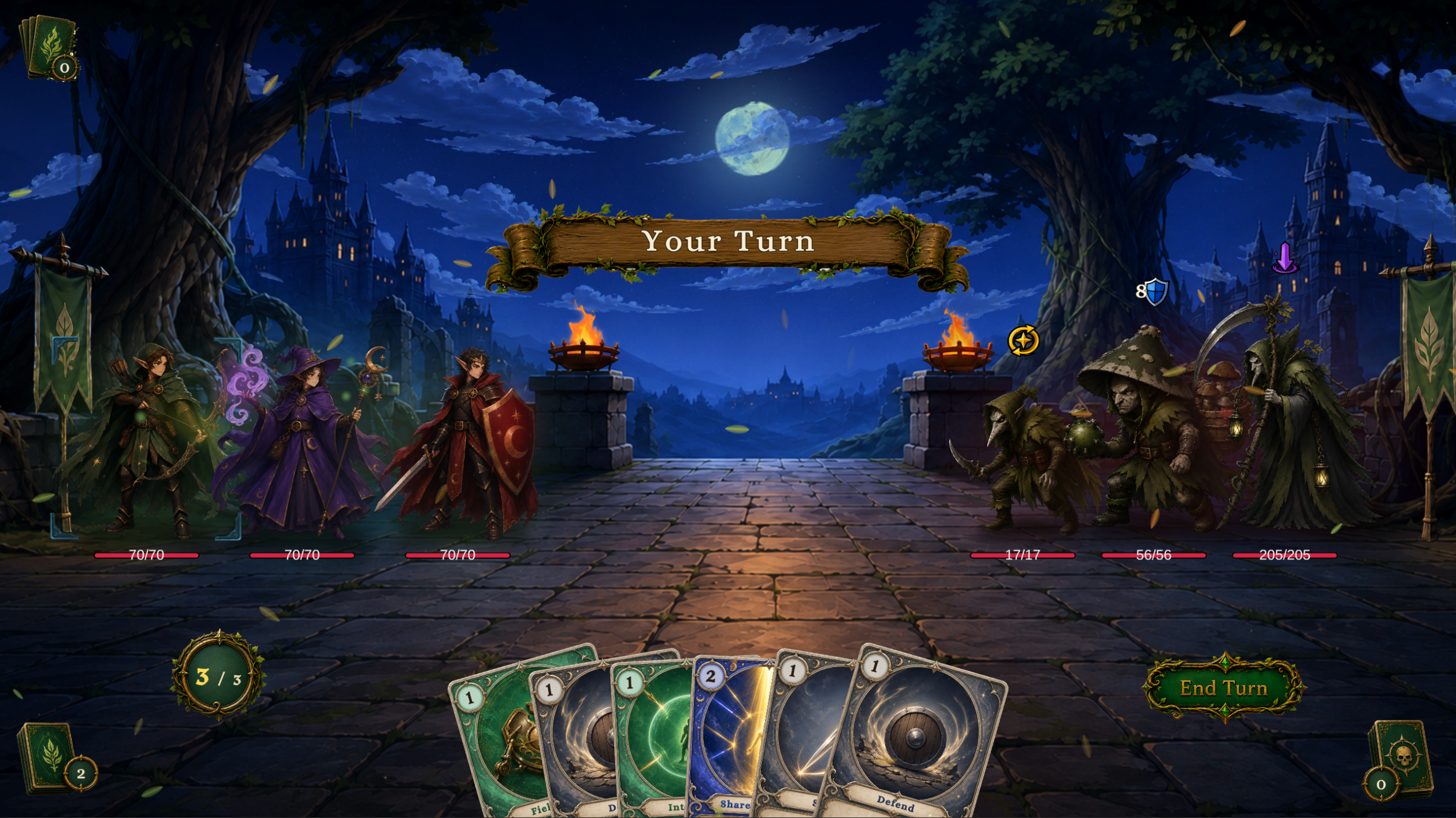
Player Unit 1, Scout, supplies Party Tactics for the shared eight-card pool
- Check that each player slot displays HP, armor, and statuses
- Select different members and check the active player and energy display
- Switch members before playing an attack from
Party Tactics, check that shared energy pays the cost, the selected member becomesSourceUnit, and the originalOwnerUnitIdstays unchanged - Play
Field Mend,Interpose,Shared Resolve, andEmergency Aidto check single-ally, other-ally, all-ally, and random-ally targeting - End the party turn and check that enemy actions begin after all members finish their turn triggers
- Open Game Card Monitor and check each member's
UnitId, slot, activation state, shared energy, and statuses
The source and targets in Monitor should match the scene's characters, single-character Encounters need only one Player Units row