Game Event Node Behavior
Configure each Flow Graph node's condition, start delay, argument passing, priority, and Trigger or Chain behavior.
For developers configuring individual flow nodes after placing them on the canvas.The graph shows connections; the Node Behavior Configuration Window controls the execution logic of each individual node.
Access: Double-click any node in the flow graph to open its behavior configuration window.
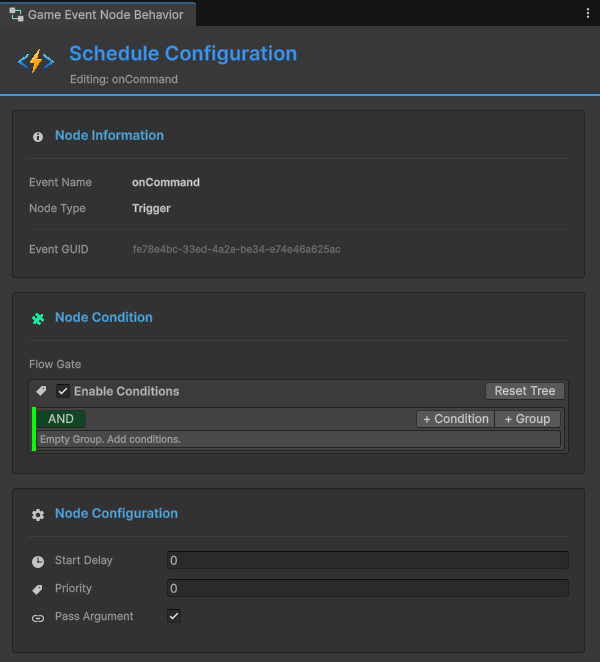
Window Overview
The configuration window is divided into three main sections:
| Section | Purpose | Applies To |
|---|---|---|
| Node Information | View event details and type | All nodes |
| Node Condition | Visual logic gate for execution control | All nodes |
| Node Configuration | Timing, priority, and data passing settings | All nodes (type-specific) |
Node Information
Displays read-only details about the selected node.

Event Name: The Game Event this node will raise.
Node Type: Trigger (parallel) or Chain (sequential).
Event GUID: Unique identifier for internal tracking.
Use Case: Verify you're editing the correct node before making changes.
Node Condition (Flow Gate)
Each node has its own visual condition tree that controls whether it executes.
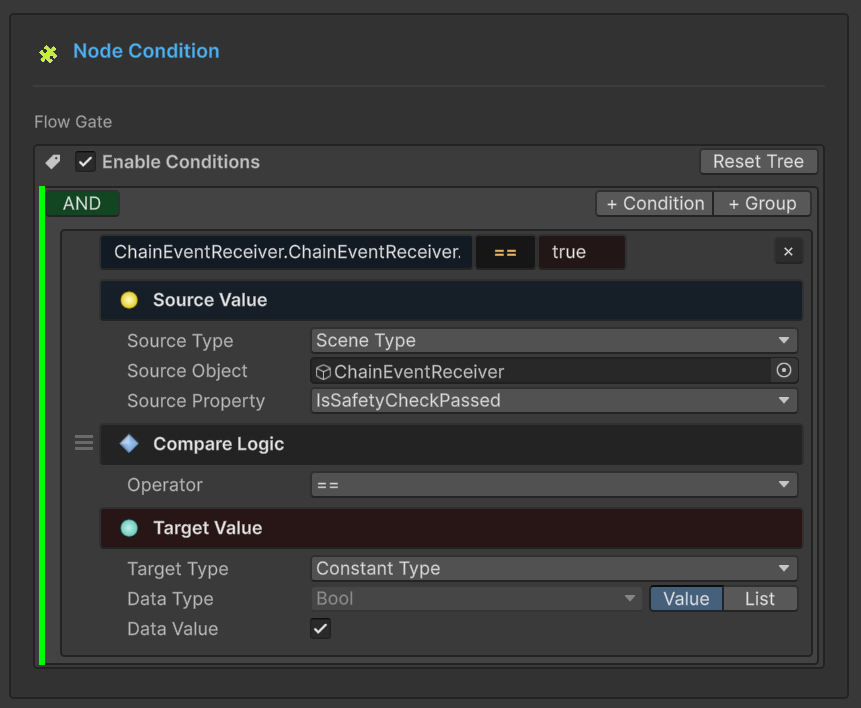
How It Works
If condition evaluates to FALSE:
- Node does not fire
- Flow stops down this branch
- Connected child nodes are skipped
If condition evaluates to TRUE:
- Node fires normally
- Flow continues to children
Condition Context
You have access to:
Event Argument (Arg): Data from the incoming event
Example: Arg.amount > 50
Sender (Sender): Source object (for sender events)
Example: Sender.tag == "Enemy"
Scene Objects: Any GameObject/Component in the scene
Example: Player.Health < 20
Visual Builder
The condition system uses the same Visual Condition Tree as Event Behaviors.
Full Documentation: See Visual Condition Tree for complete guide on:
- Building logic gates (AND/OR groups)
- Source types (Event Argument, Scene Type, Random, Constant)
- Comparison operators
- Type validation
- Best practices
The visual condition system is identical across:
- Event Behaviors (in Event Inspector)
- Flow Nodes (this window)
Learn it once, use it everywhere!
Practical Example
Scenario: Only play "Low Health Warning" when health is critical.
Condition Tree:
Result: Sound only plays when all three conditions pass.
Node Configuration
Settings that control timing, priority, and data flow.
General Settings (All Nodes)
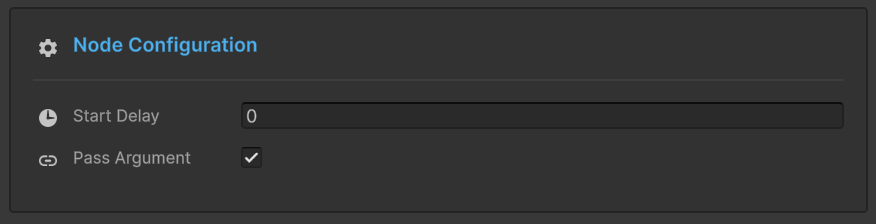
Start Delay
Unit: Seconds (float)
Effect: Node waits this duration before raising its event.
Use Cases:
- Staggered explosions (0.2s apart)
- Delayed reactions to events
- Timed sequences
Example:
🔘 Raise: OnButtonPressed
│
├─► ⏱️ 0.5s ──┐
│             ▼
│            🎵 PlayClickSound        ✅ Executed
│
├─► ⏱️ 1.0s ────────┐
│                   ▼
│                  💬 ShowConfirmation  ✅ Executed
│
└─► ⏱️ 2.0s ──────────────────┐
                              ▼
                             🚪 CloseMenu        ✅ Finalized
Visual Indicator: Badge shows ⏱️ 0.5s at bottom of node.
Pass Argument
Type: Boolean toggle
Effect: Controls whether event data flows to this node.
Checked (Pass Argument: ON)
Node receives data from previous event (if types are compatible).
When to Use:
- Forwarding damage info
- Passing scores/values
- Data pipelines
Example:
Connection Color: Depends on type compatibility (Green/Yellow/Orange).
Unchecked (Pass Argument: OFF)
Node fires as static call with default/null arguments.
When to Use:
- Connecting incompatible types
- Generic notifications (no data needed)
- Forcing type-safe connections
Example:
🚀 Event: OnDamageReceived(DamageInfo)
│   (Payload: { amount: 20.0, ... })
│
🛡️ Filter: [ Pass Argument: OFF ]
│   (Logic: Trigger Only / Data Dropped)
│
└─► 🔊 Callback: PlayGenericSound()
│
🎯 Result: Sound plays reliably without needing DamageInfo data.
Connection Color: Always 🟢 Green (forced safe).
Impact on Connections
Pass Argument directly affects connection line colors:
| Pass | Source Type | Target Type | Result |
|---|---|---|---|
| OFF | Any | Any | 🟢 Green (always safe) |
| ON | <int> | <int> | 🟢 Green (perfect match) |
| ON | <int> | <void> | 🟡 Yellow (data discarded) |
| ON | <int> | <float> | 🟠 Orange (conversion) |
| ON | <int> | <string> | 🔴 Red (blocked) |
Recommendation: Use OFF when connecting incompatible types to avoid red connections.
Type-Specific Settings
Configuration options change based on node type (Trigger vs Chain).
Trigger Node
Trigger Node (🟠 Orange)
Execution: Parallel (fan-out) - fires and immediately continues.
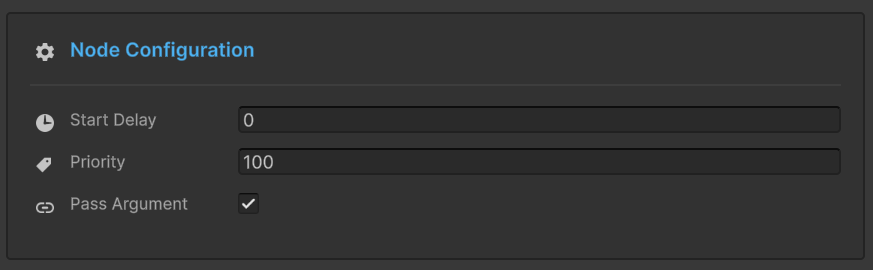
Priority
Type: Integer (default: 0)
Rule: Higher number = Earlier execution
Use Case: Control execution order when multiple Triggers connect to the same parent.
How Priority Works
Scenario: Three Triggers connected to one Root node.
Execution Order: 10 → 5 → 0 (high to low)
Priority Values
| Value | Meaning | Use Case |
|---|---|---|
| Positive | Higher priority | Critical actions (sound, input blocking) |
| 0 | Default priority | Normal actions |
| Negative | Lower priority | Cleanup, logging, analytics |
Example Use Cases:
- +100: Block player input
- +50: Play critical sound
- 0: Standard VFX
- -50: Log to analytics
- -100: Cleanup temporary objects
Visual Indicator
Badge shows ⬆️ +10 at bottom of node.
Chain Node
Chain Node (🟢 Green)
Execution: Sequential (blocking) - fires and waits before continuing.
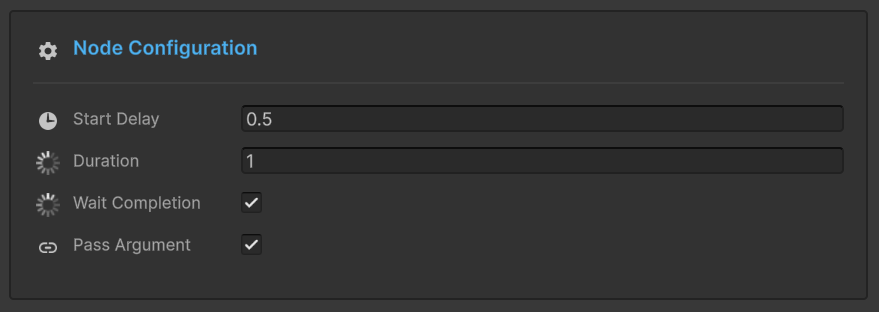
Duration
Type: Seconds (float)
Effect: Forces graph to pause at this node for specified time after event fires.
Use Case: Wait for animations, timed sequences, cooldowns.
Duration Examples
Animation Wait:
🖼️ T+0.0s | Initiation
⚔️ PlayAttackAnimation()
│
┆  (Δ 1.5s Delay: Animation Duration)
▼
🖼️ T+1.5s | Execution
💥 DealDamage()
│
📊 Result: 1.5s total duration | ✅ Chain Completed
Timed Sequence:
🖼️ T+0.0s | Activation
⚠️ ShowWarning()
│
┆  (Δ 3.0s Display Duration)
▼
🖼️ T+3.0s | Cleanup
🙈 HideWarning()
│
📊 Lifecycle: 3.0s Active | ✅ Auto-Cleanup Completed
Visual Indicator: Badge shows ⏳ 3.0s at bottom of node.
Wait for Completion
Type: Boolean toggle
Effect: Graph waits for async operations to finish before continuing.
Requirements: Event listener must return Task or IEnumerator.
Async Support
Coroutines (IEnumerator):
public IEnumerator OnLoadLevel()
{
    yield return SceneManager.LoadSceneAsync("Level2");
    Debug.Log("Load complete");
}
Async/Await (Task):
public async Task OnDownloadData()
{
    await DownloadFromServer();
    Debug.Log("Download complete");
}
Flow Behavior:
Without "Wait for Completion", ShowSuccessMessage would fire immediately (before loading finishes).
Duration + Wait Combined
Both settings work together:
Scenario A: Task < Duration (Minimum Floor)
Example: The cutscene finishes quickly (1.5s), but the goal is to maintain the 2.0s pacing.
🖼️ T+0.0s | Initiation
🎬 PlayCutscene() ➔ [Task Starts]
│
├─ ⏱️ 1.5s: [Task Completed Internally]
│  ⏳ Status: Still Waiting (Safety Floor active)
│
└─ 🏁 T+2.0s: Logic Continues
│
📊 Result: Exact 2.0s duration (Pacing Maintained)
Scenario B: Task > Duration (Async Wait)
Example: The cutscene takes longer (5.0s) due to loading. The system waits for the task to finish.
🖼️ T+0.0s | Initiation
🎬 PlayCutscene() ➔ [Task Starts]
│
├─ ⏱️ 2.0s: [Safety Floor Reached]
│  ⏳ Status: Task still running... (Async Wait active)
│
└─ 🏁 T+5.0s: [Task Finally Completed] ➔ Logic Continues
│
📊 Result: 5.0s duration (Full Completion Guaranteed)
Visual Indicators:
- ⏳ 2.0s (duration badge)
- ⚓ Wait (completion badge)
Configuration Examples
Example 1: Delayed Trigger Sequence
Goal: Play 3 sounds with staggered timing.
Example 2: Conditional Chain with Wait
Goal: Load level only if player completed tutorial.
Flow:
- Level completes
- Check condition (passes if tutorial done)
- Start async load, wait for completion
- Show level start UI
Quick Node Type Conversion
To change a node's type, you do not delete and recreate it.
How To:
- Right-click the node in graph
- Select "Convert to Trigger" or "Convert to Chain"
What's Preserved:
- ✅ Event assignment
- ✅ Connections
- ✅ Start Delay
- ✅ Pass Argument
- ✅ Conditions
What Changes:
- Trigger → Chain: Priority removed, Duration/Wait added
- Chain → Trigger: Duration/Wait removed, Priority added
Troubleshooting
Node Doesn't Fire
Checklist:
- ✅ Is condition enabled and passing?
- ✅ Is parent node firing?
- ✅ Is connection intact?
- ✅ Is graph enabled in toolbar?
Debug: Add temporary condition-less node to test flow.
"Pass Argument" Grayed Out
Cause: Event type is void (no arguments to pass).
Solution: This is expected—void events have no data to forward.
Duration Not Working
Common Issues:
- Node type is Trigger (duration only works on Chain nodes)
- Duration set to 0
- "Wait for Completion" blocking longer than duration
Solution: Verify node type and check both duration and wait settings.
Async Not Waiting
Cause: "Wait for Completion" is unchecked.
Solution: Enable "Wait for Completion" toggle.
Requirement: Event listener must return Task or IEnumerator.