02 基本类型事件:用事件传递数据
📋 概述
虽然void事件非常适合简单的信号,但大多数游戏需要传递数据:"造成多少伤害?"、"哪个物品?"、"在哪里生成?"。此演示展示了泛型事件系统,它允许您将标准的C#和Unity类型作为事件参数传递,而无需编写自定义事件类。
- 如何为不同的数据类型创建泛型事件
- 系统如何自动生成类型安全的事件类
- 如何触发和接收带参数的事件
- 编辑器中的类型安全强制执行
🎬 演示场景
Assets/TinyGiants/GameEventSystem/Demo/02_BasicTypesEvent/02_BasicTypesEvent.unity
场景组成
UI层(Canvas):
- 🎮 四个按钮 - 位于屏幕底部
- "Raise (String)" → 触发
BasicTypesEventRaiser.RaiseString() - "Raise (Vector3)" → 触发
BasicTypesEventRaiser.RaiseVector3() - "Raise (GameObject)" → 触发
BasicTypesEventRaiser.RaiseGameObject() - "Raise (Material)" → 触发
BasicTypesEventRaiser.RaiseMaterial()
- "Raise (String)" → 触发
游戏逻辑层(演示脚本):
-
📤 BasicTypesEventRaiser - 带有触发器脚本的GameObject
- 持有对4个不同泛型事件的引用:
GameEvent<string>、GameEvent<Vector3>、GameEvent<GameObject>、GameEvent<Material> - 每个按钮使用特定数据触发不同的触发方法
- 持有对4个不同泛型事件的引用:
-
📥 BasicTypesEventReceiver - 带有接收器脚本的GameObject
- 通过游戏事件编辑器中的可视化绑定监听所有4个事件
- 引用各种场景对象以应用事件数据
视觉反馈层(演示对象):
- 📝 HoloDisplay - 显示接收到的字符串消息的TextMeshPro对象
- 🎲 Cube - 当Vector3事件触发时移动的3D对象,当Material事件触发时改变颜色
- 📍 TargetPosition - 标记GameObject事件生成位置的Transform
- 🏠 Plane - 用于视觉上下文的地面表面
🎮 如何交互
步骤1:进入播放模式
按Unity中的播放按钮。
步骤2:测试每种事件类型
点击"Raise (String)":
- 📝 HoloDisplay文本更新为"Hello World [计数]"
- 🔢 每次点击计数器递增
- 📊 控制台日志:
[Sender] Raised String Event→[Receiver] String Event Processed
点击"Raise (Vector3)":
- 🎲 蓝色立方体传送到随机位置
- 📊 位置在范围内随机(-2到2,0到3,0)
- 📝 控制台显示发送和接收的确切坐标
点击"Raise (GameObject)":
- 🎁 随机预制体(立方体或球体)在TargetPosition生成
- 🔄 创建新对象前销毁之前的生成对象
- 📝 控制台记录实例化了哪个预制体
点击"Raise (Material)":
- 🎨 立方体变为随机颜色(红色/绿色/蓝色/黄色)
- ✨ 材质变化是即时的
- 📝 控制台记录应用的材质名称
🏗️ 场景架构
事件定义
打开游戏事件编辑器窗口以查看4个预配置的事件:
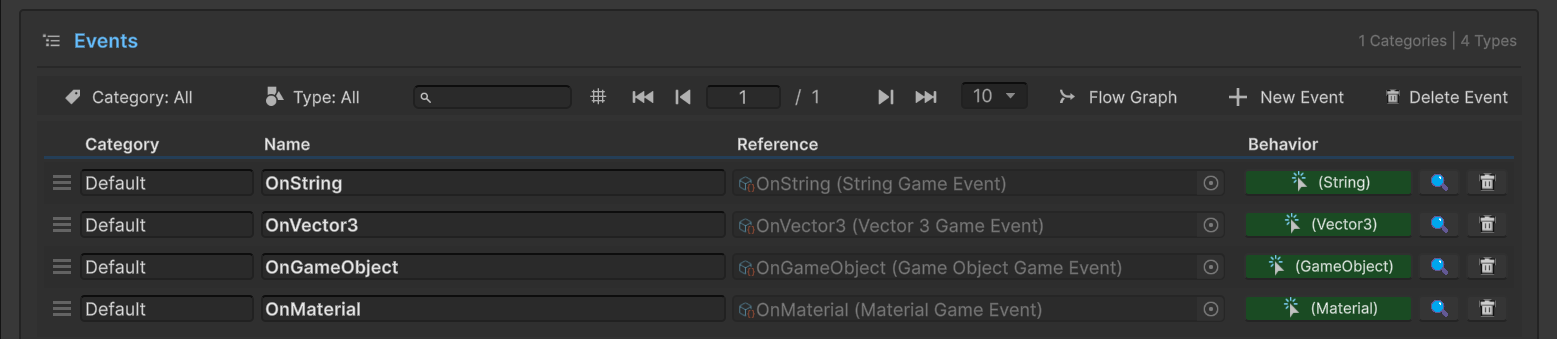
数据库中的事件:
| 事件名称 | 类型 | 目的 |
|---|---|---|
OnString | GameEvent<string> | 更新文本显示 |
OnVector3 | GameEvent<Vector3> | 发送位置/移动数据 |
OnGameObject | GameEvent<GameObject> | 传递用于生成的预制体引用 |
OnMaterial | GameEvent<Material> | 发送用于视觉变化的材质资产 |
注意行为列: 每个事件在行为列中显示彩色类型指示器(例如,(String)、(Vector3))。点击这些图标会打开行为窗口,您可以在其中配置回调绑定——与您在上一个演示中看到的相同的可视化绑定系统。
您不需要手动创建StringGameEvent或Vector3GameEvent类。当您在编辑器中创建新事件时,系统会自动生成像GameEvent<T>这样的具体类型。
发送者设置(BasicTypesEventRaiser)
在层级视图中选择BasicTypesEventRaiser GameObject:
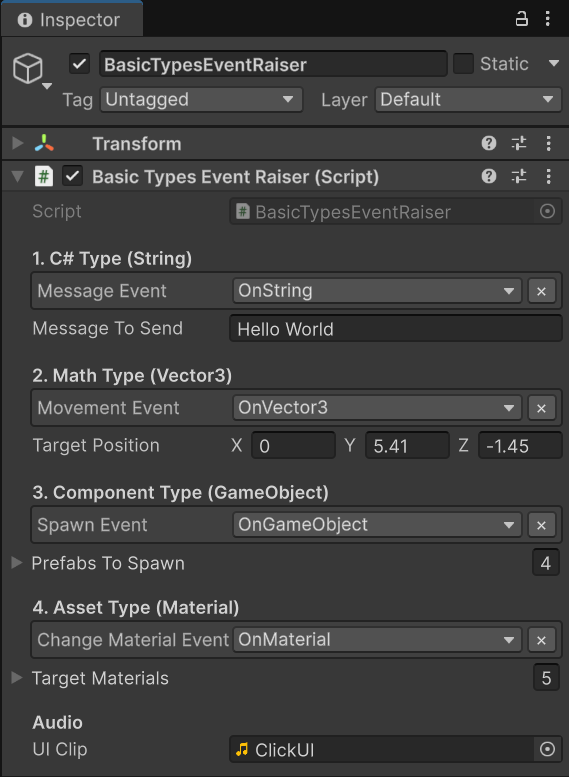
配置详情:
1. C#类型(String)
Message Event→OnString(类型过滤下拉菜单)Message To Send→ "Hello World"(模板文本)
2. 数学类型(Vector3)
Movement Event→OnVector3Target Position→ (0, 5.41, -1.45)(参考位置)
3. 组件类型(GameObject)
Spawn Event→OnGameObjectPrefabs To Spawn→ 4个基本预制体的列表(立方体、球体等)
4. 资产类型(Material)
Change Material Event→OnMaterialTarget Materials→ 5个彩色材质的列表
类型安全实践:
[GameEventDropdown]特性自动按类型过滤事件- 您只能将
GameEvent<string>分配给"Message Event"槽 - 尝试将
GameEvent<Vector3>分配给字符串槽会被编辑器阻止 - 这种编译时类型安全防止运行时错误
接收者设置(BasicTypesEventReceiver)
在层级视图中选择BasicTypesEventReceiver GameObject以查看其场景引用:
场景引用:
Log Text→ HoloDisplay(TextMeshPro组件)Moving Cube→ Cube(Transform组件)Changing Cube Renderer→ Cube(MeshRenderer组件)Spawn Point→ TargetPosition(Transform组件)
行为绑定:
4个事件中的每一个都通过游戏事件编辑器中的行为窗口绑定到相应的接收器方法(类似于您在Void事件演示中配置的内容):
| 事件 | 绑定方法 | 签名 |
|---|---|---|
OnString | OnMessageReceived | void (string msg) |
OnVector3 | OnMoveReceived | void (Vector3 pos) |
OnGameObject | OnSpawnReceived | void (GameObject prefab) |
OnMaterial | OnMaterialReceived | void (Material mat) |
行为窗口的方法下拉菜单根据事件的参数类型自动过滤方法。对于GameEvent<string>,您只会看到带有(string)参数的方法。这在配置时确保类型安全!
💻 代码分解
📤 BasicTypesEventRaiser.cs(发送者)
using UnityEngine;
using TinyGiants.GameEventSystem.Runtime;
using System.Collections.Generic;

public class BasicTypesEventRaiser : MonoBehaviour
{
    [Header("1. C#类型(String)")]
    [GameEventDropdown] public GameEvent<string> messageEvent;
    public string messageToSend = "Hello World";

    [Header("2. 数学类型(Vector3)")]
    [GameEventDropdown] public GameEvent<Vector3> movementEvent;
    public Vector3 targetPosition = new Vector3(0, 2, 0);

    [Header("3. 组件类型(GameObject)")]
    [GameEventDropdown] public GameEvent<GameObject> spawnEvent;
    public List<GameObject> prefabsToSpawn = new List<GameObject>();

    [Header("4. 资产类型(Material)")]
    [GameEventDropdown] public GameEvent<Material> changeMaterialEvent;
    public List<Material> targetMaterials = new List<Material>();

    private int _count;
    private AudioSource _audioSource;

    /// <summary>
    /// 用动态文本内容触发GameEvent<string>。
    /// 接收者必须有签名:void MethodName(string value)
    /// </summary>
    public void RaiseString()
    {
        if (messageEvent == null)
        {
            Debug.LogWarning("[MessageEvent] 未分配GameEvent。");
            return;
        }

        // 传递带递增计数器的动态字符串
        messageEvent.Raise($"{messageToSend} [{_count++}]");
        Debug.Log($"[Sender] 触发了String事件:{messageEvent.name}");
    }

    /// <summary>
    /// 用随机位置数据触发GameEvent<Vector3>。
    /// 对于移动、方向或物理力很有用。
    /// </summary>
    public void RaiseVector3()
    {
        Vector3 randomPos = new Vector3(
            Random.Range(-2f, 2f),
            Random.Range(0f, 3f),
            0
        );

        if (movementEvent != null)
        {
            movementEvent.Raise(randomPos);
            Debug.Log($"[Sender] 触发了Vector3事件:{randomPos}");
        }
    }

    /// <summary>
    /// 用预制体引用触发GameEvent<GameObject>。
    /// 演示安全地传递Unity对象引用。
    /// </summary>
    public void RaiseGameObject()
    {
        if (spawnEvent != null && prefabsToSpawn != null && prefabsToSpawn.Count > 0)
        {
            GameObject randomPrefab = prefabsToSpawn[Random.Range(0, prefabsToSpawn.Count)];
            spawnEvent.Raise(randomPrefab);
            Debug.Log($"[Sender] 触发了GameObject事件。生成:{randomPrefab?.name ?? "null"}");
        }
        else
        {
            Debug.LogWarning("[Sender] RaiseGameObject失败:事件或预制体列表为null/空。");
        }
    }

    /// <summary>
    /// 用材质资产引用触发GameEvent<Material>。
    /// 非常适合运行时视觉定制。
    /// </summary>
    public void RaiseMaterial()
    {
        if (changeMaterialEvent != null && targetMaterials != null && targetMaterials.Count > 0)
        {
            Material randomMaterial = targetMaterials[Random.Range(0, targetMaterials.Count)];
            changeMaterialEvent.Raise(randomMaterial);
            Debug.Log($"[Sender] 触发了Material事件。材质:{randomMaterial?.name ?? "null"}");
        }
        else
        {
            Debug.LogWarning("[Sender] RaiseMaterial失败:事件或材质列表为null/空。");
        }
    }
}
关键点:
- 🎯 泛型语法 -
GameEvent<T>自动处理不同类型 - 🔒 类型安全 - 每个事件只能接受其声明的参数类型
- 📦 数据传递 -
.Raise(value)方法接受类型化参数 - 🔇 解耦 - 发送者不知道谁或什么响应
📥 BasicTypesEventReceiver.cs(监听器)
using UnityEngine;
using TMPro;

public class BasicTypesEventReceiver : MonoBehaviour
{
    [SerializeField] private TextMeshPro logText;
    [SerializeField] private Transform movingCube;
    [SerializeField] private MeshRenderer changingCubeRenderer;
    [SerializeField] private Transform spawnPoint;

    /// <summary>
    /// 通过游戏事件编辑器的行为窗口绑定到'OnString'事件。
    /// 签名:void (string)
    /// </summary>
    public void OnMessageReceived(string msg)
    {
        if (logText != null)
            logText.text = $"接收到字符串:\n<color=yellow>{msg}</color>";

        Debug.Log($"[Receiver] 处理了String事件:{msg}");
    }

    /// <summary>
    /// 通过游戏事件编辑器的行为窗口绑定到'OnVector3'事件。
    /// 签名:void (Vector3)
    /// </summary>
    public void OnMoveReceived(Vector3 pos)
    {
        if (movingCube != null)
            movingCube.localPosition = pos;

        Debug.Log($"[Receiver] 将立方体移动到:{pos}");
    }

    /// <summary>
    /// 通过游戏事件编辑器的行为窗口绑定到'OnGameObject'事件。
    /// 签名:void (GameObject)
    /// </summary>
    public void OnSpawnReceived(GameObject prefab)
    {
        if (prefab != null && spawnPoint != null)
        {
            // 清除之前的生成对象
            if (spawnPoint.childCount > 0)
            {
                foreach(Transform child in spawnPoint)
                    Destroy(child.gameObject);
            }

            Instantiate(prefab, spawnPoint.position, Quaternion.identity, spawnPoint);
            Debug.Log($"[Receiver] 生成了实例:{prefab.name}");
        }
    }

    /// <summary>
    /// 通过游戏事件编辑器的行为窗口绑定到'OnMaterial'事件。
    /// 签名:void (Material)
    /// </summary>
    public void OnMaterialReceived(Material mat)
    {
        if (changingCubeRenderer != null && mat != null)
        {
            changingCubeRenderer.material = mat;
            Debug.Log($"[Receiver] 材质更改为:{mat.name}");
        }
    }
}
关键点:
- 🎯 签名匹配 - 每个方法参数必须完全匹配事件类型
- 🔒 类型安全 - 编辑器的行为窗口仅显示兼容的方法
- 🎨 直接使用 - 接收到的数据可以立即使用(无需转换)
- 🔇 解耦 - 接收者不知道发送者
🔑 关键要点
| 概念 | 实现 |
|---|---|
| 🎯 泛型事件 | GameEvent<T>支持任何可序列化类型 |
| 🔒 类型安全 | 编辑器在配置时强制执行匹配类型 |
| 🏭 自动生成 | 不需要手动创建事件类 |
| 📦 数据传递 | .Raise(value)无缝传递类型化参数 |
| 🔄 灵活性 | 一个系统处理字符串、向量、对象、材质等 |
泛型系统消除了样板代码。您不需要创建StringGameEvent、Vector3GameEvent等,只需使用任何类型的GameEvent<T>。系统自动处理代码生成和类型强制执行!
🎯 下一步?
您已经学会了如何传递内置类型。但是您自己的自定义类呢?
下一章:在**03 自定义类型事件**中使用自定义数据类型创建事件