07 Delayed Event: The Time Bomb Scenario
📋 Overview
Standard events fire instantly (Raise() → Execute()). Delayed events introduce a critical gap: Raise() → [Pending State] → Execute(). This demo demonstrates the Scheduling System through a classic "Cut the Wire" mini-game, where you'll learn how to configure delayed execution and—critically—how to cancel pending events before they execute.
- How to configure action delays in the Behavior Window
- How the event scheduling system works internally
- How to cancel pending events with
.Cancel() - The difference between visual timers and logic timers
🎬 Demo Scene
Assets/TinyGiants/GameEventSystem/Demo/07_DelayedEvent/07_DelayedEvent.unity
Scene Composition
Visual Elements:
- 💣 TimeBomb_TNT - Cylindrical bomb in the center
- Black cylinder body with red caps
- Orange timer display showing countdown: "04.046" (updates in real-time)
- Two colored indicator lights (red and green) on top
- Sits on a grey circular platform
UI Layer (Canvas):
- 🎮 Three Buttons - Bottom of the screen
- "Arm Bomb" (White) → Triggers
DelayedEventRaiser.ArmBomb() - "Cut RedWire" (Red/Pink) → Triggers
DelayedEventRaiser.CutRedWire() - "Cut GreenWire" (Green) → Triggers
DelayedEventRaiser.CutGreenWire()
- "Arm Bomb" (White) → Triggers
Game Logic Layer (Demo Scripts):
-
📤 DelayedEventRaiser - GameObject with the raiser script
- Manages bomb arming and wire cutting logic
- Randomly determines which wire is safe each round
- Controls visual countdown timer (cosmetic)
- Calls
.Cancel()when correct wire is cut
-
📥 DelayedEventReceiver - GameObject with the receiver script
- Listens to
onExplodeEvent - Executes explosion logic: VFX, physics, camera shake
- Only called if timer reaches zero (not canceled)
- Listens to
Audio-Visual Feedback:
- 🔊 Tick Sound - Plays every second during countdown
- 💥 Explosion VFX - Particle system spawns on detonation
- ⚡ Wire Sparks - Particle effect when cutting wires
- 📹 Camera Shake - Intense shake on explosion
🎮 How to Interact
The Defusal Challenge
You have 5 seconds to identify and cut the correct wire. One wire is SAFE (cancels the event), the other is a TRAP (does nothing).
The safe wire is randomized every time you arm the bomb! Pay attention to the Console log (or take your chances).
Step 1: Enter Play Mode
Press the Play button in Unity. The bomb displays "READY" in white text.
Step 2: Arm the Bomb
Click "Arm Bomb" (White Button):
What Happens:
- 🔊 Ticking sound begins (beep every second)
- ⏱️ Timer starts counting down from
05.000in orange - 🎲 System randomly selects safe wire (Red or Green)
- 📝 Console reveals the answer:
[Game Logic] Bomb Armed! The SAFE wire is: Red - 💣 Event enters Pending State - will execute in 5 seconds
Visual Changes:
- Timer text turns from white to orange
- Timer counts down with millisecond precision:
04.987,04.834... - Color gradually shifts from orange → red as time runs out
Behind the Scenes:
explodeEvent.Raise()is called- Because Action Delay = 5s is configured in the Behavior Window
- The event is queued in the GameEventManager's scheduler
- A countdown timer starts internally
Step 3: Choose Your Fate
You now have three options with very different outcomes:
Option A: Do Nothing (Let It Explode)
Action: Don't click any button. Wait.
Timeline:
04.000- Second tick sound03.000- Tick, timer turns more red02.000- Tick, urgency builds01.000- Final tick00.000- BOOM!
Result: 💥 EXPLOSION
- Console:
BOOM! The event executed. - Massive explosion VFX spawns at bomb location
- Bomb cylinder becomes kinetic and launches into the air
- Camera shakes violently (0.5s duration, 0.8 magnitude)
- Explosion sound plays
- Timer text changes to "ERROR" in dark red
Why: The 5-second delay elapsed, so DelayedEventReceiver.OnExplode() was invoked by the scheduler.
Option B: Cut the Wrong Wire
Action: Click the button that is NOT the safe wire.
Example: If Console said The SAFE wire is: Red, click "Cut GreenWire"
What Happens:
- ⚡ Wire sparks VFX plays
- 🔊 Wire cutting sound
- 📝 Console:
[Player] Cutting Green Wire... - 📝 Console:
Wrong wire! The clock is still ticking... - ⏱️ Timer continues counting down
- 💣 Event remains in Pending State
Result: Nothing changes. The countdown continues.
- After a few seconds: BOOM! (same as Option A)
- You get to feel the tension of making the wrong choice
Why: The code checks if (color == _safeWireColor), and since it's false, .Cancel() is never called. The scheduler keeps running.
Option C: Cut the Correct Wire (Defuse)
Action: Click the button matching the safe wire.
Example: If Console said The SAFE wire is: Red, click "Cut RedWire"
What Happens:
- ⚡ Wire sparks VFX plays
- 🔊 Wire cutting sound
- 📝 Console:
[Player] Cutting Red Wire... - 🎯 CRITICAL:
explodeEvent.Cancel()is called - ⏱️ Timer stops immediately at current value (e.g.,
03.247) - 📝 Console:
BOMB DEFUSED! Event Cancelled. - ✅ Timer text changes to "DEFUSED" in green
- 🔕 Defuse success sound plays
- 💣 Event removed from Pending State
Result: 🟢 SUCCESS - No Explosion
- The bomb is safe
DelayedEventReceiver.OnExplode()is NEVER CALLED- You can arm the bomb again for another round
Why: .Cancel() removes the scheduled event from the GameEventManager's internal queue. When the 5-second timer would have elapsed, there's nothing to execute.
🏗️ Scene Architecture
The Scheduling System
Delayed events use an internal timer managed by the GameEventManager:
🚀 Initiation: Raise()
│
📦 [ Queue Event + Start Timer ]
│
⏳ Status: Waiting...
│
├─ ⚡ Execution Path (Timer Expired)
│  └─► ✅ Execute() ➔ Logic Invoked
│
└─ 🛑 Interruption Path (Manual/Condition)
   └─► 🧹 Cancel() ➔ [ Removed from Queue ]
Key Concepts:
- Pending State: Between
Raise()and execution - Scheduler Queue: Internal list of timed events
- Cancellation: Removes event from queue before execution
- Atomic Operation: If canceled, receiver method never runs
Event Definition

| Event Name | Type | Configured Delay |
|---|---|---|
onExplodeEvent | GameEvent (void) | 5.0 seconds |
Behavior Configuration with Delay
Click the (void) icon in the Behavior column to open the Behavior Window:
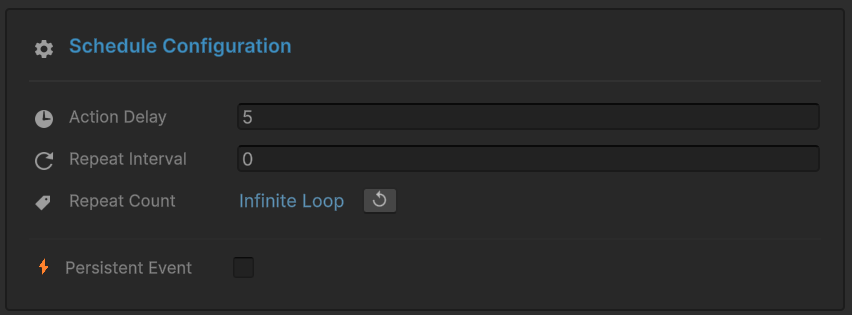
Schedule Configuration Section:
-
⏱️ Action Delay:
5seconds- This is the time gap between
Raise()and execution - Configurable per-event in the Editor
- No code changes needed to adjust timing
- This is the time gap between
-
🔄 Repeat Interval:
0(disabled) -
🔢 Repeat Count:
Infinite Loop(not used in this demo) -
💾 Persistent Event: Unchecked
Event Action:
- Method:
DelayedEventReceiver.OnExplode() - Mode: Runtime Only
Want to make the bomb countdown faster or slower? Just change the Action Delay value in this window. Try 3 for harder difficulty or 10 for easier!
Sender Setup (DelayedEventRaiser)
Select the DelayedEventRaiser GameObject:
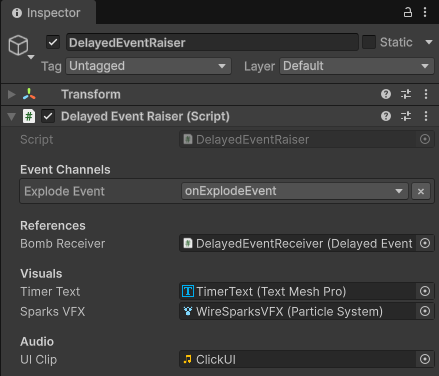
Event Channels:
Explode Event:onExplodeEvent- Tooltip: "Configuration: Start Delay = 5.0 seconds"
References:
Bomb Receiver: DelayedEventReceiver (for callback coordination)
Visuals:
Timer Text: TimerText (TextMeshPro) - displays countdownSparks VFX: WireSparksVFX (Particle System) - wire cutting effect
Receiver Setup (DelayedEventReceiver)
Select the DelayedEventReceiver GameObject:

References:
Bomb Raiser: DelayedEventRaiser (for state callback)Bomb Rigidbody: TimeBomb_TNT (Rigidbody) - for explosion physics
Visuals:
Explosion VFX Prefab: BombExplosionVFX (Particle System)
Audio:
Tick Clip: BeepSFX (tick sound every second)Explosion Clip: BoomSFX (explosion sound)Defuse Clip: DefuseSFX (success sound)
💻 Code Breakdown
📤 DelayedEventRaiser.cs (Sender)
using UnityEngine;
using TinyGiants.GameEventSystem.Runtime;
using System.Collections;

public class DelayedEventRaiser : MonoBehaviour
{
    [Header("Event Channels")]
    [Tooltip("Configuration: Start Delay = 5.0 seconds.")]
    [GameEventDropdown] public GameEvent explodeEvent;

    private bool _isArmed;
    private float _countDownTime = 5.0f;
    private string _safeWireColor; // Randomized each round

    /// <summary>
    /// Button Action: Arms the bomb and starts the delayed event.
    /// </summary>
    public void ArmBomb()
    {
        if (_isArmed || explodeEvent == null) return;

        _isArmed = true;

        // Randomize the puzzle solution
        _safeWireColor = Random.value > 0.5f ? "Red" : "Green";
        Debug.Log($"[Game Logic] Bomb Armed! The SAFE wire is: " +
                  $"<color={_safeWireColor.ToLower()}>{_safeWireColor}</color>");

        // CRITICAL: Raise the delayed event
        // This does NOT execute immediately!
        // The event enters "Pending State" for 5 seconds
        explodeEvent.Raise();

        // Start cosmetic countdown (visual only)
        StartCoroutine(CountdownRoutine());
    }

    /// <summary>
    /// Button Action: Player attempts to cut the Red wire.
    /// </summary>
    public void CutRedWire() => ProcessCut("Red");

    /// <summary>
    /// Button Action: Player attempts to cut the Green wire.
    /// </summary>
    public void CutGreenWire() => ProcessCut("Green");

    private void ProcessCut(string color)
    {
        if (!_isArmed) return;

        Debug.Log($"[Player] Cutting {color} Wire...");

        // Play wire cutting VFX...

        // CRITICAL DECISION POINT
        if (color == _safeWireColor)
        {
            // THE MAGIC: Cancel the pending event
            // This removes it from the scheduler's queue
            // OnExplode() will NEVER be called
            explodeEvent.Cancel();

            DisarmSuccess();
        }
        else
        {
            // Wrong wire - event remains pending
            Debug.LogWarning("Wrong wire! The clock is still ticking...");
        }
    }

    private void DisarmSuccess()
    {
        _isArmed = false;
        StopAllCoroutines(); // Stop visual countdown

        // Update UI to show success...
        Debug.Log("<color=green>BOMB DEFUSED! Event Cancelled.</color>");
    }

    private IEnumerator CountdownRoutine()
    {
        // This is PURELY COSMETIC
        // The real timer is managed by GameEventManager's scheduler
        // Even if this coroutine stops, the bomb would still explode

        float _currentTimer = _countDownTime;

        while (_currentTimer > 0)
        {
            _currentTimer -= Time.deltaTime;
            if (_currentTimer < 0) _currentTimer = 0;

            // Update visual timer text
            if (timerText)
            {
                timerText.text = _currentTimer.ToString("00.000");

                // Color lerp from orange to red for urgency
                float urgency = 1f - (_currentTimer / _countDownTime);
                timerText.color = Color.Lerp(new Color(1f, 0.5f, 0f),
                                            Color.red, urgency);
            }

            yield return null;
        }
    }
}
Key Points:
- 🎯 Separation of Concerns - Visual timer (coroutine) vs Logic timer (scheduler)
- 🎲 Random Selection -
_safeWireColordetermined each round - 🔴 Cancel API -
.Cancel()removes pending event from queue - ⏱️ Cosmetic Countdown - UI updates independently of event system
📥 DelayedEventReceiver.cs (Listener)
using UnityEngine;
using System.Collections;

public class DelayedEventReceiver : MonoBehaviour
{
    [SerializeField] private Rigidbody bombRigidbody;
    [SerializeField] private ParticleSystem explosionVFXPrefab;

    private AudioSource _audioSource;
    private Camera _mainCamera;

    /// <summary>
    /// [Event Callback - Delayed Execution]
    ///
    /// This method is ONLY called if:
    /// 1. explodeEvent.Raise() was called
    /// 2. 5 seconds elapsed
    /// 3. explodeEvent.Cancel() was NOT called during that time
    ///
    /// If the correct wire is cut, this method never runs.
    /// </summary>
    public void OnExplode()
    {
        Debug.Log("<color=red><b>BOOM! The event executed.</b></color>");

        // Spawn explosion VFX
        if (explosionVFXPrefab != null)
        {
            ParticleSystem vfx = Instantiate(explosionVFXPrefab,
                                            transform.position,
                                            Quaternion.identity);
            vfx.Play();
            Destroy(vfx.gameObject, 3.0f);
        }

        // Enable physics on bomb
        if (bombRigidbody)
        {
            bombRigidbody.isKinematic = false;

            // Apply explosion force (launches bomb upward)
            bombRigidbody.AddExplosionForce(2000f,
                                           transform.position + Vector3.down * 0.5f,
                                           5f);
            bombRigidbody.AddTorque(Random.insideUnitSphere * 100f,
                                   ForceMode.Impulse);
        }

        // Audio + Camera shake
        if (explosionClip) _audioSource.PlayOneShot(explosionClip);
        StartCoroutine(ShakeCamera(0.5f, 0.8f));
    }

    private IEnumerator ShakeCamera(float duration, float magnitude)
    {
        if (_mainCamera == null) yield break;

        Vector3 originalPos = _mainCamera.transform.position;
        float elapsed = 0f;

        while (elapsed < duration)
        {
            float x = Random.Range(-1f, 1f) * magnitude;
            float y = Random.Range(-1f, 1f) * magnitude;
            _mainCamera.transform.position = originalPos + new Vector3(x, y, 0);
            elapsed += Time.deltaTime;
            yield return null;
        }

        _mainCamera.transform.position = originalPos;
    }
}
Key Points:
- 🎯 Conditional Execution - Only runs if not canceled
- 💥 Explosion Logic - VFX, physics, audio, camera shake
- 🎬 Pure Reaction - No knowledge of timers or cancellation
- ⏱️ Delayed Invocation - Called 5 seconds after
Raise()(if not canceled)
🔑 Key Takeaways
| Concept | Implementation |
|---|---|
| ⏱️ Action Delay | Configure execution delay in Behavior Window (no code) |
| 📋 Pending State | Events wait in scheduler queue between Raise and Execute |
| 🔴 Cancellation API | .Cancel() removes event from queue before execution |
| 🎯 Atomic Execution | Canceled events never invoke receiver methods |
| 🎨 Visual vs Logic | Separate cosmetic timers from event system timers |
Delayed events are perfect for:
- Timed abilities - Cooldowns, cast times, channeling
- Countdown mechanics - Bombs, buffs expiring, reinforcements arriving
- Cancelable actions - Interrupt casting, defuse mechanics
- Turn-based delays - Wait for animation before next action
- Scheduled events - Day/night cycle triggers, periodic spawns
The .Cancel() API is critical for interactive gameplay—letting players interrupt dangerous actions adds tension and player agency!
🎯 What's Next?
You've mastered delayed execution and cancellation. Now let's explore repeating events for periodic behavior.
Next Chapter: Learn about repeat intervals in 08 Repeating Event
📚 Related Documentation
- Game Event Behavior - Complete guide to schedule configuration
- Raising and Scheduling - API reference for
.Raise()and.Cancel() - Best Practices - Patterns for timed gameplay mechanics