08 Repeating Event: Automated Loops
📋 Overview
Normally, creating a repeating pulse (like radar scans or poison damage) requires writing timer loops with InvokeRepeating or coroutines in C#. The GameEvent System moves this logic into the Event Asset itself—no code loops needed. Configure once in the Editor, then Raise() automatically handles the repetition.
- How to configure repeat intervals and counts in the Behavior Window
- The difference between finite loops (N times) and infinite loops (forever)
- How to cancel infinite loops with
.Cancel() - When to use repeating events vs manual triggers
🎬 Demo Scene
Assets/TinyGiants/GameEventSystem/Demo/08_RepeatingEvent/08_RepeatingEvent.unity
Scene Composition
Visual Elements:
-
📡 SonarBeacon - Central tower beacon
- Black cylindrical tower with grey base
- RotatingCore - Spinning element at the top (rotation speed indicates active mode)
- Emits expanding cyan shockwave rings when pulsing
-
🎯 ScanTargets - Four floating green cubes scattered around the beacon
- Display "?" text by default
- Change to red material and show "DETECTED" when hit by shockwave
- Reset to green after brief highlight
-
🔵 Cyan Ring - Large circular boundary line
- Indicates maximum scan range (40 units radius)
- Visual guide for pulse expansion area
UI Layer (Canvas):
- 🎮 Three Buttons - Bottom of the screen
- "Activate Beacon" (White) → Triggers
RepeatingEventRaiser.ActivateBeacon() - "Toggle Mode (Finite[5])" → Triggers
RepeatingEventRaiser.ToggleMode()- Switches between Finite and Infinite modes
- Text updates to show current mode
- "StopSignal" (White) → Triggers
RepeatingEventRaiser.StopSignal()
- "Activate Beacon" (White) → Triggers
Game Logic Layer (Demo Scripts):
-
📤 RepeatingEventRaiser - GameObject with the raiser script
- Manages two events:
onFinitePulseEventandonInfinitePulseEvent - Switches between modes and controls beacon rotation speed
- Calls
.Raise()once—system handles repetition automatically
- Manages two events:
-
📥 RepeatingEventReceiver - GameObject with the receiver script
- Listens to pulse events
- Spawns shockwave VFX and sonar audio
- Runs physics-based scan routine to detect targets
Audio-Visual Feedback:
- 💫 ShockwaveVFX - Expanding cyan particle ring
- 🔊 Sonar Ping - Audio pulse on each scan
- 🎵 Toggle/Stop Sounds - UI feedback
🎮 How to Interact
The Two Loop Modes
This demo showcases two distinct looping patterns:
Finite Mode (5 Pulses):
- Interval: 1.5 seconds
- Count: 5 repetitions
- Behavior: Fires 5 times automatically, then stops
Infinite Mode (Continuous):
- Interval: 1.0 second
- Count: -1 (Infinite Loop)
- Behavior: Fires forever until manually canceled
Step 1: Enter Play Mode
Press the Play button in Unity. The beacon's core rotates slowly (idle state).
UI State:
- Mode button shows: "Toggle Mode (Finite[5])"
- Beacon rotation: ~20°/sec (idle speed)
Step 2: Test Finite Loop Mode
Current Mode Check: Ensure the button displays "Toggle Mode (Finite[5])" (default mode).
Click "Activate Beacon":
What Happens:
-
🎯 Beacon core rotation speeds up to 150°/sec
-
📡 First pulse fires immediately
- Cyan shockwave ring spawns and expands outward
- Sonar ping sound plays
- Green cubes turn red briefly when ring reaches them
- Console:
[Raiser] Beacon Activated. Mode: Finite (5x) - Console:
[Receiver] Pulse #1 emitted.
-
⏱️ 1.5 seconds later - Second pulse
- Console:
[Receiver] Pulse #2 emitted. - Another shockwave expands
- Targets flash red again
- Console:
-
⏱️ Pulses 3, 4, 5 continue at 1.5s intervals
- Console counts up to
[Receiver] Pulse #5 emitted.
- Console counts up to
-
✅ After 5th pulse - Auto-stop
- Beacon core rotation slows down to 20°/sec (idle)
- No more pulses fire
- System automatically stopped—no manual intervention
Timeline:
🖼️ T+0.0s | Initial
⚡ Pulse #1 (First Trigger)
│
┆  (Δ 1.5s Loop)
▼
🖼️ T+1.5s | Repeat 1
⚡ Pulse #2
│
┆  (Δ 1.5s Loop)
▼
🖼️ T+3.0s | Repeat 2
⚡ Pulse #3
│
┆  (Δ 1.5s Loop)
▼
🖼️ T+4.5s | Repeat 3
⚡ Pulse #4
│
┆  (Δ 1.5s Loop)
▼
🖼️ T+6.0s | Repeat 4
⚡ Pulse #5 (Final)
│
┆  (Δ 1.5s Gap)
▼
🛑 T+7.5s | Lifecycle End
🏁 [ Auto-stopped: No Pulse #6 ]
Result: ✅ Event repeated exactly 5 times, then terminated automatically.
Step 3: Test Infinite Loop Mode
Click "Toggle Mode":
- Button text changes to: "Toggle Mode (Infinite)"
- Toggle sound plays
- If beacon was active, it stops first
- Console: Mode switched
Click "Activate Beacon":
What Happens:
-
🎯 Beacon core rotation speeds up to 300°/sec (faster than finite mode!)
-
📡 Continuous pulses begin
- First pulse fires immediately
- Console:
[Raiser] Beacon Activated. Mode: Infinite - Console:
[Receiver] Pulse #1 emitted.
-
⏱️ Every 1.0 second - New pulse
- Faster interval than finite mode (1.0s vs 1.5s)
- Pulses keep coming: #2, #3, #4, #5...
- Counter increments indefinitely
-
⚠️ Never stops automatically
- Pulse #10, #20, #100...
- Will continue until manually canceled
- Beacon spins rapidly throughout
Observation Period: Let it run for ~10 seconds to see it won't auto-stop. Console shows pulse counts increasing without limit.
Step 4: Manual Cancellation
While Infinite Mode is Running:
Click "StopSignal":
What Happens:
-
🛑 Pulses cease immediately
- Current pulse finishes, but no new pulse is scheduled
- Beacon core rotation slows to idle (20°/sec)
- Console:
[Raiser] Signal Interrupted manually.
-
🔄 System state resets
- Pulse counter resets to 0
- Power down sound plays
- Beacon returns to standby mode
Result: ✅ Infinite loop successfully canceled via .Cancel() API.
- Finite Mode: Stops automatically after N repetitions
- Infinite Mode: Requires manual
.Cancel()to stop
🏗️ Scene Architecture
The Repeating Event System
Unlike delayed events (wait once, execute once), repeating events use a timer loop:
🚀 Initiation: Raise()
│
▼ ❮─── Loop Cycle ───┐
⚡ [ Execute Action ]  │
│                    │
⏳ [ Wait Interval ]  │ (Δ Delta Time)
│                    │
🔄 [ Repeat Check ] ──┘ (If Remaining > 0)
│
🛑 [ Stop Condition ] ➔ 🏁 Lifecycle Finalized
Stop Conditions:
- Repeat Count Reached: Finite mode auto-stops after N executions
- Manual Cancel:
.Cancel()terminates infinite loops immediately - Scene Unload: All pending events are cleaned up
Internal Scheduling:
- GameEventManager maintains a scheduler queue
- Each repeating event has an internal timer
- Timer resets after each execution to maintain precise intervals
Event Definitions

| Event Name | Type | Repeat Interval | Repeat Count |
|---|---|---|---|
onFinitePulseEvent | GameEvent (void) | 1.5 seconds | 5 |
onInfinitePulseEvent | GameEvent (void) | 1.0 second | -1 (Infinite) |
Same Receiver Method:
Both events are bound to RepeatingEventReceiver.OnPulseReceived(). The receiver doesn't know or care which event triggered it—it just responds to each pulse.
Behavior Configuration Comparison
Finite Loop Configuration
Click the (void) icon for onFinitePulseEvent to open the Behavior Window:
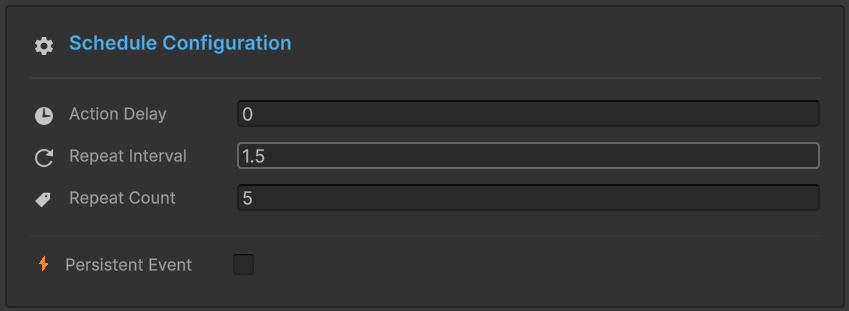
Schedule Configuration:
- ⏱️ Action Delay:
0(no initial delay) - 🔄 Repeat Interval:
1.5seconds- Time between each pulse execution
- 🔢 Repeat Count:
5- Total number of pulses
- Stops automatically after 5th execution
Behavior:
🖼️ T+0.0s | Initial Raise
🚀 Raise() ➔ ⚡ Execute #1
│
┆  (Δ 1.5s Interval)
▼
🖼️ T+1.5s | Repeat 1/4
⚡ Execute #2
│
┆  (Δ 1.5s Interval)
▼
🖼️ T+3.0s | Repeat 2/4
⚡ Execute #3
│
┆  (Δ 1.5s Interval)
▼
🖼️ T+4.5s | Repeat 3/4
⚡ Execute #4
│
┆  (Δ 1.5s Interval)
▼
🖼️ T+6.0s | Repeat 4/4
⚡ Execute #5 ➔ [Final Execution]
│
🏁 T+7.5s | Lifecycle End
🛑 [ Sequence Terminated: Counter at 0 ]
Infinite Loop Configuration
Click the (void) icon for onInfinitePulseEvent to open the Behavior Window:
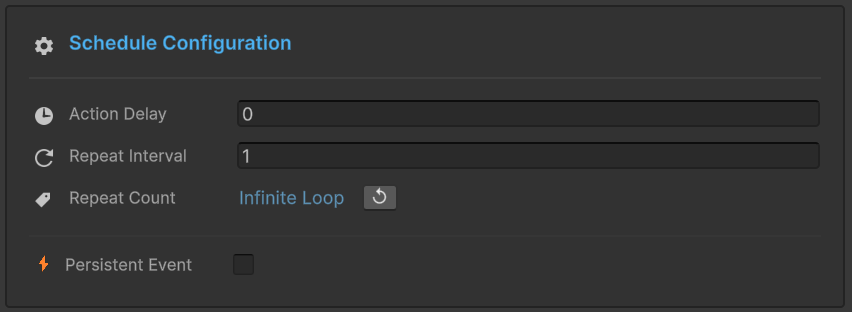
Schedule Configuration:
- ⏱️ Action Delay:
0 - 🔄 Repeat Interval:
1second (faster than finite mode) - 🔢 Repeat Count:
Infinite Loop♾️- Special value:
-1means unlimited - Will never auto-stop
- Special value:
Behavior:
🚀 Initiation: Raise()
│
▼ ❮━━━━━━━━━  Perpetual Loop  ━━━━━━━━━┓
⚡ Execute #1 (Initial)                ┃
│                                      ┃
⏳ (Wait 1.0s)                         ┃
│                                      ┃
⚡ Execute #2 (Repeat)                 ┃
│                                      ┃
⏳ (Wait 1.0s)                         ┃
│                                      ┃
⚡ Execute #N... (Repeat)              ┛
│
│   [ External Intervention Required ]
└─► 🛠️ Call: .Cancel()
    └─► 🛑 Loop Terminated ➔ 🏁 Cleanup
To set infinite repetition, click the Infinite Loop toggle button (♾️ icon) next to Repeat Count. This automatically sets the value to -1.
Sender Setup (RepeatingEventRaiser)
Select the RepeatingEventRaiser GameObject:

Event Channels:
Finite Pulse Event:onFinitePulseEvent- Tooltip: "Interval = 1.0s, Count = 5"
Infinite Pulse Event:onInfinitePulseEvent- Tooltip: "Interval = 0.5s, Count = -1 (Infinite)"
References:
Repeating Event Receiver: RepeatingEventReceiver (for coordination)
Visual References:
Rotating Core: RotatingCore (Transform) - visual indicator of active stateMode Text: Text (TMP) (TextMeshProUGUI) - displays current mode
Receiver Setup (RepeatingEventReceiver)
Select the RepeatingEventReceiver GameObject:
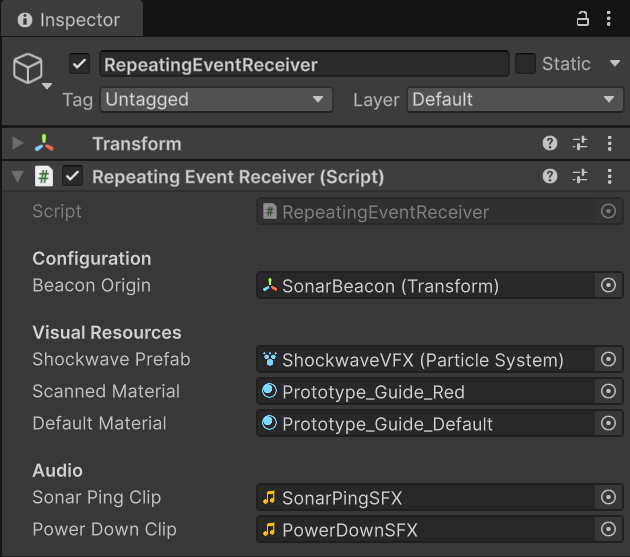
Configuration:
Beacon Origin: SonarBeacon (Transform) - pulse spawn point
Visual Resources:
Shockwave Prefab: ShockwaveVFX (Particle System) - expanding ring effectScanned Material: Prototype_Guide_Red - target highlight materialDefault Material: Prototype_Guide_Default - target normal material
Audio:
Sonar Ping Clip: SonarPingSFX - pulse soundPower Down Clip: PowerDownSFX - stop sound
💻 Code Breakdown
📤 RepeatingEventRaiser.cs (Sender)
using UnityEngine;
using TinyGiants.GameEventSystem.Runtime;
using TMPro;

public class RepeatingEventRaiser : MonoBehaviour
{
    [Header("Event Channels")]
    [Tooltip("Configured in Editor: Interval = 1.5s, Count = 5.")]
    [GameEventDropdown] public GameEvent finitePulseEvent;

    [Tooltip("Configured in Editor: Interval = 1.0s, Count = -1 (Infinite).")]
    [GameEventDropdown] public GameEvent infinitePulseEvent;

    [SerializeField] private Transform rotatingCore;
    [SerializeField] private TextMeshProUGUI modeText;

    private bool _isInfiniteMode = false;
    private bool _isActive = false;
    private GameEvent _currentEvent;

    private void Update()
    {
        // Visual feedback: Rotation speed indicates state
        if (rotatingCore != null)
        {
            float speed = _isActive
                ? (_isInfiniteMode ? 300f : 150f)  // Active: fast or medium
                : 20f;                              // Idle: slow
            rotatingCore.Rotate(Vector3.up, speed * Time.deltaTime);
        }
    }

    /// <summary>
    /// Button Action: Starts the repeating event loop.
    ///
    /// CRITICAL: This calls Raise() only ONCE.
    /// The Event System's scheduler handles all repetition automatically
    /// based on the Repeat Interval and Repeat Count configured in the Editor.
    /// </summary>
    public void ActivateBeacon()
    {
        if (_isActive) return;

        _isActive = true;

        // Select which event to use based on current mode
        _currentEvent = _isInfiniteMode ? infinitePulseEvent : finitePulseEvent;

        if (_currentEvent != null)
        {
            // THE MAGIC: Single Raise() call starts entire loop
            // System checks event's Repeat Interval & Repeat Count
            // Automatically schedules all future executions
            _currentEvent.Raise();

            Debug.Log($"[Raiser] Beacon Activated. Mode: " +
                     $"{(_isInfiniteMode ? "Infinite" : "Finite (5x)")}");
        }
    }

    /// <summary>
    /// Button Action: Switches between Finite and Infinite modes.
    /// Stops any active loop before switching.
    /// </summary>
    public void ToggleMode()
    {
        // Must stop before switching modes
        if (_isActive) StopSignal();

        _isInfiniteMode = !_isInfiniteMode;
        UpdateUI();
    }

    /// <summary>
    /// Button Action: Manually cancels the active loop.
    ///
    /// Essential for Infinite loops - they never auto-stop.
    /// For Finite loops, this allows early termination.
    /// </summary>
    public void StopSignal()
    {
        if (!_isActive || _currentEvent == null) return;

        // THE CRITICAL API: Cancel removes event from scheduler
        // Stops timer immediately - no more pulses will fire
        _currentEvent.Cancel();

        _isActive = false;
        UpdateUI();

        Debug.Log("[Raiser] Signal Interrupted manually.");
    }

    private void UpdateUI()
    {
        if (modeText)
            modeText.text = _isInfiniteMode
                ? "Toggle Mode\n<b>(Infinite)</b>"
                : "Toggle Mode\n<b>(Finite[5])</b>";
    }
}
Key Points:
- 🎯 Single Raise() - Only called once to start entire loop
- 🔀 Mode Selection - Switches between two pre-configured events
- 🛑 Cancel API - Stops infinite loops or terminates finite loops early
- 🎨 Visual Feedback - Rotation speed indicates active state and mode
📥 RepeatingEventReceiver.cs (Listener)
using UnityEngine;
using System.Collections;

public class RepeatingEventReceiver : MonoBehaviour
{
    [Header("Configuration")]
    public Transform beaconOrigin;

    [Header("Visual Resources")]
    public ParticleSystem shockwavePrefab;
    public Material scannedMaterial;
    public Material defaultMaterial;

    [Header("Audio")]
    public AudioClip sonarPingClip;

    private AudioSource _audioSource;
    private int _pulseCount = 0;

    /// <summary>
    /// [Event Callback - Repeating Execution]
    ///
    /// Bound to both 'onFinitePulseEvent' and 'onInfinitePulseEvent'.
    ///
    /// This method executes:
    /// - Immediately when Raise() is called (first pulse)
    /// - Then repeatedly at each Repeat Interval
    /// - Until Repeat Count reached (finite) or Cancel() called (infinite)
    ///
    /// The receiver is STATELESS - it doesn't track pulse numbers or loop status.
    /// It simply reacts to each trigger.
    /// </summary>
    public void OnPulseReceived()
    {
        _pulseCount++;
        Debug.Log($"[Receiver] Pulse #{_pulseCount} emitted.");

        Vector3 spawnPos = beaconOrigin != null
            ? beaconOrigin.position
            : transform.position;

        // Spawn visual shockwave
        if (shockwavePrefab != null)
        {
            var vfx = Instantiate(shockwavePrefab, spawnPos, Quaternion.identity);
            vfx.Play();
            Destroy(vfx.gameObject, 2.0f);
        }

        // Play sonar ping with slight pitch variation
        if (sonarPingClip)
        {
            _audioSource.pitch = Random.Range(0.95f, 1.05f);
            _audioSource.PlayOneShot(sonarPingClip);
        }

        // Start physics-based target scanning
        StartCoroutine(ScanRoutine(spawnPos));
    }

    public void OnPowerDown()
    {
        _pulseCount = 0;  // Reset counter when system powers down
    }

    /// <summary>
    /// Expands an invisible sphere from the beacon origin.
    /// Targets within the expanding wavefront get highlighted.
    /// </summary>
    private IEnumerator ScanRoutine(Vector3 center)
    {
        float maxRadius = 40f;      // Match cyan ring size
        float speed = 10f;          // Expansion speed
        float currentRadius = 0f;

        while (currentRadius < maxRadius)
        {
            currentRadius += speed * Time.deltaTime;

            // Physics sphere cast to find targets
            Collider[] hits = Physics.OverlapSphere(center, currentRadius);

            foreach (var hit in hits)
            {
                if (hit.name.Contains("ScanTarget"))
                {
                    var rend = hit.GetComponent<Renderer>();
                    if (rend && rend.sharedMaterial != scannedMaterial)
                    {
                        float dist = Vector3.Distance(center, hit.transform.position);

                        // Only highlight if at wavefront edge (within 1 unit)
                        if (dist <= currentRadius && dist > currentRadius - 1.0f)
                        {
                            StartCoroutine(HighlightTarget(rend));
                        }
                    }
                }
            }

            yield return null;
        }
    }

    private IEnumerator HighlightTarget(Renderer target)
    {
        // Flash red temporarily
        target.material = scannedMaterial;

        var tmp = target.GetComponentInChildren<TMPro.TextMeshPro>();
        if(tmp) tmp.text = "DETECTED";

        yield return new WaitForSeconds(0.4f);

        // Reset to default
        target.material = defaultMaterial;
        if(tmp) tmp.text = "?";
    }
}
Key Points:
- 🎯 Stateless Receiver - Doesn't track loop count or timing
- 📡 Physics Scanning - Expanding sphere cast detects targets
- 🎨 Wavefront Detection - Only highlights targets at shockwave edge
- 🔢 Pulse Counter - Tracks total pulses received (cosmetic)
🔑 Key Takeaways
| Concept | Implementation |
|---|---|
| 🔄 Repeat Interval | Time between each execution (configured in Editor) |
| 🔢 Repeat Count | Number of repetitions (N for finite, -1 for infinite) |
| 🎯 Single Raise() | One call starts entire loop—no manual triggers needed |
| ✅ Auto-Stop | Finite loops terminate automatically after N executions |
| 🛑 Manual Cancel | .Cancel() required to stop infinite loops |
| 🎨 Stateless Receivers | Callbacks don't need to track loop state |
Repeating events are perfect for:
- Periodic abilities - Poison damage, regeneration, area denial
- Environmental effects - Lava bubbles, steam vents, lighthouse beacons
- Spawning systems - Enemy waves, item drops, particle bursts
- Radar/detection - Sonar pulses, security scans, proximity alerts
- Gameplay loops - Turn timers, checkpoint autosaves, periodic events
Use Finite loops when you know exactly how many times something should repeat (e.g., "fire 3 shots"). Use Infinite loops for ongoing effects that should continue until a specific condition is met (e.g., "pulse until player leaves area").
You can also configure loops purely via code, overriding Inspector settings:
// Override Inspector settings temporarily
myEvent.RaiseRepeating(interval: 0.5f, repeatCount: 10);

// Or use default Inspector settings
myEvent.Raise();
This allows dynamic adjustment based on runtime conditions (e.g., difficulty modifiers, power-ups).
🎯 What's Next?
You've mastered repeating events for automated loops. Now let's explore persistent events that survive scene transitions.
Next Chapter: Learn about cross-scene events in 09 Persistent Event
📚 Related Documentation
- Game Event Behavior - Complete guide to schedule configuration
- Raising and Scheduling - API reference for
.Raise(),.RaiseRepeating(),.Cancel() - Best Practices - Patterns for periodic gameplay mechanics