[Coming Soon] Game Event System - Professional Visual Event Architecture for Unity
Hello Unity Community! 👋
I'm excited to finally share Game Event System with you all—a production-ready event architecture that I've been building and refining as an indie developer. This is the flagship product from my studio, TinyGiants, and I'm releasing it to help solve a problem that has plagued my own projects for years: invisible, unmaintainable event spaghetti.
🚀 Current Status: Pre-Release
The plugin is feature-complete and battle-tested in my own projects. I'm sharing it here with the community before the official Asset Store launch to gather feedback, build connections, and give you an early look at what's coming.
📢 Want to be notified when it launches? Join the Discord community or follow this thread!
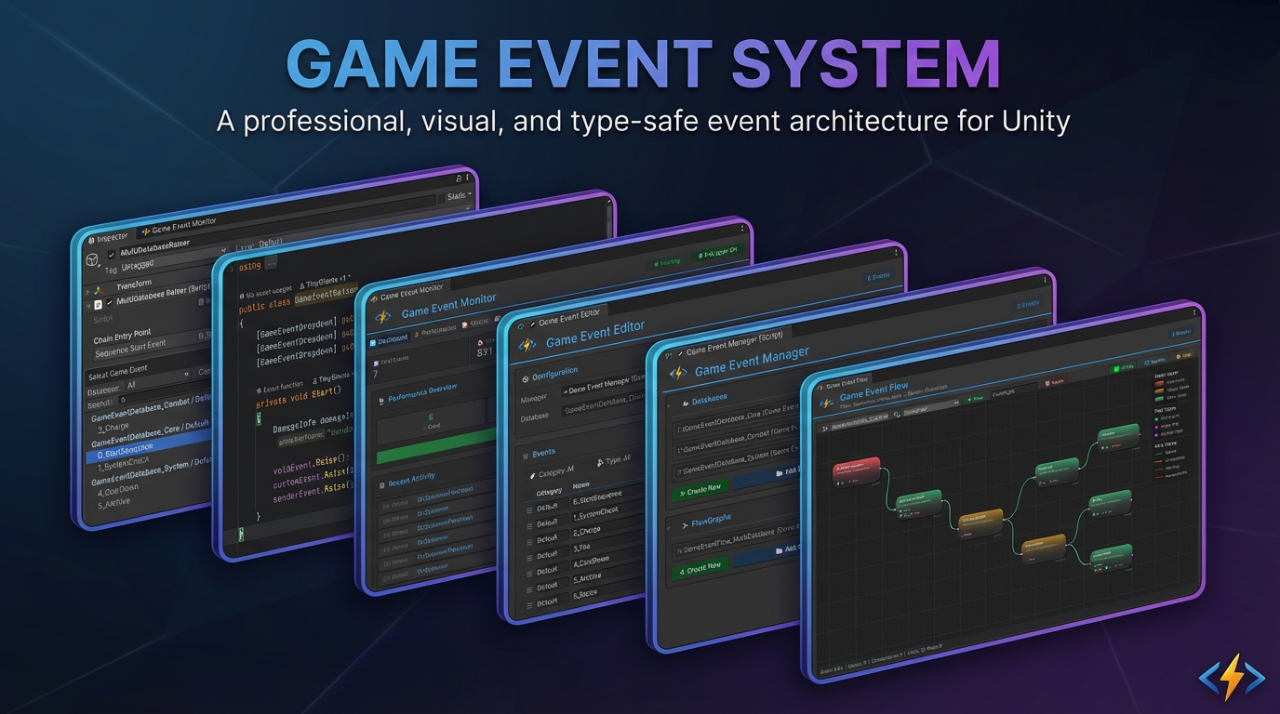
💌 A Note from the Creator
As an indie developer, I learned the hard way that the Event System is the nervous system of any game—it touches everything. Early in my career, I battled endless "spaghetti code": events scattered across dozens of scripts, mysterious sound triggers, and UI windows that opened for reasons I couldn't trace. I spent more time debugging event chains than actually building gameplay.
I tried existing solutions, but each had compromises:
- Visual-only tools were great for organization but lacked the coding flexibility I needed for complex logic
- Code-heavy frameworks offered power but became impossible to visualize and maintain
- Performance was often sacrificed for convenience—reflection costs piling up in production builds
The Solution I Built
I created the tool I always wished existed—one that delivers the best of all worlds:
| 🎨 Visual Management | ⚡ Code Control | 🚀 Zero Overhead |
|---|---|---|
| Organization and flow at a glance | Complex logic and full flexibility | Production-ready performance |
The TinyGiants Vision
TinyGiants represents my commitment to creating professional-grade tools for the Unity community. The Game Event System is my flagship product—the first of many high-quality solutions designed to empower developers.
When you choose this tool, you're not just purchasing a plugin; you're joining a journey of continuous improvement. I'm here to support your project as if it were my own.
Happy coding,
[TinyGiants] from China
🌟 What is Game Event System?
Game Event System (GES) is a production-ready, visual event architecture for Unity that transforms chaotic event management into maintainable, testable workflows.
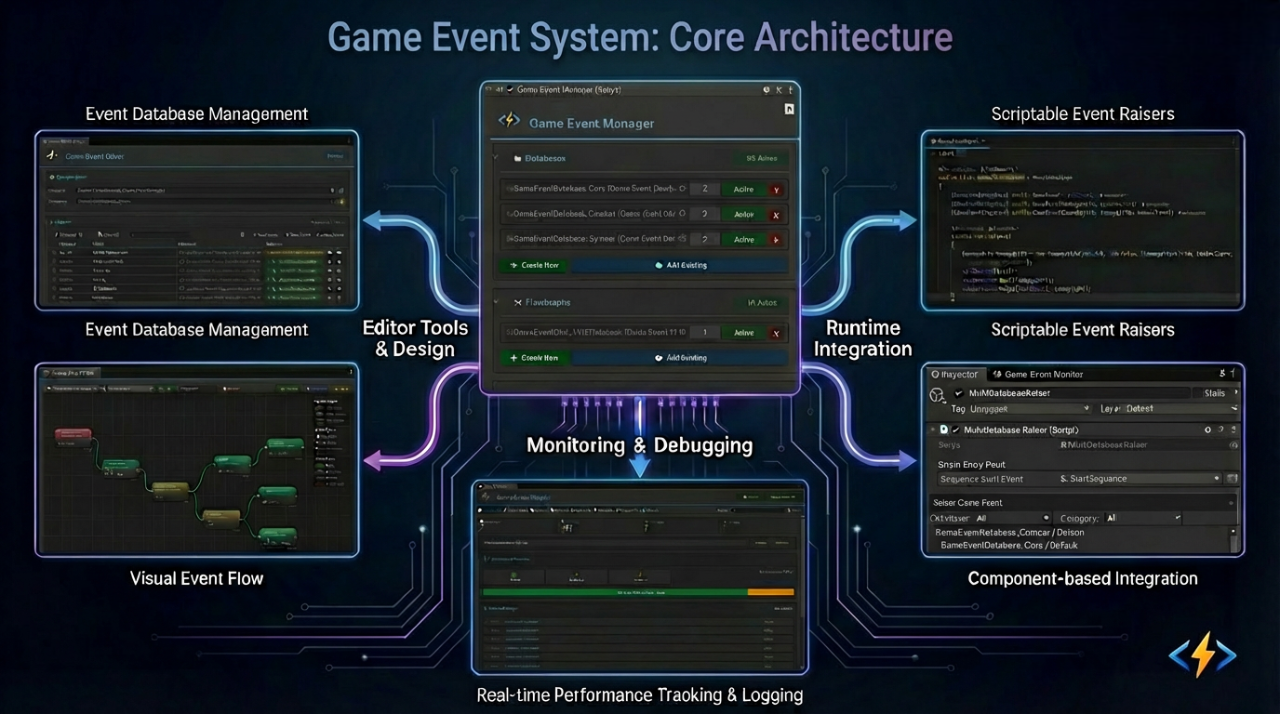
The Problem This Solves
In traditional Unity development, events become invisible spaghetti:
- Hidden Dependencies: Who's listening? Where's it triggered? Good luck finding out.
- Runtime Breakage: Rename a method, break 10 scene objects.
- Cross-Scene Hell: Events die when scenes unload—memory leaks and null references everywhere.
- No Visibility: Complex event chains exist only in your head (and outdated comments).
The Solution
Game Event System provides a Visual-First, Type-Safe event architecture:
✅ Events as Assets - ScriptableObject-based, GUID-protected, survives refactoring
✅ Visual Flow Graphs - See your event chains, triggers, and conditions in one window
✅ Zero-Reflection Runtime - Expression Tree compilation for C++-like performance
✅ Designer-Friendly - Drag-and-drop binding, no coding required for simple workflows
✅ Production-Grade Tools - Real-time monitoring, reference finding, code generation automation
🏗️ Core Architecture: How It Works
The Game Event System is built on a "Management-Asset-Action" architecture designed to centralize event logic while maintaining decentralized execution.
The Foundation: GameEventManager & Databases
At the heart of the system is the GameEventManager, which manages and maintains Event Databases.
- Events as Assets: Every event is a
ScriptableObjectstored within a database asset. - Centralized Management: The Game Event System Dashboard serves as the primary command center. From here, you access specialized tools:
- Creator: Rapidly generate new event assets
- Behavior & Finder: Configure event properties and locate dependencies across scenes
- FlowGraph: Design complex, multi-step event sequences visually
- Monitor: Real-time debugging and performance tracking
The Hybrid Workflow: Visual & Code
The system seamlessly bridges the gap between technical implementation and creative design:
- Direct Code Integration: Programmers can trigger events anywhere in their scripts using a simple
.Raise()call. - Visual Inspector Binding: Designers can bind logic to events directly in the Inspector using intuitive dropdown menus, completely eliminating "magic strings" or manual component searching.
- Real-Time Monitoring: The Monitor window provides a live view of event activity, helping you verify the flow of data and execution timing during Play Mode.
Full API Parity
While the system provides a robust visual interface for designers, it is API-first. Every feature available in the visual editors is accessible via the Runtime API. Whether you prefer building event chains in a graph or registering/unregistering listeners dynamically through C# code, the system provides the same level of power and performance.
Why This Architecture?
- Decoupling: Senders and receivers don't need to know each other; they only need to know the Event Asset.
- Visibility: The "invisible spaghetti" of standard events is replaced by a searchable, visual database.
- Reliability: Because events are assets, references don't break when you rename methods or move files.
🎯 Key Features & Capabilities
1️⃣ ScriptableObject-Driven Foundation
Unlike string-based or singleton event systems, events are first-class assets:
// Events are assets, not magic strings
[GameEventDropdown] public GameEvent onPlayerDeath;
[GameEventDropdown] public Int32GameEvent onScoreChanged;

void Die() {
    onPlayerDeath.Raise(); // Type-safe, asset-referenced
}
Benefits:
- ✅ Complete Decoupling - Senders never know receivers. Fire once, notify many.
- ✅ Cross-Scene Persistence - Events survive scene loads/unloads.
- ✅ GUID Identity - Rename files, reorganize folders—references never break.
- ✅ Multi-Database Support - Modular organization for large teams.
How GUID Protection Works: Every event has a unique GUID stored in .meta files. Even if you rename PlayerDeath to OnCharacterDied, Unity maintains the reference via GUID. No broken scene links.
2️⃣ Visual Flow Orchestration
Stop hunting through code to understand event relationships. The Flow Editor turns invisible logic into maintainable graphs:
Triggers (Fan-Out) - One event triggers multiple parallel actions
Chains (Sequential) - Events execute in precise order with delays and conditions
Hybrid Flows - Mix parallel + sequential logic in complex patterns
Visual Benefits:
- Group Organization - Color-coded groups for large flows
- Real-Time Validation - Connection type checking (Green=Valid, Red=Error)
- Undo/Redo Support - Full history system (Ctrl+Z/Y)
- Runtime Debugging - Active nodes highlight in Play Mode
3️⃣ Type-Safe, Zero-Reflection Performance
Unity's generic serialization is broken by design. Game Event System fixes it.
The Problem:
// ❌ Unity can't serialize this
[SerializeField] private GameEvent<PlayerData> onPlayerDataChanged;
The Solution:
// ✅ Auto-generated concrete class
[GameEventDropdown] public PlayerDataGameEvent onPlayerDataChanged;

// Generated code (automatic):
[Serializable]
public class PlayerDataGameEvent : GameEvent<PlayerData> { }
Performance Benefits:
- 🚀 Expression Tree Compilation - Conditions compile to delegates at startup (no runtime parsing)
- 🚀 No Reflection Cost - Direct method calls, not
Invoke() - 🚀 Native Inspector Support - Full
UnityEvent<T>compatibility
Code Generation Workflow: Select Types → Generate → Compile → Create. Time investment: ~10 seconds. Benefit: Lifetime type safety.
🛠️ Visual Tools Showcase
Let me walk you through the complete toolset with actual screenshots from the system:
🎛️ System Dashboard
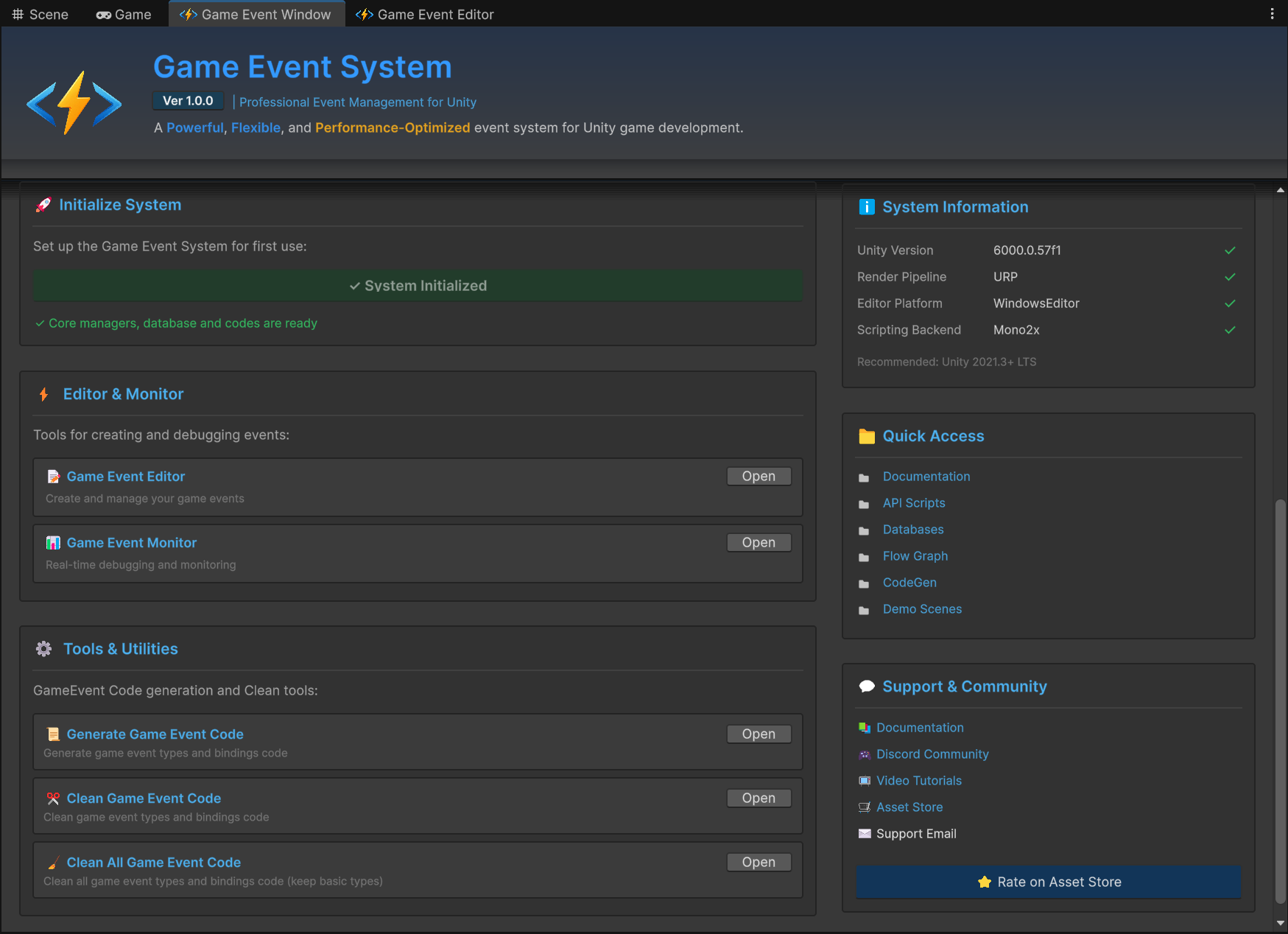
Your central command center. Browse all events, search with fuzzy matching, create new events with the wizard, and access specialized tools. The dashboard provides instant visibility into your entire event architecture.
📊 GameEventManager Inspector
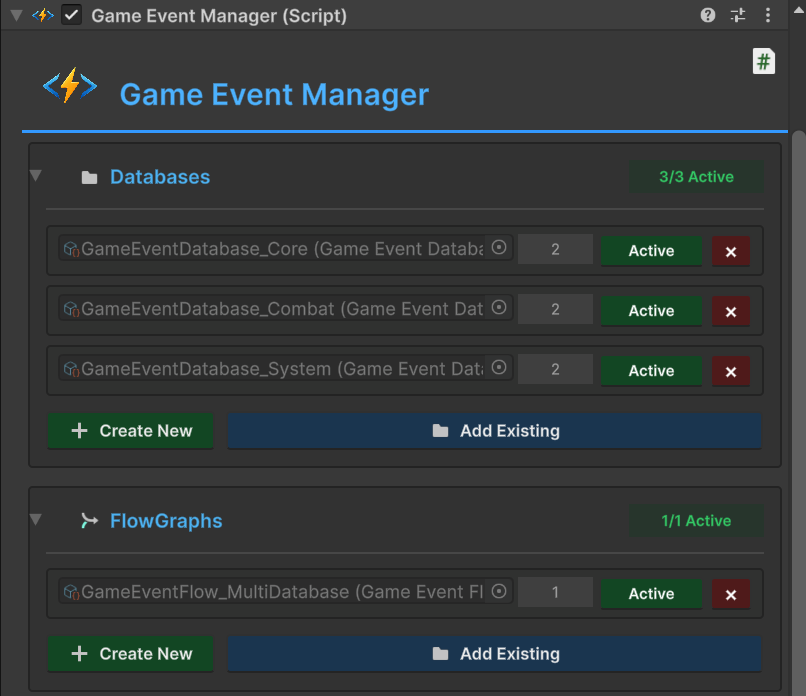
Manages multiple event databases and flow graphs. Supports modular organization for large projects with automatic health checks and dynamic loading systems.
✏️ GameEvent Editor Window
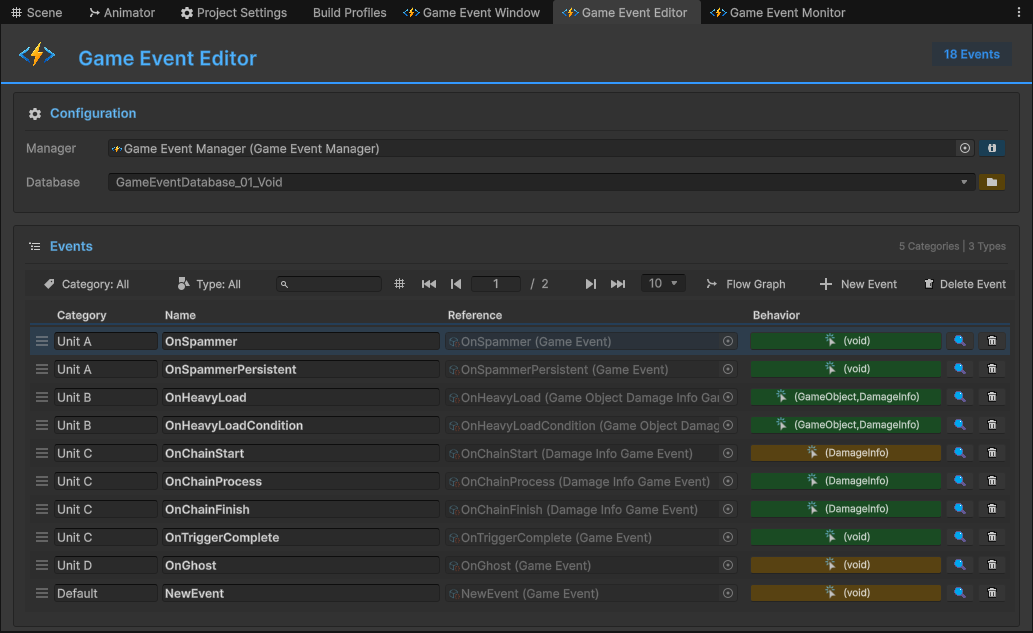
Batch edit event properties, categories, and descriptions. Powerful search and filtering capabilities let you manage hundreds of events efficiently.
🎨 GameEvent Creator Window
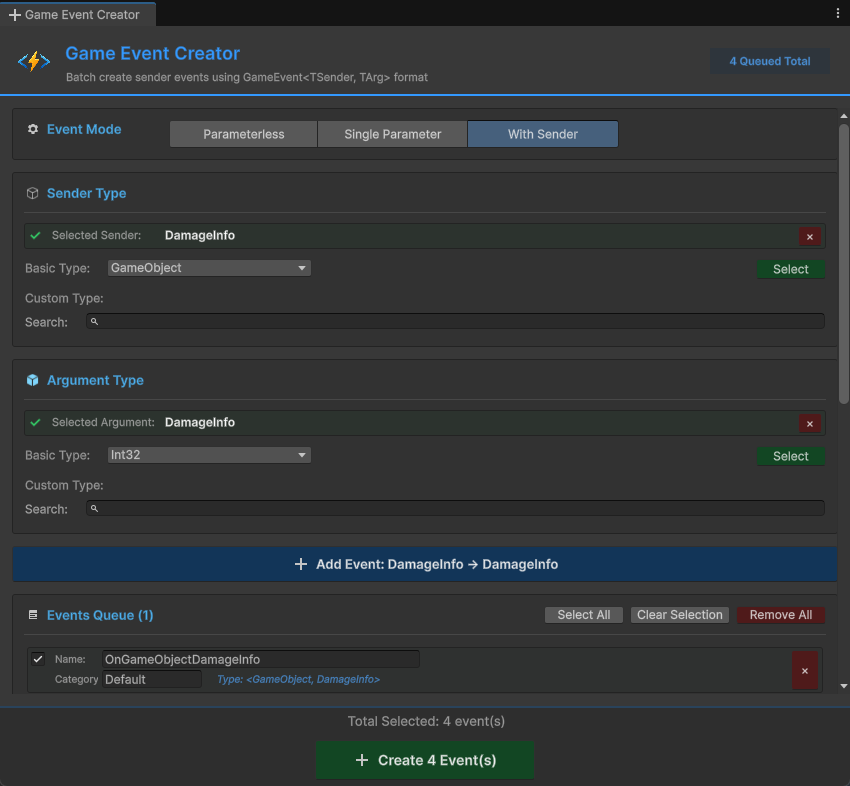
Rapid event creation with intelligent naming suggestions. The fuzzy-search wizard helps you generate events in seconds with consistent naming conventions.
⚙️ GameEvent Behavior Window
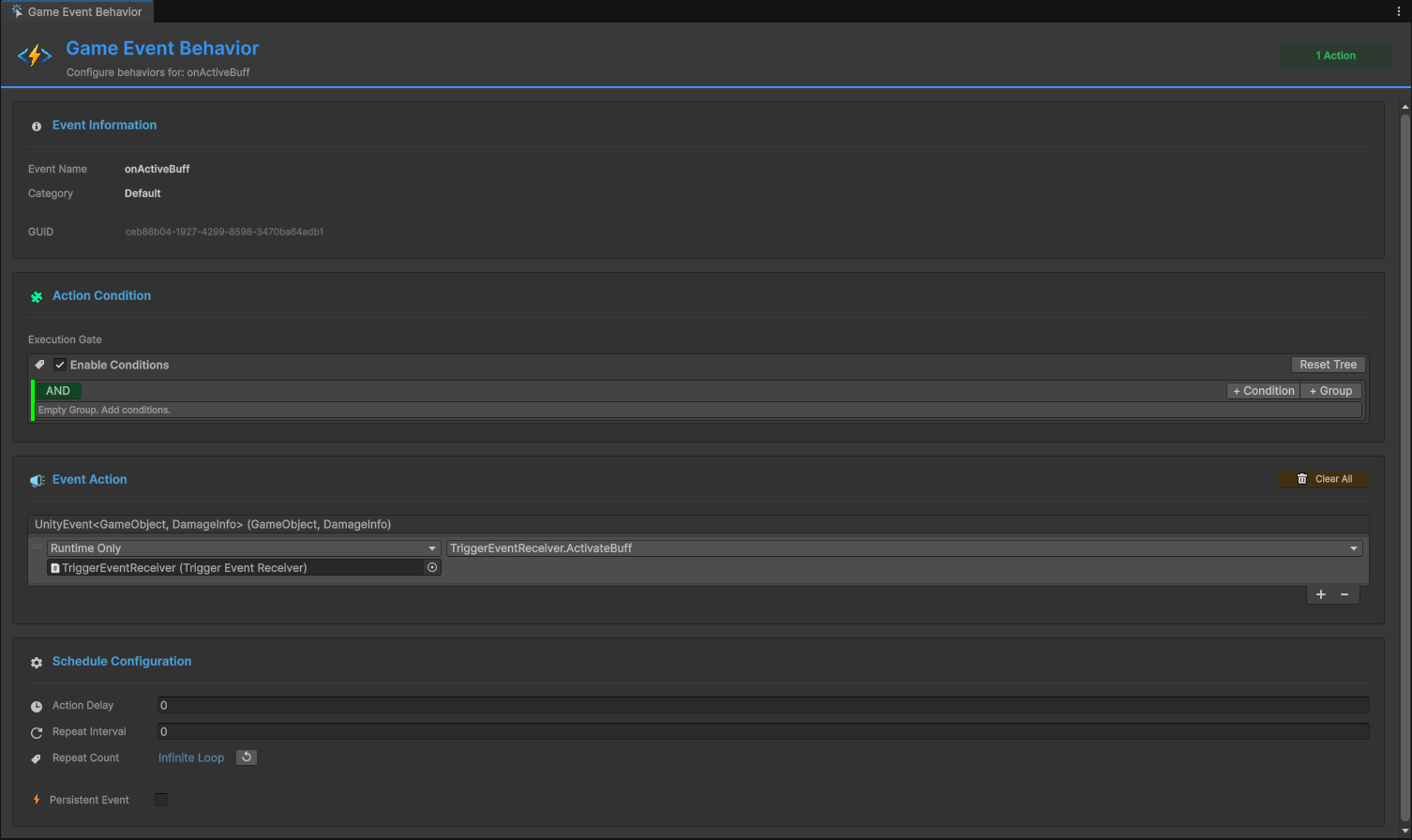
Configure individual event behaviors, add visual condition trees, and set up complex logic gates without writing code.
🕸️ Flow Graph Editor
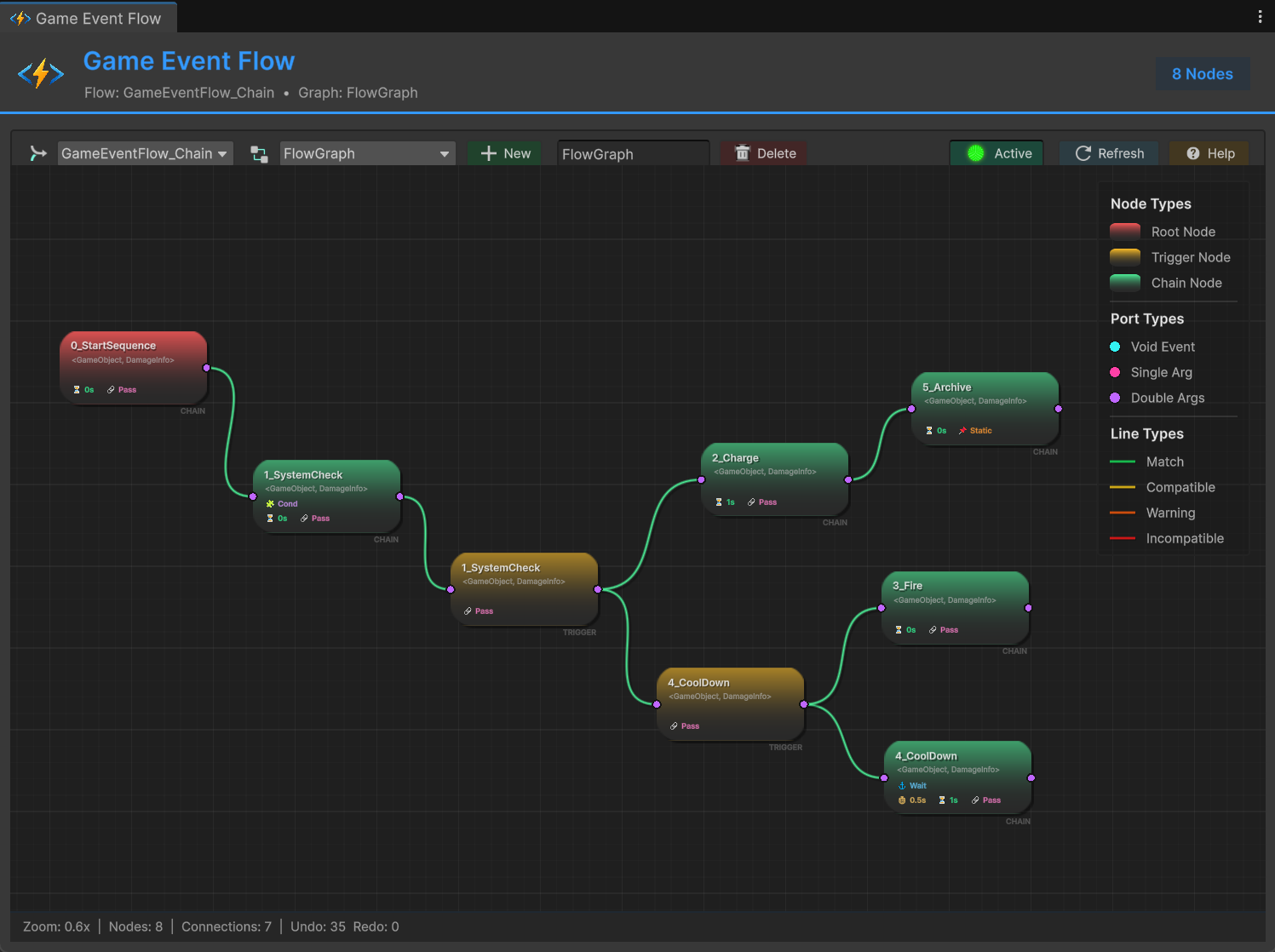
Build complex multi-step logic visually. Create chains, triggers, and hybrid flows with drag-and-drop nodes. Real-time validation ensures connections are type-safe.
📝 Inspector Dropdown Integration
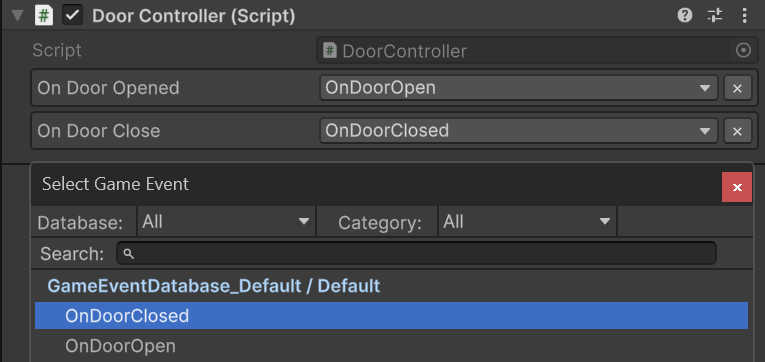
Events appear as searchable dropdowns in the Inspector. No more typing asset names—just select from a categorized list.
💻 Code Integration Example
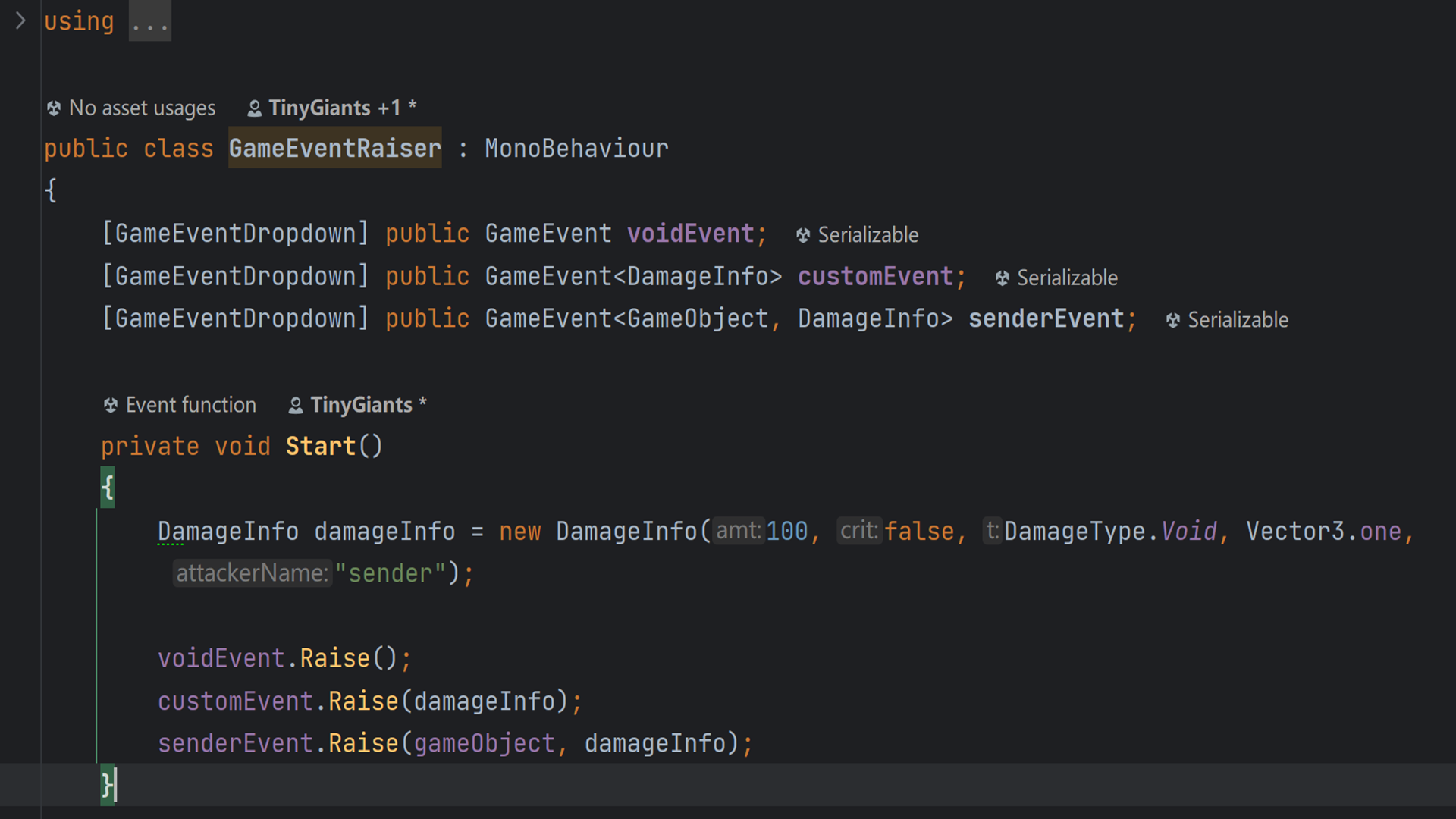
Clean, readable code. The [GameEventDropdown] attribute provides visual selection while maintaining full type safety in your scripts.
📡 Runtime Monitor Dashboard
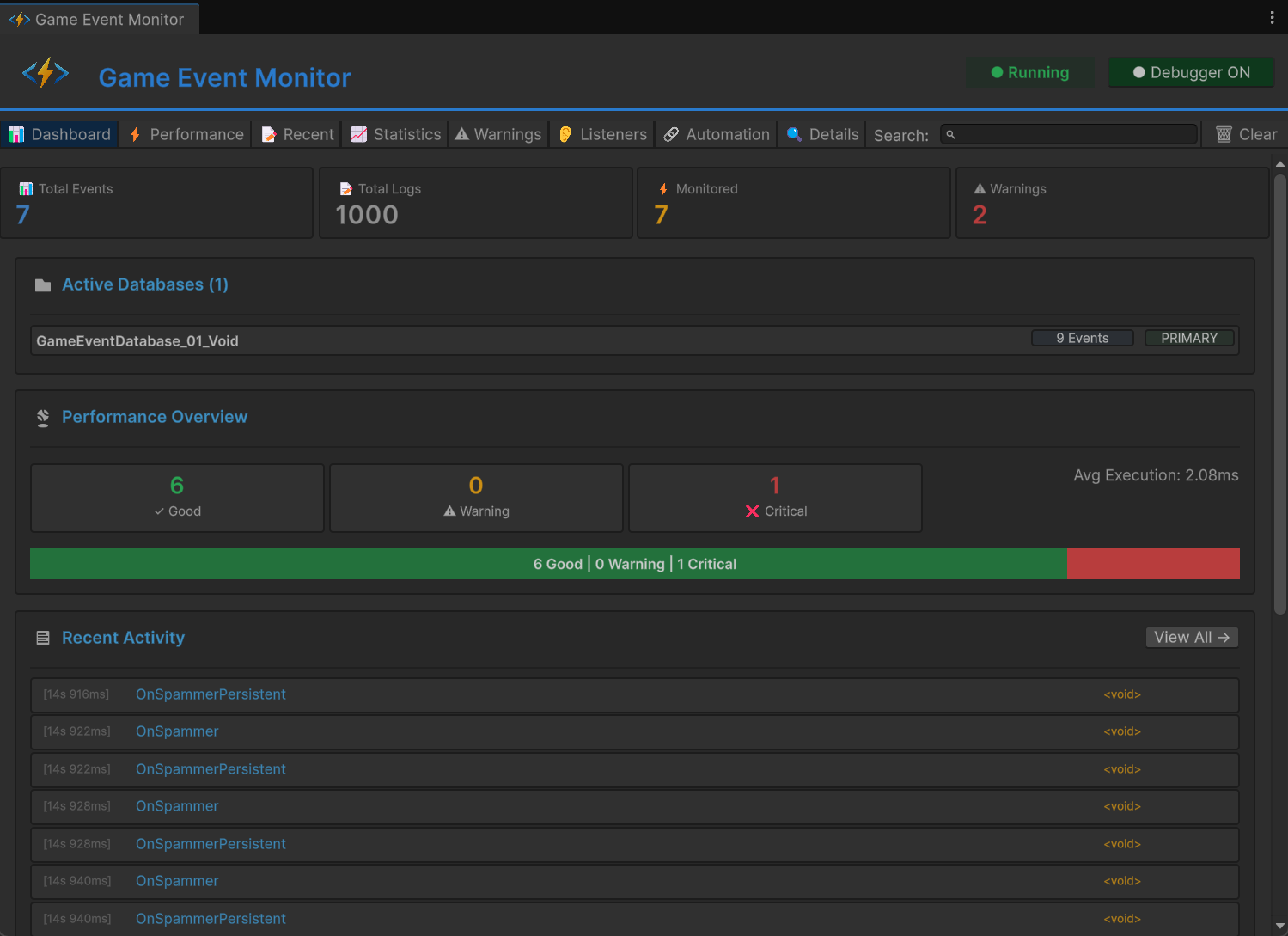
Real-time profiling of all events during Play Mode. Track execution times (Avg/Min/Max), listener counts, and GC allocations. Identify performance bottlenecks instantly.
🔍 GameEvent Finder
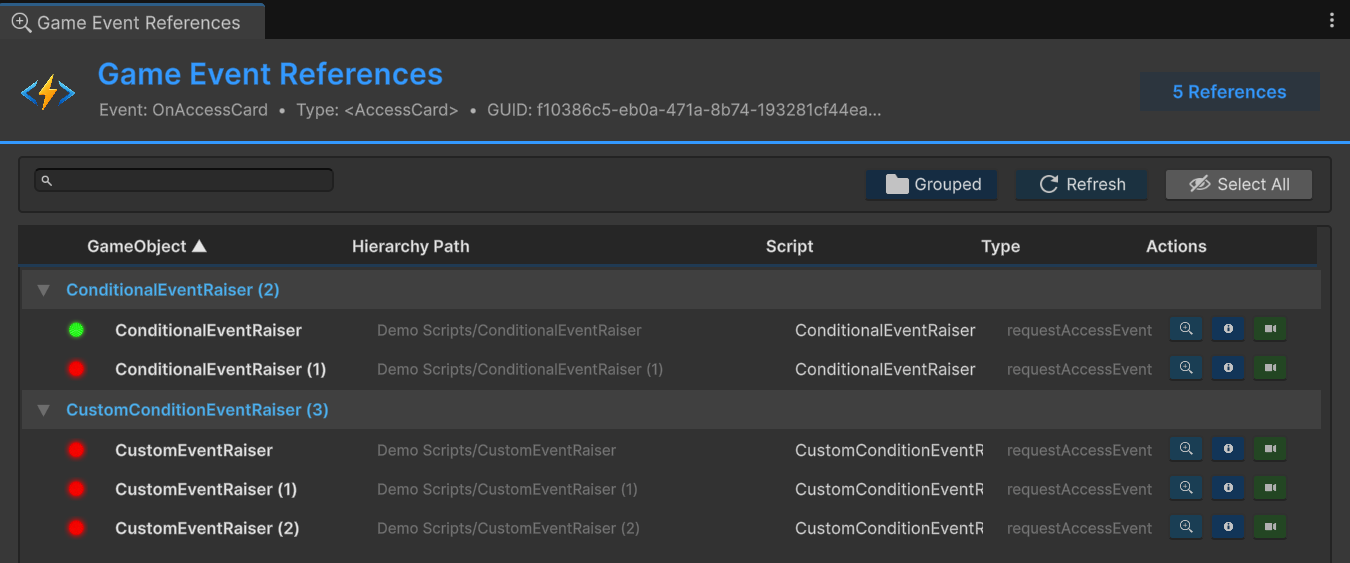
Scan your entire project to find every component that references a specific event. Essential for refactoring and dependency analysis.
🔧 Code Generator
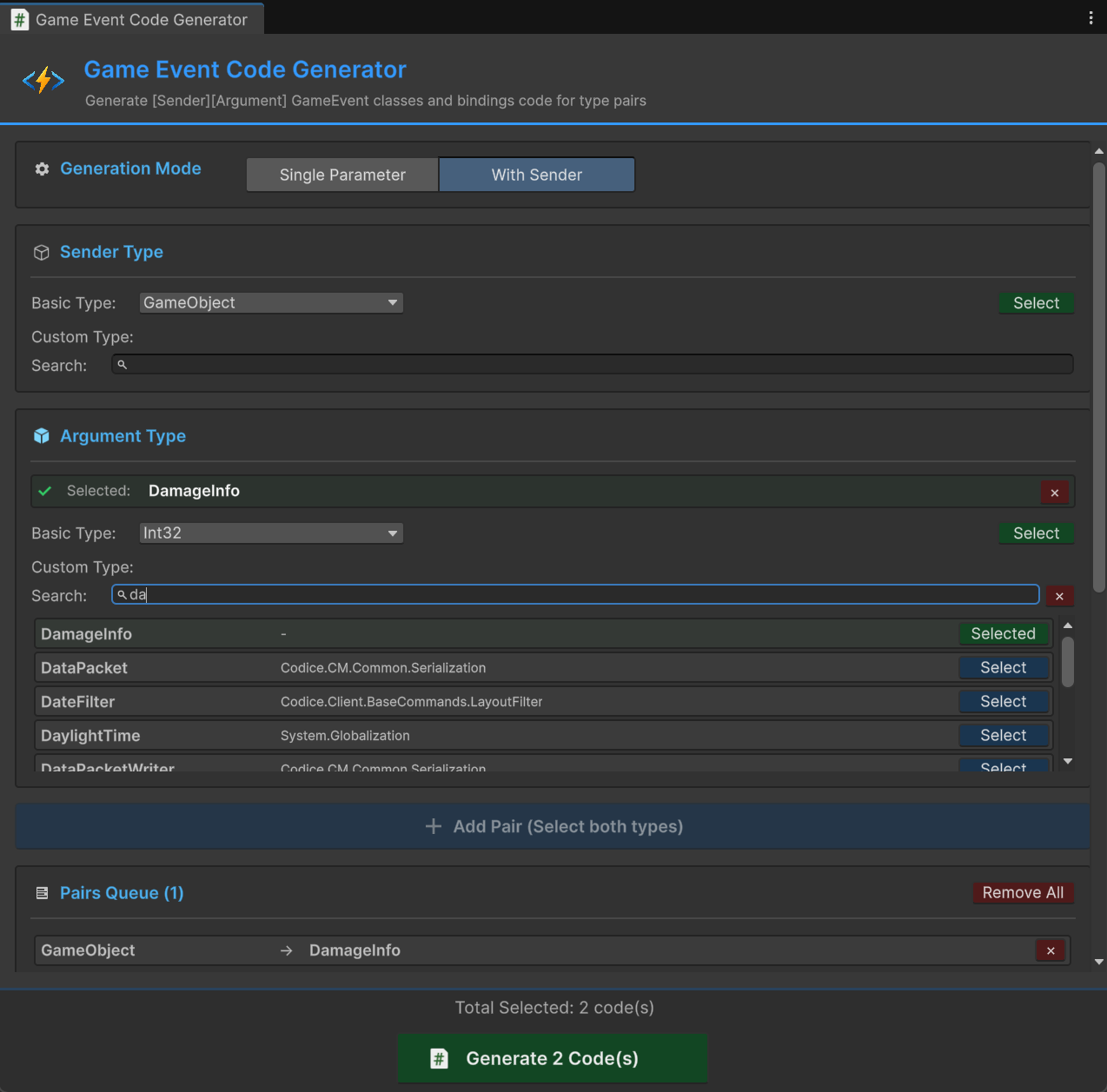
Tri-Mode code generation for custom types. Automatically creates serializable event classes with full integration into the Unity compilation pipeline.
🧹 Code Cleanup Tool
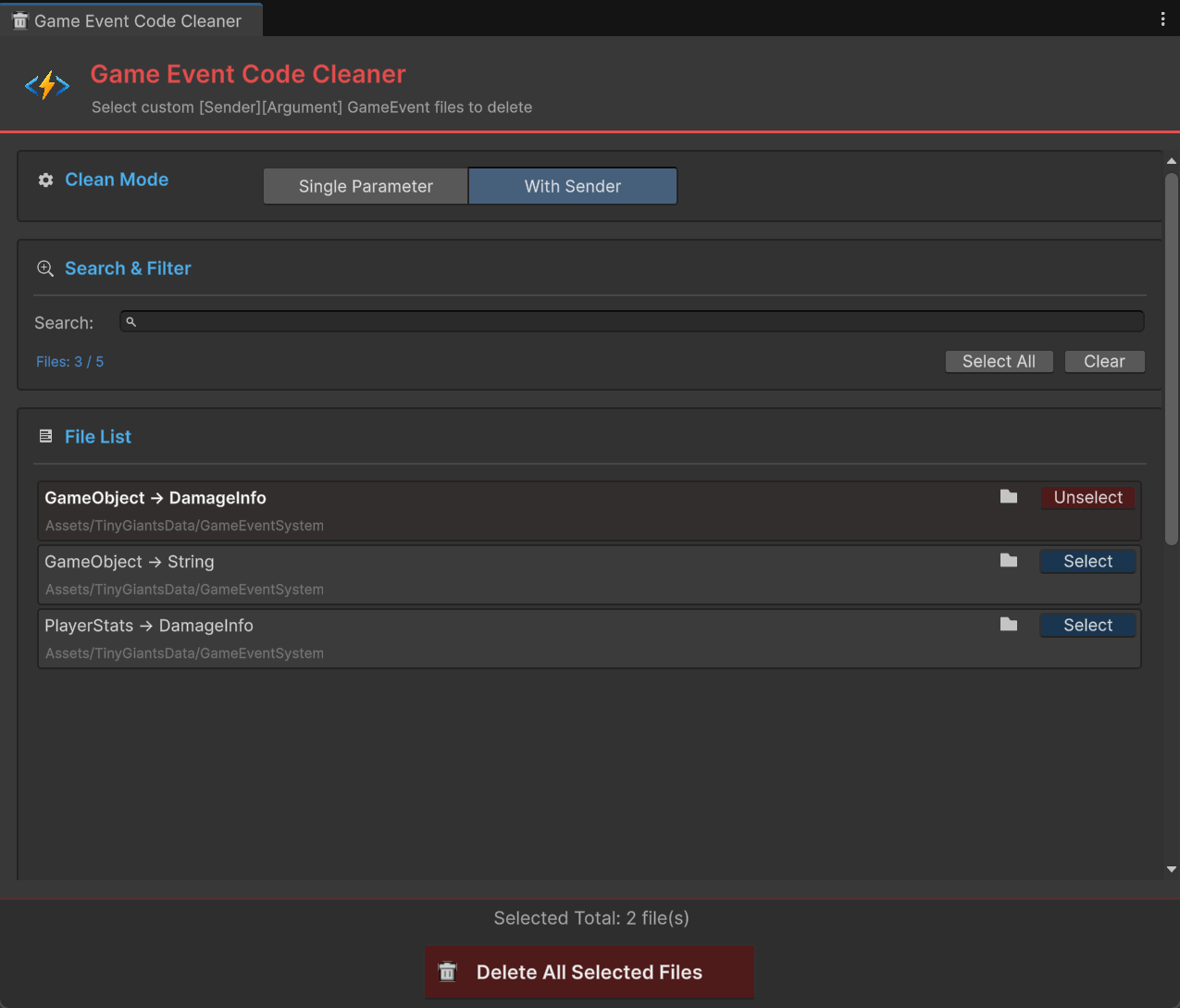
Remove obsolete generated classes safely. Maintains code hygiene as your project evolves.
📊 Feature Matrix
Core Architecture
| Feature | Description |
|---|---|
| Asset-Based Events | ScriptableObject architecture with GUID Identity—references survive renames and file moves |
| Comprehensive Generics | Native support for GameEvent<Void>, GameEvent<T>, and source-aware GameEvent<TSender, TArgs> |
| Multi-Database System | Modular organization supporting multiple databases with Dynamic Loading and Health Checks |
| Category System | String-based categorization for efficient fuzzy-search filtering within large event libraries |
| Auto Static Reset | Automatic clearing of static caches in Editor Play Mode to prevent data pollution |
Advanced Logic & Flow
| Feature | Description |
|---|---|
| Expression Trees | Zero-reflection logic evaluation; conditions compile into high-performance delegates at runtime |
| Visual Logic Builder | Construct complex nested AND/OR logic and dynamic property comparisons without code |
| Hybrid Execution | Seamlessly mix parallel Fan-out Triggers and sequential Blocking Chains in one graph |
| Argument Transformers | Dynamically extract and pass specific object properties as arguments between flow nodes |
| Granular Flow Control | Per-node delays, Async/Coroutine waits, loop counts, and conditional execution gates |
Listening & Binding
| Feature | Description |
|---|---|
| Visual Binding | Drag-and-drop UnityEvent wiring in the Inspector with visual status markers and type safety |
| Priority Listeners | Integer-based sorting ensuring critical systems react before standard UI/Audio listeners |
| Conditional Listeners | Built-in Predicate support—callbacks only fire when specific logical criteria are met |
| Persistent Listeners | Native support for cross-scene listeners that remain active during scene transitions |
| Dynamic Runtime API | Full programmatic control to register or unregister listeners and manage Task Handles |
Tooling & Debug
| Feature | Description |
|---|---|
| Dashboard & Wizard | Modern UI for Batch Operations and a fuzzy-matching Wizard for rapid event creation |
| Code Automation | Tri-Mode CodeGen (Basic/Custom/Sender) with automatic compilation pipeline integration |
| Reference Finder | Scene-wide scanner to pinpoint exactly which components reference specific event assets |
| Runtime Monitor | Real-time profiling of Execution Time (Avg/Min/Max), listener counts, and GC allocation |
| Automation Tree | Real-time visualizer for active Trigger and Chain hierarchies to debug complex logic flows |
⚡ Performance Characteristics
Real-world metrics from production builds:
| Scenario | Performance | Notes |
|---|---|---|
| Event Raise (0 listeners) | ~0.001ms | Virtually free |
| Event Raise (10 listeners) | ~0.02ms | No GC allocation |
| Condition Evaluation | ~0.003ms | Expression Tree compilation |
| Flow Node Execution | ~0.05ms | Includes coroutine overhead |
| Monitor Window (100 events) | ~0.3ms | Editor-only, no runtime cost |
Production Ready: Tested in shipped titles with 500+ events and 10,000+ listeners across scenes. Zero performance regressions.
📚 Complete Learning Resources
Comprehensive Documentation
The documentation site includes English and Chinese support:
🌐 Documentation Portal: https://tinygiants.tech/docs/ges/intro/overview
The documentation includes:
- Introduction: Project structure, installation, and architecture fundamentals
- Visual Workflow: Complete guides for all editor tools and windows
- Flow Orchestration: Building complex visual logic with the node editor
- Runtime API: Deep-dive into C# integration and advanced programming patterns
- Tools & Support: Code generation, monitoring, and community resources
- 14 Example Scenes: From Quick Start to advanced production patterns
14 Production-Ready Examples
Every example is a complete, ready-to-run scene demonstrating real-world usage:
| ID | Example | Key Learning |
|---|---|---|
| 00 | Quick Start | The minimal workflow for creating, raising, and binding an event |
| 01 | Void Event | Using parameterless signals for global triggers like "Level Start" |
| 02 | Basic Types Event | Passing primitive data (int, float, string) through events |
| 03 | Custom Type Event | Leveraging CodeGen for serialized custom data classes and structs |
| 04 | Custom Sender Event | Using source-aware events to identify which entity raised the signal |
| 05 | Priority Event | Precisely controlling the execution order of multiple listeners |
| 06 | Conditional Event | Using predicates to execute callbacks only when criteria are met |
| 07 | Delayed Event | Managing timed logic and using Task Handles for cancellation |
| 08 | Repeating Event | Creating recurring pulse signals and automated logic loops |
| 09 | Persistent Event | Handling events during scene transitions (DontDestroyOnLoad) |
| 10 | Trigger Event | Bridging Unity's Physics system with Game Event assets |
| 11 | Chain Event | Building visual sequential logic using the Flow Orchestration graph |
| 12 | Multi Database | Isolating events into different assets for modular project organization |
| 13 | Runtime API | Registering and unregistering listeners dynamically via C# scripts |
| 14 | Runtime Monitor | Using profiling tools to debug execution timing and GC allocations |
🎯 Use Cases & Benefits
For Solo Developers
- Reduce debugging time by 50%+ with visual event tracking
- No more "where did I trigger this?" moments
- Clean architecture that scales as your project grows
For Teams
- Designers can wire events without touching code
- Programmers maintain full control via API
- Multi-database system prevents merge conflicts
- Visual documentation that stays in sync with code
For Production Projects
- Zero performance overhead (no reflection at runtime)
- Comprehensive monitoring and profiling tools
- GUID-based references survive refactoring
- 14 production-tested example patterns
🌐 Official Links
-
🏠 TinyGiants Homepage: https://tinygiants.tech
-
📖 Complete Documentation: https://tinygiants.tech/docs/ges/intro/overview
-
💬 Discord Community: https://tinygiants.tech/discord
-
🎮 Unity Forum Thread: https://tinygiants.tech/forum
-
📧 Email Support: support@tinygiants.tech
🤝 Community & Support
💬 Join the Discord (Recommended)
The fastest way to get help and connect with other developers.
Why join?
- Real-time answers from myself and experienced community members
- Early access to roadmap updates and beta features
- 24/7 community support across global timezones
- Share screenshots, debug together, and learn best practices
📧 Direct Support
For private inquiries or sensitive bug reports: support@tinygiants.tech
Response time: Within 24-48 hours
🗺️ Your Voice Shapes the Future
This is a living plugin—your feedback directly shapes development.
- Post feature requests in Discord's #ges-features channel
- Vote on upcoming features in community polls
- Participate in priority discussions
Lifetime License Guarantee: Your purchase includes lifetime updates. All future versions, improvements, and new features are completely free—no subscriptions.
💎 What Makes This Different?
I know the Unity Asset Store is full of event systems. Here's what makes Game Event System unique:
✅ True Visual-Code Hybrid
Most tools force you to choose: either visual OR code. Game Event System gives you both, seamlessly integrated.
✅ Production Performance
Zero reflection at runtime. Expression Tree compilation means conditions run at native speed.
✅ GUID-Based Assets
Your events are real assets. References never break. This alone saves hours of debugging.
✅ Complete Tooling Suite
Not just an API: Game Event System includes professional tools for monitoring, debugging, code generation, and reference tracking.
✅ Comprehensive Documentation
4 languages, 14 examples, detailed API reference. Documentation coverage is deliberately broad.
✅ Solo Dev Support
Built by an indie developer for indie developers. I use this in my own games every day.
🎉 Launch Special
To celebrate the launch and thank early adopters, special pricing is available for the first month. Check the Asset Store listing for current pricing.
Lifetime Updates Included - No subscriptions, no hidden costs. Buy once, update forever.
🙏 Thank You
Thank you for taking the time to read about Game Event System. Whether you're building your first game or shipping your tenth, I hope this tool can make your development journey smoother and more enjoyable.
If you have any questions, feedback, or just want to chat about game development, please don't hesitate to reach out. I'm here to help.
Let's build better games together,
[TinyGiants]
Professional tools for professional developers